Behavior Patterns - Inheriting From Pattern Entities
The Entity to which a pattern is applied is referred to as the Deriving Entity. Multiple patterns can be applied to a single Deriving Entity.
What are Behavior Patterns?
A Behavior Pattern is an Entity (with common attributes, behavior, and UI) that can be used as a template by other entities. It is similar to Multiple Class Inheritance in the Object-Oriented Programming paradigm.
The entity to which a pattern is applied is referred to as the Deriving Entity. Multiple patterns can be applied to a single Deriving Entity. When a pattern is applied, the pattern's properties and APIs get inherited and become available to the Deriving Entity. These inherited properties and APIs can be overridden and customized based on the Deriving Entity's design requirements.
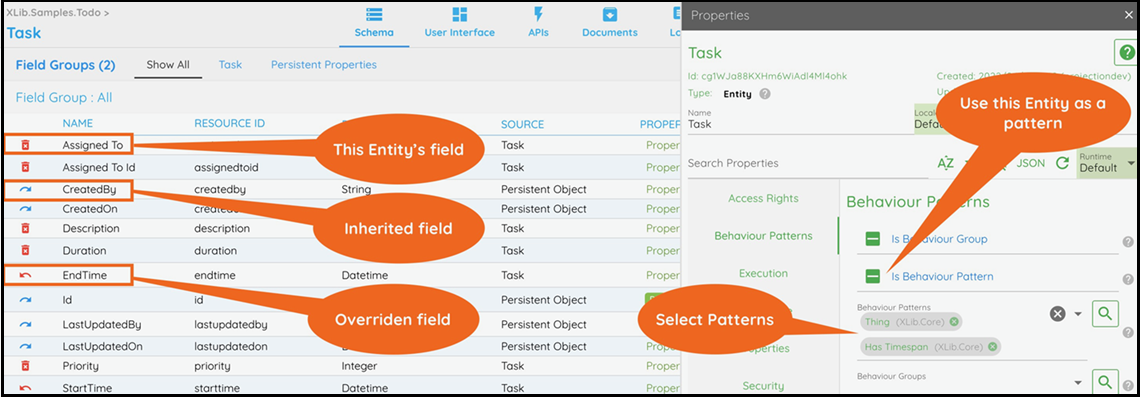
Applying Behaviour Patterns to an Entity
Click the Entity Name/Edit button to open the properties window.
Select the behavior patterns to be used in the Behavior Patterns > Behavior Patterns property.
Click SAVE to save the changes in the entity.
Creating a Behavior Pattern
Click the Entity Name/Edit button to open the properties window.
Check the Behavior Patterns > Is Behavior Pattern property.
Click SAVE to save the changes in the entity.
Refresh the browser for the pattern to be available to other entities.
Overriding Inherited Fields and APIs is Supported in Contineo
Fields inherited from the behaviour patterns can be overridden and modified.
Such overridden fields can be disabled or hidden, and their data loaders or validations can be changed.
Note:
The data type of overridden persistent fields should not be modified, as it may cause conflicts with the persistence of the base entity.
Fields and APIs can be visually identified and operated on as follows:
Fields/APIs created in the Entity: These can be deleted from the entity.
Marked by a delete button (delete_forever) on the left.Fields/APIs inherited from patterns: These can be overridden in the entity.
Marked by an override button (redo) on the left.Inherited fields/APIs which have been overridden: These can be reverted.
Marked by an undo-override button (undo), restoring the original inherited field/API.