Calling Actions as REST APIs
Allow external applications to access Contineo Actions.
External applications can consume Actions implemented in Contineo by using HTTP or HTTPS protocol.
Although any Contineo Action can be accessed by an external application, predominantly external applications access:
Business logic implemented using JavaScript in Contineo.
Database Actions responsible for executing CRUD operations.
Steps
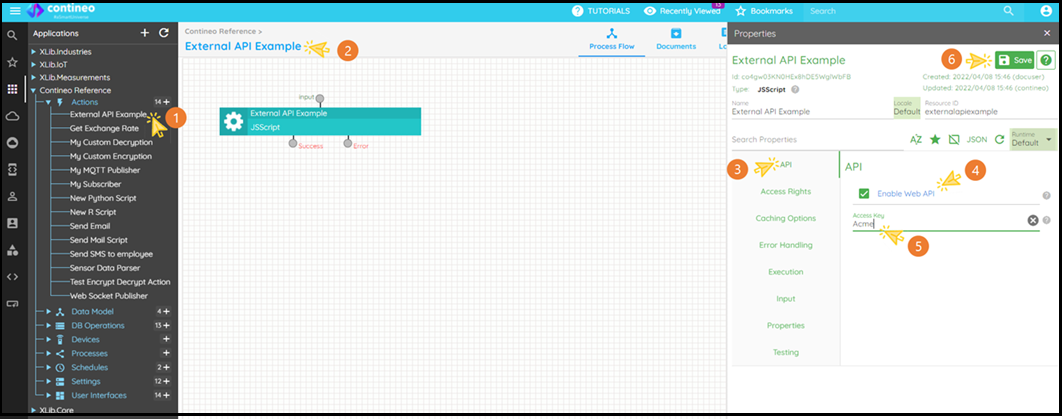
Create a new Action (or select an existing Action).
Open the Property panel.
Click API.
Select the Enable Web API checkbox.
Optionally assign a value to the Access Key. The value-assigned Access Key is used to authenticate the third-party application. If authentication is not required, enter
<none>(without double quotes).Click Save.
Optionally select: Properties Panel > Execution > Enable Log Visualization
Response
If the Action is a JavaScript action, then the value assigned to the variable
resultis returned as an HTTP Response.If the Action is a DataBase Action, the result of the DataBase operation is returned as HTTP Response.
Optionally use the Action SetAPIResult and assign the value to be returned to the valueToSet variable.
Accessing Action from an External Application
Prerequisite
Download the Advanced REST Client plugin for Chrome or POSTMAN.
Or
Open browser.
Or
Implement HTTP client in your favorite language.
URL format to access the Action
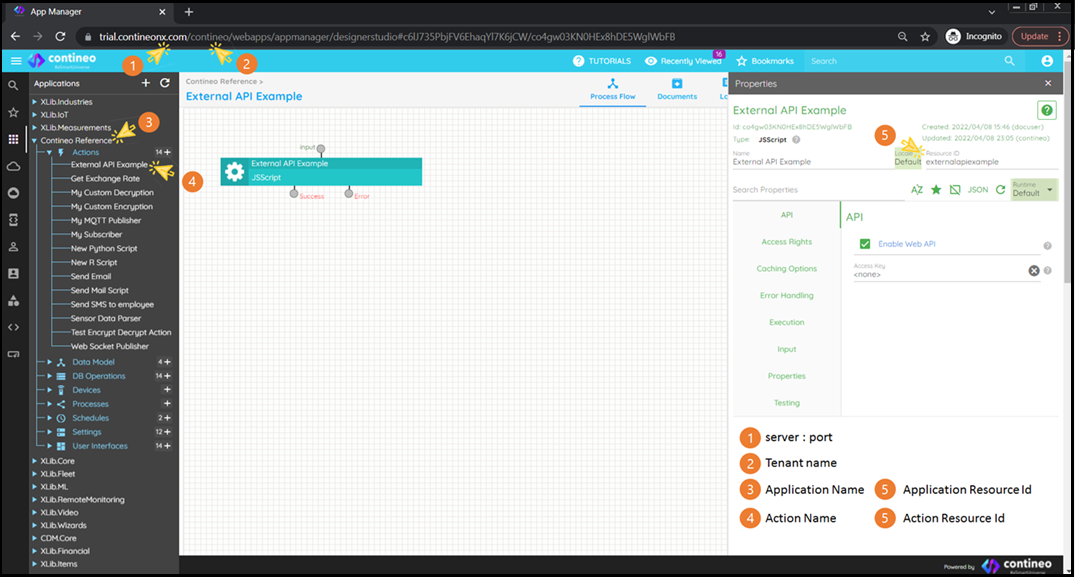
http(s)://<server:port>/<tenant name>-<application resource id>-API/<action resource id>?<parameters>
The following image shows various components of the URL:
Parameters
Parameters depend on the Action type. If the Action is:
A JavaScript Action, the recommended parameter format is:
input=<{URLEncodedJSONString}>This ensures reusability, since other Contineo Actions consuming the JavaScript Action pass the parameter values using the
inputvariable.A DataBase Action, the parameter string should be:
?<column 1 resource id>=<value>&<column 2 resource id>=<value>&...If access keys are configured, include them in the parameter string. For example, if the accessKey is set as
"Acme", then the URL should include:accessKey=Acme
HTTP Method
The Action configured as the API can be accessed using GET and POST methods.
If the HTTP POST method is used, set the header as content-type = application/x-www-form-urlencoded