NeoPilot Agent-Pipeline Framework Overview
NeoPilot is an AI framework that enables developers to build intelligent, modular applications using agent-based interfaces and backend pipelines. This guide introduces key concepts, architecture, and best practices to help you get started.
About NeoPilot
NeoPilot is Contineo's AI-powered work engine that enables users to develop, build, and deploy personal or business applications quickly with generative AI. It operates on the Contineo Platform, This platform uses IoT and AI with Low-Code/No-Code (LCNC) technology.
Core Purpose: NeoPilot allows users to chat with AI to create applications in hours rather than days or weeks, significantly accelerating the development process. You enhance applications through the chat interface or the Contineo Designer Studio.
The Agent-Pipeline Framework is a core component of NeoPilot, It provides the structure to create AI applications.
Introduction
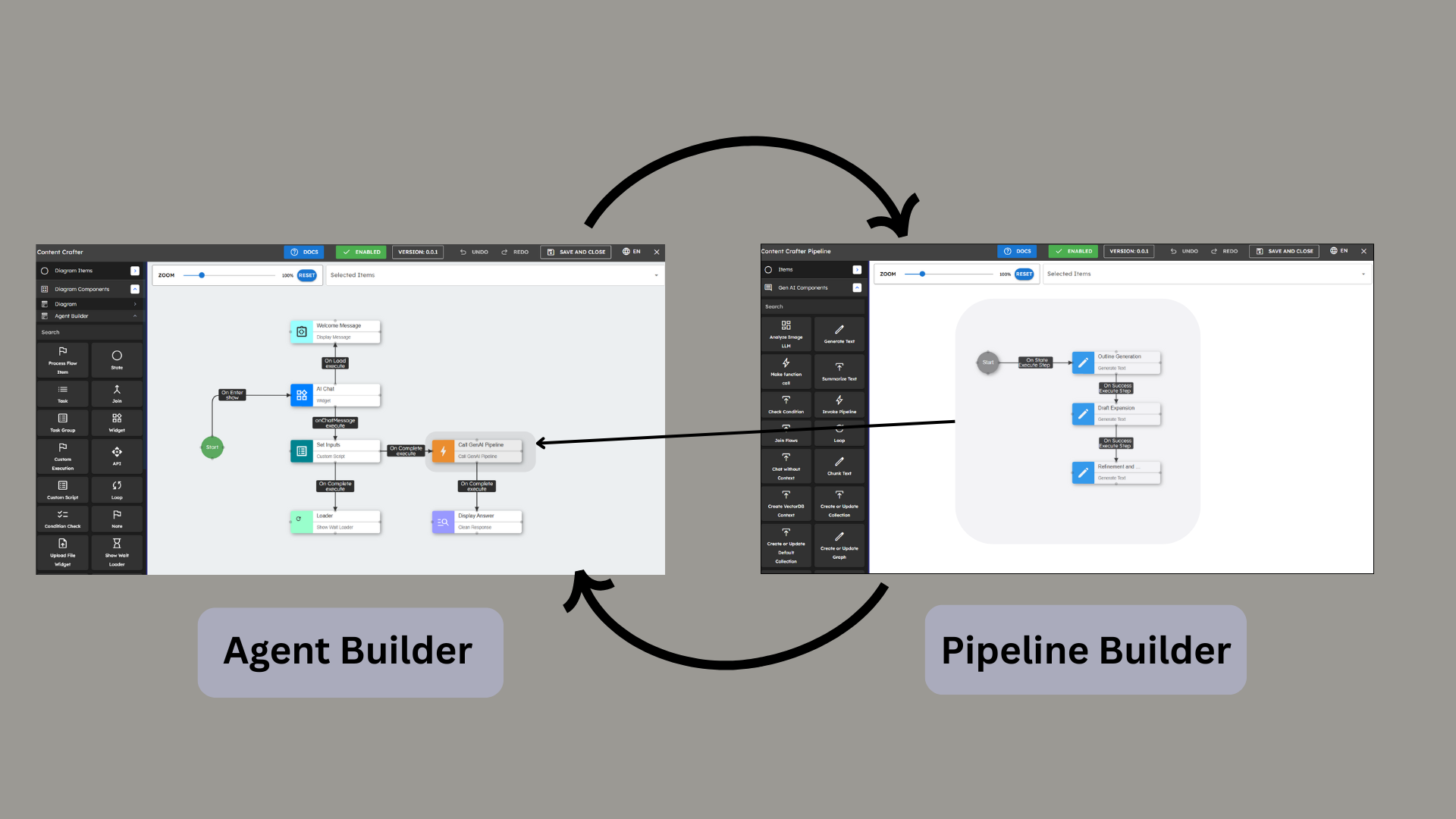
NeoPilot is a comprehensive AI orchestration framework designed to create intelligent agents that can perform complex tasks by combining multiple AI capabilities. The framework is built around two primary systems:
Agent Builder: Orchestrates user interactions and workflow management.
Pipeline Builder: Executes specialized AI processing and business logic.
This documentation provides a detailed explanation of these systems, their components, and how they work together to create powerful AI applications.
Overview of AI Application Building
Creating effective AI applications with NeoPilot follows a fundamental interaction model:
User Interface: Widgets give users interactive elements.
Intelligence Layer: AI Agents use these widgets to collect input and present output.
Processing Layer: Based on user input, agents invoke specialized pipelines to process data and generate results.
This three-tier approach separates user experience, logic, and AI processing. Enabling developers to build applications with less code. As Contineo's AI Assistant, NeoPilot leverages this framework to dramatically reduce development time from weeks to hours.
Architecture Overview
Core Architecture
NeoPilot uses a modular architecture that separates the user interface from AI processing:
Agent Layer: Handles all user interactions, UI management, and workflow orchestration.
Pipeline Layer: Processes data with AI models and performs operations.
Communication Layer: Enables agents to invoke pipelines and receive results.
This separation provides these benefits:
You optimize each layer for its task.
Independent development and testing.
Reuse of pipelines across multiple agents.
Clear boundaries between presentation and processing logic.
The Interaction Flow
A typical NeoPilot application works in this sequence:
User Engagement: Users interact with widgets (buttons, forms, chat interfaces, etc.)
Data Collection: AI Agents receive and organize this user input.
Processing Delegation: Agents select the correct pipeline for the task.
AI Processing: Selected pipelines process the data with AI models.
Result Handling: Pipelines send results back to the agent.
Response Presentation: The agent formats results and shows them to the user.
This organized flow makes each component perform its specific job: widgets handle user input, agents control workflow, and pipelines process data.
Agents vs. Pipelines
Agents | Pipelines |
|---|---|
User-facing | Backend processing |
Orchestrate workflow | Execute AI tasks |
Manage UI components | Process data |
Control application flow | Implement business logic |
JavaScript-based | Python-based |
3. Agent Builder
3.1 What Are Agents?
Agents are software services that understand user requests, manage conversations, and perform tasks by connecting different components. Agents connect users to AI functions.
Key characteristics of agents:
Keep track of conversation information.
Break down complex tasks.
Manage workflow execution.
Show results in clear formats.
Handle error states and recovery.
Agents act as intelligent intermediaries that:
Collect and validate user input from widgets.
Select the correct pipelines for user needs.
Format results and show them to users.
Maintain the state and context of ongoing interactions
For advanced agent-building concepts, developers can refer to the Agent Building Component documentation at 2. Agent Building Components
3.2 Widgets: UI Building Blocks
Widgets are UI components that you add to agents to make interactive interfaces. Agents use widgets to show information, collect user input, and display data in clear formats.
Key characteristics of widgets:
Pre-built, configurable UI components.
Create consistent user experiences.
Work with different types of user actions.
Can be dynamically updated based on the agent state.
Show data in visual formats.
Users work with AI Agents through widgets. Widgets give:
Input tools that collect user data and questions.
Display formats for presenting AI-generated results.
Interactive controls that start agent actions.
3.3 Common Widget Types
NeoPilot provides a variety of Widget UI Building Components for different user tasks:
Input Widgets: Text fields, dropdowns, date pickers, file uploads.
Display Widgets: Rich text, images, tables, code blocks.
Visualization Widgets: Charts, graphs, dashboards.
Structural Widgets: Cards, tabs, accordions, containers.
Interactive Widgets: Buttons, toggles, sliders.
3.4 Widget Implementation
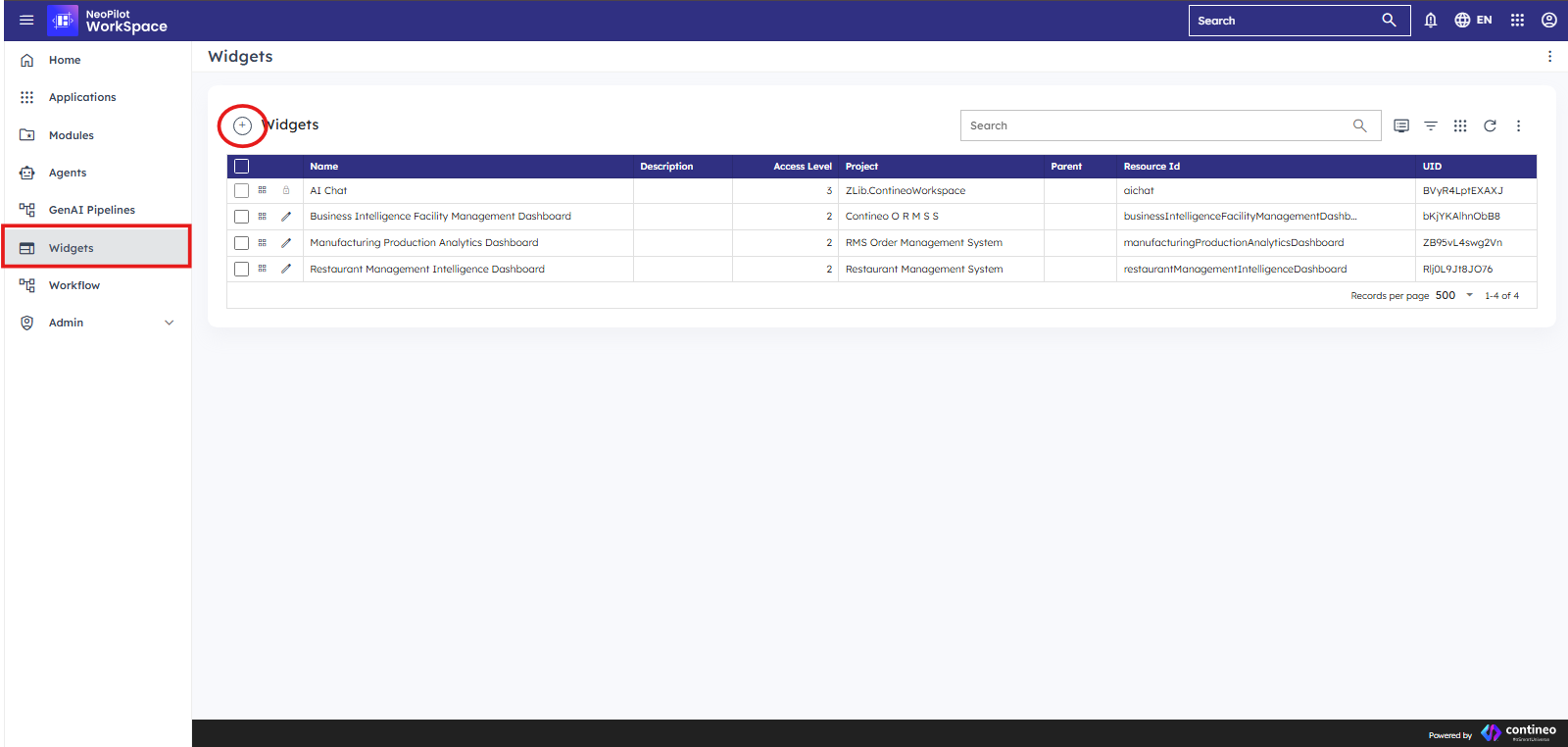
You add widgets to agent flows in the visual Agent Builder interface.
To build a new widget, click the widget in the workspace screen.
For advanced customization, developers can reference the Widget UI Builder Component documentation at UI Builder
4. Pipeline Builder
4.1 What Are Pipelines?
Pipelines are step-by-step workflows that process data with AI. Pipelines work as the 'brain' of the NeoPilot system. They make decisions and perform actions. For example, a pipeline takes user input, analyzes it with AI, and then generates a response.
Key characteristics of pipelines:
Run AI model operations.
Process and change data.
Applies business logic.
Manage data flow between steps.
Work as reusable processing units.
Agents handle user interactions through widgets. Pipelines perform the AI processing tasks that give intelligence to your application. Agents invoke different pipelines based on the processing needs from the user input.
5. Integrating Agents and Pipelines: When and Why
5.1 Conceptual Relationship
Agents and pipelines work separately with different responsibilities:
Agents control the user interface - they manage user interaction, conversation flow, and process steps.
Pipelines manage the "back-end" processing - complex AI operations, data analysis, and business logic.
This separation gives you these benefits:
Specialization: Each component focuses on what it does best.
Reusability: You use the same pipelines with many different agents.
Maintainability: You change AI processing without changing the user interface.
Scalability: Processing-intensive operations happen in optimized pipelines.
The Core Interaction Model
NeoPilot applications work in these steps:
User Input: Users work with widgets to give information or start actions.
Agent Processing: The AI Agent collects this input and determines what processing is needed
Pipeline Selection: The agent selects and invokes one or more pipelines based on the input.
AI Processing: The pipeline does AI tasks and sends back results.
Result Presentation: The agent shows these results to the user with widgets.
This pattern makes each part do its main job: widgets handle user actions, agents control process flow, and pipelines do AI work.
5.2 When to Use Pipelines in Agent Flows
Add pipelines to agent flows when the agent must do these tasks:
Complex AI Processing:
Create text with AI.
Analyze images or documents.
Search for meaning in large data sets.
Multi-step reasoning.
Business Logic Processing:
Change and analyze data.
Connect to external systems.
Complex decision-making algorithms.
Resource-Intensive Operations:
Operations that require significant computing resources.
Tasks that may take longer to process.
Operations that benefit from batch processing.
Reusable Functionality:
Processing that might be needed across multiple agents.
5.3 Integration Patterns
5.3.1 Query-Response Pattern
In this basic pattern, an agent collects user input, sends it to a pipeline, and shows the results.
Example Flow:
Agent collects user questions from the chat interface widget.
Agent prepares query parameters.
Agent calls pipeline for processing.
The pipeline processes the question with relevant AI models.
Agent receives results and formats them.
Agent shows the formatted response to the user.
This pattern works best for answering questions, finding documents, and creating simple content.
5.3.2 Multi-Step Analysis Pattern
For complex tasks that require several processing steps or user interactions.
Example Flow:
Agent collects initial information through input widgets.
Agent calls the first pipeline for initial analysis.
Based on the results, the agent collects additional information using contextual widgets.
Agent calls the second pipeline with combined information.
Agent shows final results to user with visual displays.
This pattern works well for document analysis, multi-turn reasoning, or processes that require user verification at intermediate steps.
5.3.3 Data Processing Pattern
When dealing with structured data that requires significant transformation or analysis.
Example Flow:
Agent receives structured data (such as CSV, and Excel) from file upload widgets.
Agent validates data format
Agent calls pipeline for in-depth analysis
Pipeline performs statistical analysis, identification, and so on.
Agent presents results as visualizations or structured reports using chart and table widgets.
This pattern is effective for business intelligence, data analysis, and reporting applications.
6. Workflow Examples
6.1 Basic Workflow
User Interaction: The user interacts with an agent widget (such as chat input or file upload).
Agent Processing: The agent processes input and prepares data for the pipeline.
Pipeline Invocation: The agent calls the appropriate pipeline based on the input type and context.
AI Processing: Pipeline executes AI tasks and data processing.
Result Handling: Pipeline returns results to the agent.
Presentation: The agent displays results to the user through appropriate widgets.
6.2 Advanced Workflow
For more complex tasks:
Multi-step User Interaction: Collect different inputs from conversation widgets.
Conditional Processing: Use condition checks to determine which pipeline to invoke.
Sequential Pipeline Calls: Call multiple pipelines in sequence based on processing requirements.
Parallel Processing: Process multiple tasks simultaneously with different pipelines.
Result Aggregation: Combine results from multiple pipelines.
Interactive Presentation: Show results with interactive UI widgets that users can explore.
7. Best Practices
7.1 Agent Development
Keep business logic in pipelines, and UI logic in agents.
Use Custom Scripts only when necessary and only for UI tasks.
Use built-in widgets when you can.
Implement proper error handling and user feedback.
Keep only important data in the agent state.
Design agents to intelligently select the appropriate pipeline based on input context.
7.2 Pipeline Development
Design pipelines to be reusable across agents.
Create pipelines for specific tasks.
Implement proper error handling.
Document input and output formats.
Test pipelines independently before integration.
7.3 Integration
Define clear interfaces between agents and pipelines.
Check inputs before pipeline calls.
Handle pipeline errors gracefully in agents.
Use consistent data structures.
Ensure widgets properly collect all necessary information before pipeline invocation.
Design widgets to effectively display pipeline results.
7.4 Widget Selection
Select input widgets that fit your data collection needs (forms for structured data, chat for natural language).
Select visualization widgets that show the type of data returned by pipelines.
Add interactive widgets to allow users to trigger specific pipeline tasks.
Connect several widgets to build comprehensive interfaces for complex tasks.
8. Conclusion
The NeoPilot framework separates agents and pipelines to create a strong structure for AI applications. By understanding each system's role and how they communicate, developers can create intelligent, interactive solutions that combine the best of both worlds:
Good user interfaces with widgets and agents.
Strong AI processing capabilities with pipelines.
This approach allows teams to focus on their strengths while building complete applications to solve business problems with AI orchestration.
As Contineo's AI Assistant, NeoPilot uses this framework to deliver on its core promise: users create applications in hours, not days or weeks through conversational AI interfaces, with the flexibility to enhance applications via both chat and the Contineo Designer Studio.
Remember the fundamental interaction model:
Widgets provide the interface for user interaction.
AI Agents use these widgets to collect input and present output.
Based on user input, agents invoke different pipelines to perform specialized processing.
When you follow these steps, you can build effective AI applications that combine intuitive user experiences with sophisticated AI capabilities.