Analyze Image LLM
The Analyze Image LLM component enables you to analyze images by using a selected Large Language Model (LLM) provider. By providing an image URL or optional base64-encoded image data, the system processes the image and generates insights using AI.
This component serves as the central hub for all image processing requirements in the system, accepting image URLs from Amazon S3 buckets or any publicly accessible image URLs without requiring download or preprocessing steps. It supports multiple LLM providers and allows custom prompting to guide analysis toward specific aspects such as defect identification, content description, or visual data extraction.
The component processes one image at a time and can be used within loops for batch image processing. It handles various image formats and can distinguish between different types of visual content based on user-defined prompts.
This component is essential for any workflow involving image understanding, visual quality control, content moderation, or automated image captioning and should be used whenever image analysis capabilities are required.
Skill Level
Understanding basic Prompt Engineering concepts is helpful.
No Python or JavaScript knowledge is required.
How to use

Key Terms
Term |
Definition |
|---|---|
LLM |
Large Language Model - an AI system trained on vast amounts of data to understand and generate human-like text and analyze images. |
LLM Provider |
A service that offers access to large language models, such as OpenAI, Google (Gemini), or Anthropic. |
System Prompt |
The LLM receives initial instructions that guide its approach to the analysis task. |
Image Analysis |
The process of extracting meaningful information from images using AI technologies. |
Image URL |
URL of the image which must be openly available over the internet for the LLM to access and analyze it. |
When to Use
Use Case |
Description |
|---|---|
Information Extraction |
When you need to extract descriptive information, details, or context from image content. |
Content Moderation |
For automated screening of visual media to identify inappropriate or restricted content. |
Visual Data Analysis |
When processing large volumes of images to identify patterns, anomalies, or specific features. |
Text-to-Data Conversion |
For transforming visual information into structured text data for downstream processing. |
Component Configuration
Main component interface:
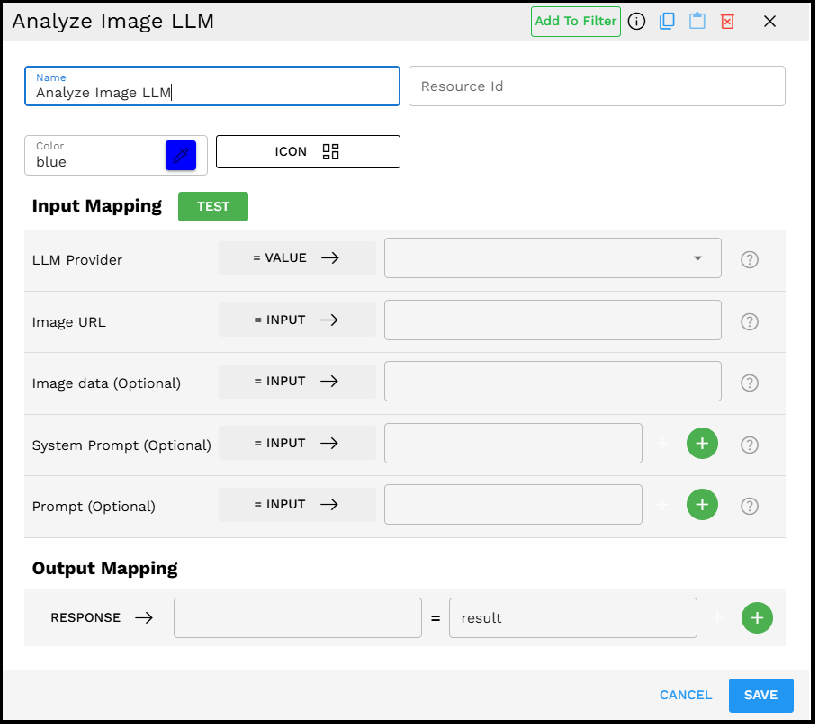
Required Inputs
Input |
Description |
Data Type |
Example |
|---|---|---|---|
LLM Provider |
Select the AI service provider that performs the image analysis. Different providers have different capabilities and specializations. |
LLMProvider |
|
Image URL |
The URL pointing to the image you want to analyze. The image must be openly accessible via this URL over the internet for the LLM to process it. |
Text |
|
Optional Inputs
Input |
Description |
Data Type |
Example |
|---|---|---|---|
Image data (Optional) |
Base64 encoded data of the image. Use this as an alternative to the Image URL when you have the image data directly. |
String |
|
System Prompt (Optional) |
System-generated prompts to guide the analysis. Can specify aspects or contexts for the LLM to consider. Multiple prompts can be added. |
Text |
|
Prompt (Optional) |
User-defined instructions to customize the analysis. Helps focus the LLM on specific aspects of the image. Multiple prompts can be added. |
Text |
|
Possible Chaining
The Analyze Image LLM component can be effectively chained with various other components in the Pipeline Builder to create powerful workflows:
Common components to use with Analyze Image LLM:
Call HTTP Get: To fetch images from external APIs or web services.
Download From S3: To retrieve images stored in S3 buckets.
Scrape Webpage: To extract images from websites for analysis.
Extract Text: To further process the analysis results.
Check Condition: To create decision branches based on image content.
Generate Text: To create summaries or reports based on image analysis.
Create VectorDB Context: To store analysis results in a vector database.
Chat Response Without Context: To generate responses based on image analysis.
Common workflow patterns include:
Image retrieval → Analyze Image LLM → Text extraction → Conditional logic
Batch image processing → Analyze Image LLM → Database storage
Example Use Case: Product Defect Detection
Scenario: Automating quality control by analyzing images of manufactured products for defects.
Configuration:
LLM Provider: Gemini - Gemini-1.5-Pro
Image URL: URL to the product image from the manufacturing line camera
System Prompt: "You are a quality control specialist analyzing product images. Focus on identifying defects, anomalies, or quality issues."
Prompt: "Analyze this image of our manufactured widget. Identify any scratches, dents, misalignments, or color inconsistencies. Rate the overall quality on a scale of 1-10."
Process:
The Pipeline Builder sends the product image to the LLM with the specified prompts.
The LLM analyzes the image for the requested defects and quality issues.
The component returns a detailed analysis including identified issues and quality rating.
Subsequent pipeline components can use this analysis to trigger alerts or sort products based on quality.
Example Implementation:
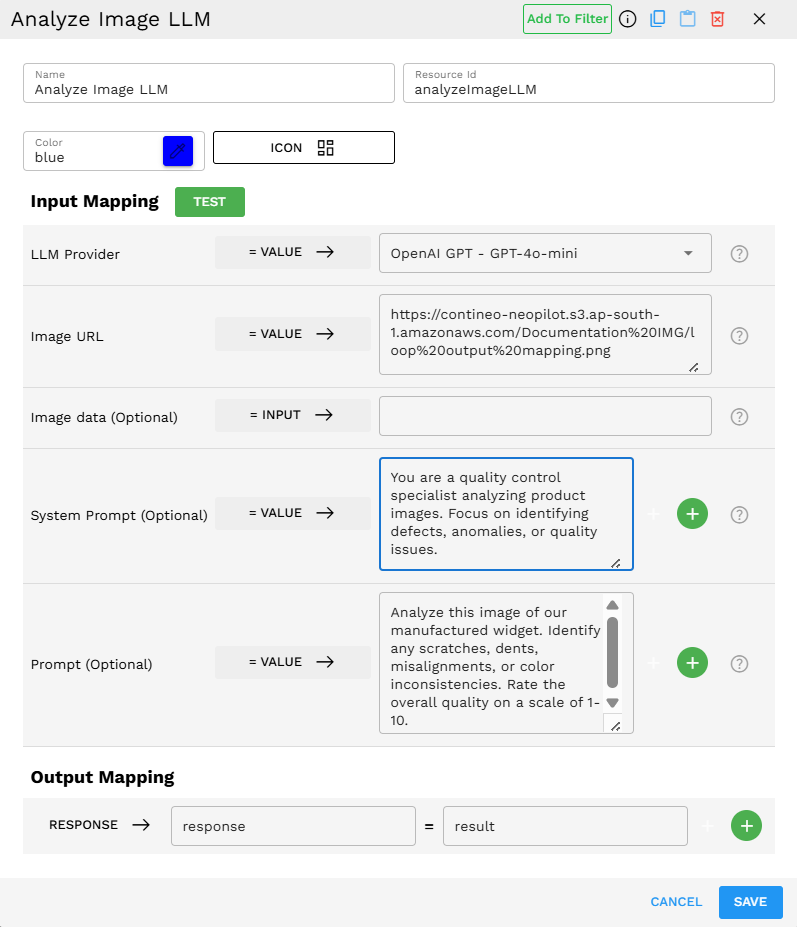
Output Format
The component outputs a detailed text analysis in the result field. Example output:
{"result":"The image shows a product with several quality issues: 1. There's a visible scratch along the right edge approximately 2cm in length. 2. The blue coloring is inconsistent, with a lighter patch in the upper left quadrant. 3. The alignment of the front panel appears to be off by about 1mm. 4. There are no visible dents or structural damage. Overall quality rating: 6/10. The product is functional but has cosmetic issues that affect its premium appearance."}
Best Practices
Use high-quality images for more accurate analysis. Poor resolution or lighting can affect the results.
Be specific in your prompts to guide the analysis toward the information you need.
Choose the appropriate LLM provider based on your specific use case - some excel at certain types of visual analysis.
Combine system and user prompts to create a layered approach, with system prompts providing general context and user prompts focusing on specific details.
Test with multiple images to ensure consistent analysis across various inputs.
Troubleshooting
Issue |
Possible Cause |
Solution |
|---|---|---|
The analysis is too general or vague |
Insufficient prompting or guidance |
Add more specific prompts that direct the analysis to the aspects you are interested in. |
Error: "Unable to process image" |
The image URL is inaccessible or the image format is unsupported |
Verify the URL is publicly accessible over the internet (not behind authentication or on a private network) and use common image formats (JPG, PNG, and so on). |
Analysis misses important details |
Image quality issues or limitations of the selected LLM |
Use higher-quality images and try a different LLM provider with better image analysis capabilities. |
Response timeout |
Image is too large or complex |
Optimize the image size or try splitting complex analyses into multiple focused queries. |
Limitations and Considerations
Limitation/Consideration |
Description |
|---|---|
Image Accessibility Requirements |
Images must be openly available over the internet. Private images, images behind authentication, or images on internal networks cannot be processed by the LLM providers. |
Provider Capabilities |
Different LLM providers have varying levels of image analysis capabilities. Results may differ between providers. |
Content Limitations |
Most providers have filters for harmful or inappropriate content and may refuse to analyze certain images. |
Processing Time |
Complex image analysis may take longer to process compared to text-only queries. |
Privacy Considerations |
Be mindful that images are sent to third-party LLM providers. Avoid sending sensitive or confidential visual information. |
Cost Implications |
Image analysis typically consumes more tokens/credits than text analysis, which may impact usage costs. |