Analyze PDF LLM
The Analyze PDF LLM component enables users to analyze PDF documents using a selected Large Language Model (LLM) provider. By providing a list of PDF URLs or optional base64-encoded PDF data, the system processes the documents and generates insights using AI. Users can choose their preferred LLM provider to perform the analysis, ensuring flexibility based on their specific needs.
How It Works
Select an LLM provider.
Input either:
PDF URLs, or
Base64-encoded PDF strings (in the format specified in this documentation).
Submit the PDFs.
The AI model processes them and returns a detailed analysis.
This makes it a powerful tool for tasks requiring automated document understanding and text extraction from PDFs.
Skill Level
Understanding basic Prompt Engineering concepts is helpful.
No Python or JavaScript knowledge is required.
How to use:

Key Terms
Term |
Definition |
|---|---|
LLM |
Large Language Model - an AI system trained on vast amounts of data to understand and generate human-like text and analyze documents. |
LLM Provider |
A service that offers access to large language models, such as OpenAI, Google (Gemini), or Anthropic. |
System Prompt |
The LLM receives initial instructions that guide its approach to the analysis task. |
PDF Analysis |
The process of extracting meaningful information from PDF documents using AI technologies. |
PDF URL |
URL of the PDF document which must be openly available over the internet for the LLM to access and analyze it. |
When to Use
Use Case |
Description |
|---|---|
Information Extraction |
When you need to extract key information, facts, or data points from PDF documents. |
Document Summarization |
For creating concise summaries of lengthy documents to quickly grasp main ideas. |
Content Classification |
When processing large volumes of PDFs to categorize them by topic, type, or relevance. |
Data Mining |
For transforming unstructured PDF content into structured data for analysis or database entry. |
Component Configuration
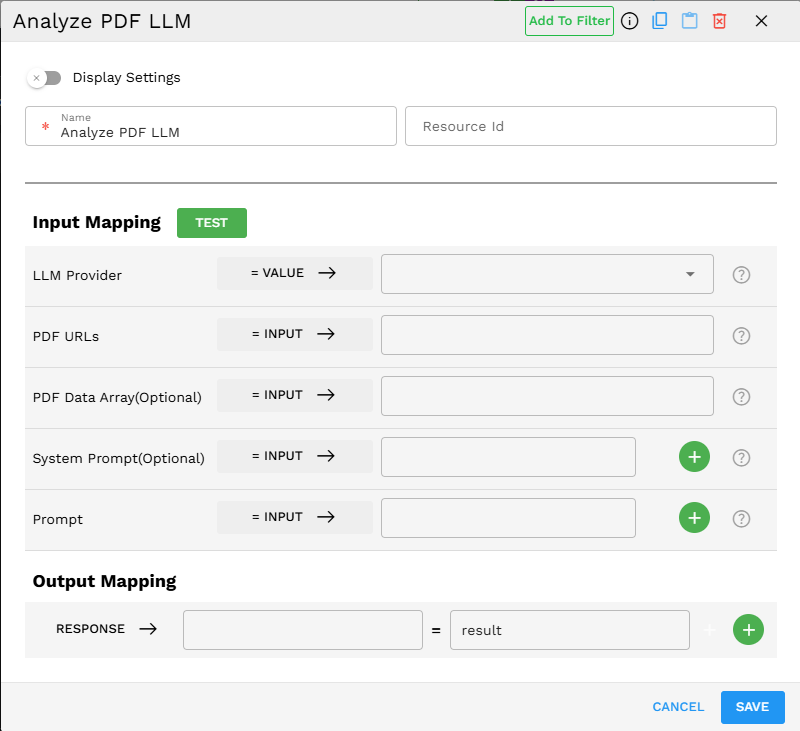
Required Inputs
Input |
Description |
Data Type |
Example |
|---|---|---|---|
LLM Provider |
Select the AI service provider that will perform the PDF analysis. Different providers have different capabilities and specializations. |
LLMProvider |
|
PDF URLs |
A list of URLs pointing to the PDF documents you want to analyze. The PDFs must be openly accessible via these URLs over the internet for the LLM to process them. Either PDF URLs or PDF data is required. If URLs are not available, you can provide base64-encoded PDF data instead. |
Array |
|
Prompt |
User-defined instructions to guide the PDF analysis. This helps focus the LLM on specific aspects of the document you want analyzed. |
Text |
|
Optional Inputs
Input |
Description |
Data Type |
Example |
|---|---|---|---|
PDF data (Optional) |
Base64 encoded data of the PDF documents. Use this as an alternative to the PDF URLs when you have the document data directly. |
|
|
System Prompt (Optional) |
System-generated prompts to guide the analysis. Can specify aspects or contexts for the LLM to consider. Multiple prompts can be added. |
|
|
Possible Chaining
The Analyze PDF LLM component can be effectively chained with various other components in the Pipeline Builder to create powerful workflows.
Common components to use with Analyze PDF LLM
Scrape Webpage: To fetch PDF URLs from websites for analysis.
Check Condition: To create decision branches based on document content.
Create VectorDB Context: To store document analysis results in a vector database.
Chat Response Without Context: To generate responses based on PDF analysis.
Common workflow patterns include
Document retrieval → Analyze PDF LLM → Text extraction → Conditional logic
Batch document processing → Analyze PDF LLM → Database storage
Example Use Case: Contract Analysis
Scenario: Automating legal document review by analyzing PDF contracts for key clauses and potential issues.
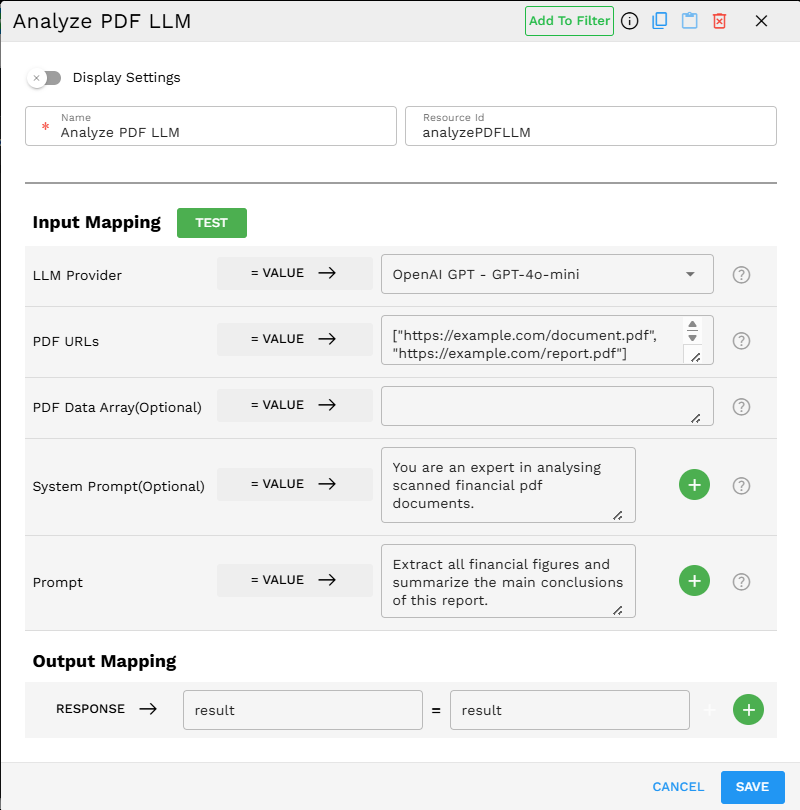
Configuration:
LLM Provider: Gemini - Gemini-1.5-Pro
PDF URLs:
["https://example.com/contracts/agreement.pdf", "https://example.com/contracts/addendum.pdf"]System Prompt:
"You are a legal document specialist analyzing contracts. Focus on identifying key clauses, obligations, termination conditions, and potential risks."Prompt:
"Analyze these contract documents. Extract all payment terms, liability clauses, and renewal conditions. Flag any unusual terms or potential legal issues. Provide a risk assessment on a scale of 1-10."
Process:
The Pipeline Builder sends the PDF documents to the LLM with the specified prompts.
The LLM analyzes the documents for the requested legal clauses and potential issues.
The component returns a detailed analysis including identified clauses, terms, and risk assessment.
Subsequent pipeline components can use this analysis to flag high-risk contracts or extract key information for database storage.
Example Implementation:
Output Format
The component outputs a detailed text analysis in the result field. Example output:
{"result":"Contract Analysis Summary: Payment Terms: 1. Monthly payment of $5,000 due on the 1st of each month 2. Late payment penalty of 2% after 5 business days 3. Annual price adjustment of CPI + 1% on contract anniversary Liability Clauses: 1. Vendor liability capped at 12 months of fees 2. No liability for consequential damages 3. Mutual indemnification for third-party claims Renewal Conditions: 1. Auto-renewal for 12-month periods unless 60-day notice provided 2. Price increase capped at 5% for renewal terms Flags: - Unusual 90-day vendor termination clause without cause - One-sided force majeure clause favoring vendor - Governing law in vendor's jurisdiction only Risk Assessment: 7/10 - Several clauses present significant risk to client position"}
Best Practices
Use well-formatted PDFs for more accurate analysis.
Be specific in your prompts to guide the analysis toward the information you need.
Choose the appropriate LLM provider based on your use case – some excel at certain types of document analysis.
Combine system and user prompts to create a layered approach (system prompts for context, user prompts for details).
Consider document length since very long documents may be truncated or require chunking.
Troubleshooting
Issue |
Possible Cause |
Solution |
|---|---|---|
The analysis is too general or vague |
Insufficient prompting or guidance |
Add more specific prompts that direct the analysis to the aspects you need. |
Error: |
The PDF URL is inaccessible or the document format is unsupported |
Verify the URL is publicly accessible and ensure the file is a valid PDF. |
Analysis misses important details |
Document quality issues or limitations of the selected LLM |
Use well-formatted PDFs or try a different LLM provider. |
Response timeout |
Document is too large or complex |
Split large documents into smaller sections or focus queries on specific parts. |
Limitations and Considerations
Limitation/Consideration |
Description |
|---|---|
Document Accessibility Requirements |
PDFs must be openly available online. Private/authenticated/internal PDFs cannot be processed. |
Provider Capabilities |
Different providers have varying levels of analysis quality. |
Content Limitations |
Most providers have token limits that prevent full processing of very large documents. |
Processing Time |
Complex document analysis may take longer than simple text queries. |
Privacy Considerations |
Documents are sent to third-party LLM providers. Avoid sensitive/confidential content. |
Cost Implications |
Document analysis consumes more tokens/credits than plain text analysis. |