Call Task Pipeline
The Call Task Pipeline component is essential for automating tasks through external APIs and Generative AI interactions. It allows the agent to call one or more rule-based task pipelines, which function similar to tools.
Task pipelines can:
Run external APIs such as database access, weather services, or Google Maps.
Call custom Python functions.
Connect with Large Language Model (LLM) APIs from providers such as Claude, Gemini, Groq, and OpenAI.
Download documents from S3.
Use Vector and Graph databases.
Retrieve data from web pages.
These capabilities enable LLMs to access real-time and contextual data (RAG) using the conversation history.
You must select one or more LLM providers used in the pipeline. You also select the Pipeline to run. If your pipeline does not need an LLM provider, such as a pipeline with only Vector RAG search, you can leave all checkboxes unchecked.
Skill Level
No coding skill is required.
How to Use

The "onComplete" event starts upon successful processing. The "onError" event starts if the pipeline has an error.
To set the input parameters of your pipeline, the Custom Script component must return a data structure with the input values in a result object. The result object returned by the custom script is set automatically as an input to the next pipeline, once the onComplete event of the Custom Script is connected to the Call Task Pipeline component.
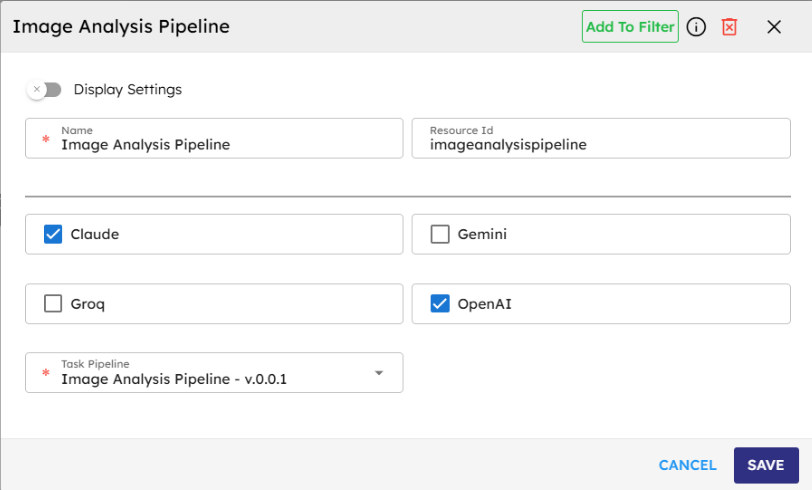
Name |
Code |
Type |
Description |
Data Type |
|---|---|---|---|---|
Name |
|
text |
Name of the component. |
string |
Resource ID |
|
text |
Unique ID of the component. |
string |
Claude |
|
checkbox |
Select if Claude is a provider |
boolean |
Gemini |
|
checkbox |
Select if Gemini is a provider |
boolean |
Groq |
|
checkbox |
Select if Groq is a provider |
boolean |
OpenAI |
|
checkbox |
Select if OpenAI is a provider |
boolean |
Task Pipeline |
|
module-selector |
Pipeline name |
string |
Methods
ID |
Name |
Description |
Input |
Output |
|---|---|---|---|---|
|
Execute |
Executes the task pipeline and returns the result in JSON format. |
Input parameters of pipeline |
Result of method execution in JSON format |
Events
ID |
Name |
Description |
Event Data |
Source Methods |
|---|---|---|---|---|
onComplete |
On Complete |
Triggered when the pipeline successfully processes the request and returns a response |
Execute |
|
onError |
On Error |
Triggered when an error occurs during pipeline execution. Possible Errors: LLM API / Other third party APIs / Custom Javascript execution errors; Vector or Graph database access errors. |
Typical Chaining of Components
Source Component |
Purpose |
Description |
|---|---|---|
Custom Script |
Set Pipeline Inputs |
The result returned by the custom script is set as Pipeline input parameters |
Target Component |
Purpose |
Description |
|---|---|---|
Process Response |
Show Response |
The result returned by the task pipeline is cleaned off any control characters and presented to the user. |
Display HTML |
Show Response HTML |
The HTML returned by the task pipeline is presented to the user. |
Display Message |
Show Response |
The result is displayed as a text response to the user. |
Show Message with Options |
Show Response with Options |
The result is displayed as text response with options for probable next actions that the user can select from. |
Implementation Example
The following example depicts how you could typically use the Call Task Pipeline component in an agentic flow:
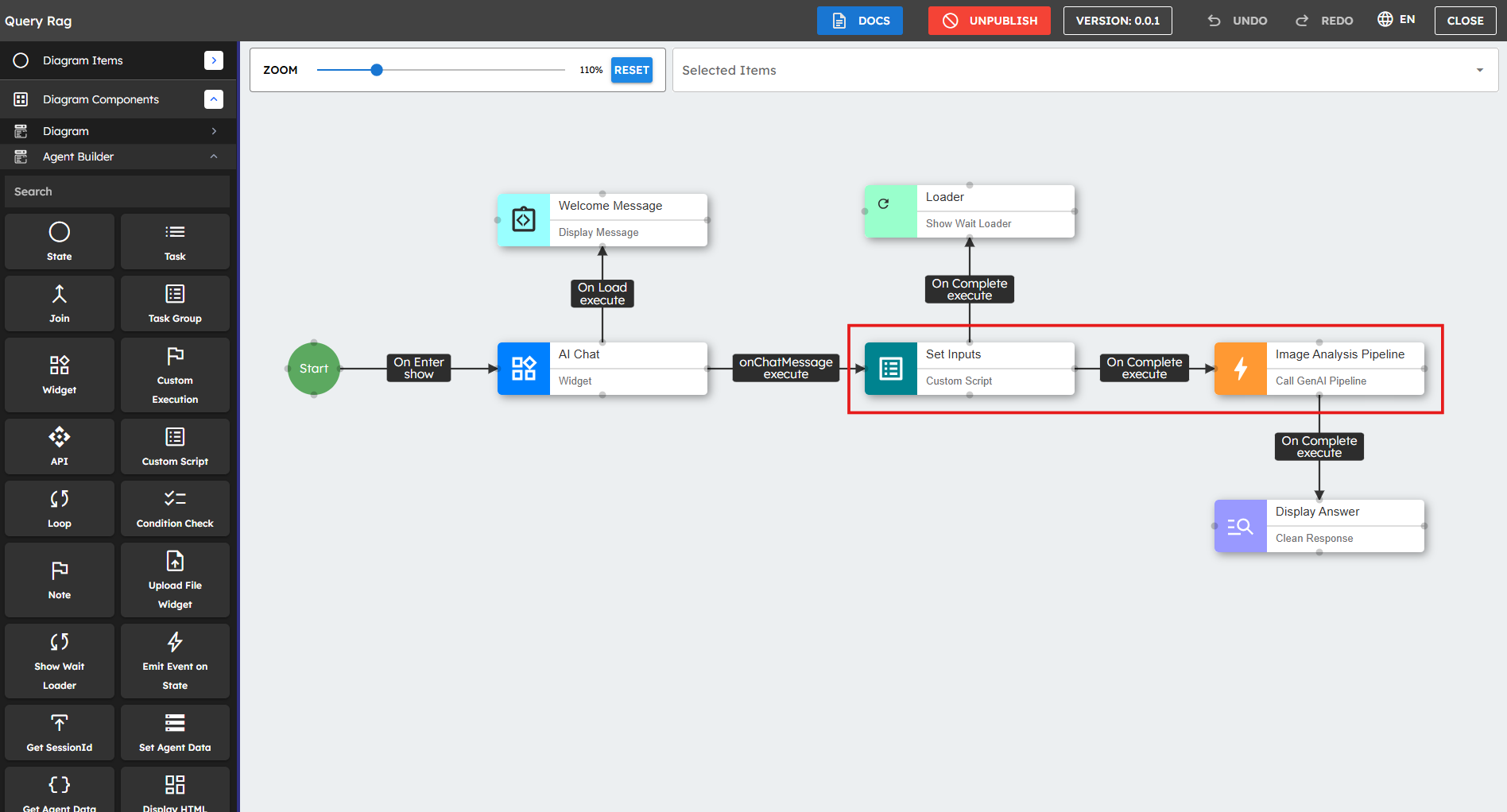
Drag the Call Task Pipeline component onto the canvas.
Select the LLM providers used in the pipeline. Check the correct boxes (Claude, Gemini, Groq, OpenAI).
Important:
If your pipeline does not need an LLM provider, you can leave all the checkboxes clear.
Select the task pipeline to run from the dropdown list. This dropdown shows all public pipelines available for execution.
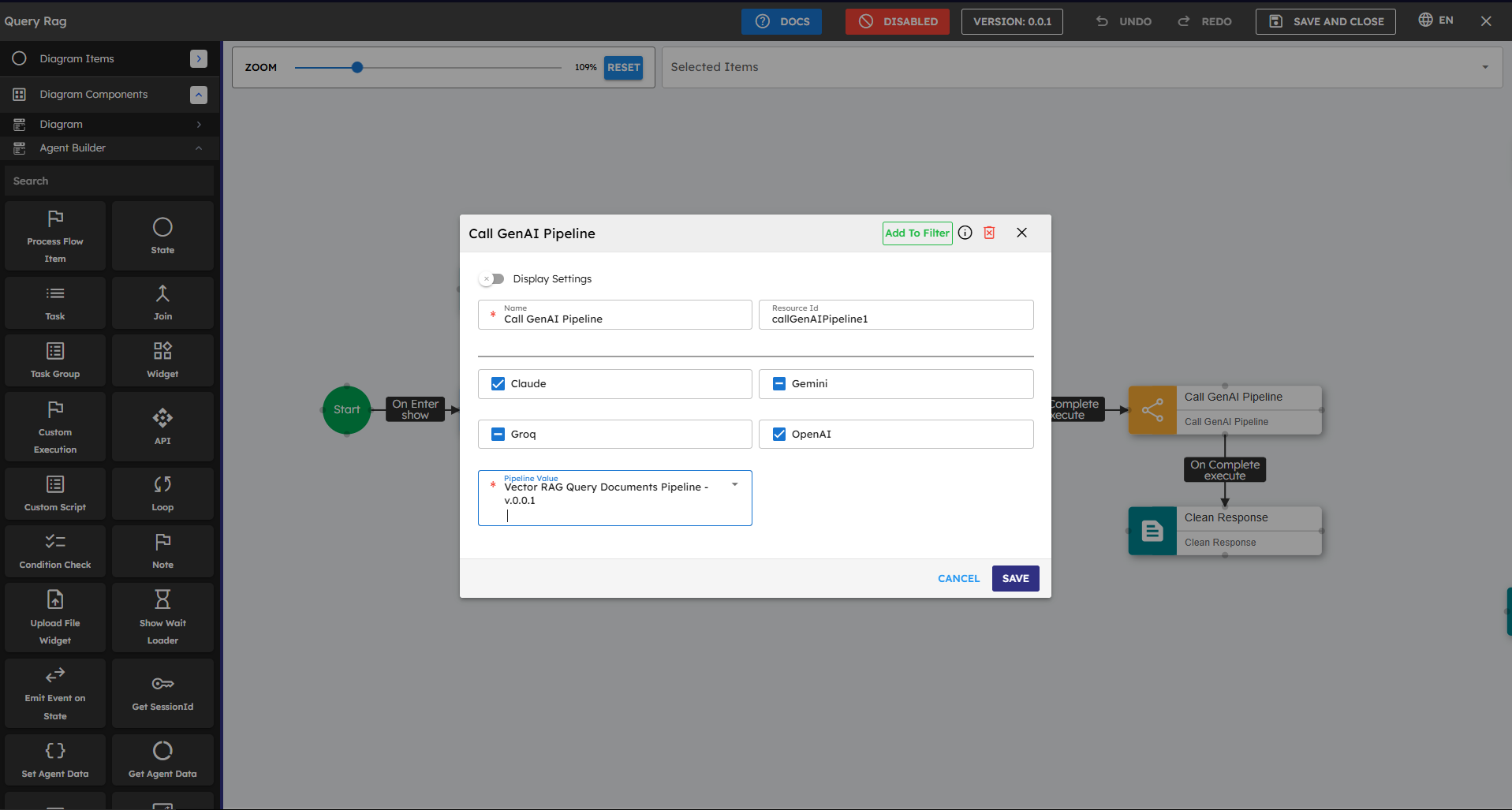
Pass input parameters to the Call Task Pipeline component. Connect a Custom Script component that returns the parameters in a result object.
// accesses the list of URLs of the files uploaded by the user during// the chat interaction, such as documents, images, or other supported file types.let uploadedFiles = this.agent.data.uploadedFiles;// Get the most recent prompt text input by the userlet lastUserInput = args.$event.message;// Create a structured JSON object combining both the inputsvar result = {lastUserInput: lastUserInput,documentUrlsList: uploadedFiles};// Return the JSON object to be used as an input to the pipelinereturn result;Connect the onComplete event to a component that processes the pipeline response, such as the Clean & Display Response component.
Connect the onError event to an error handling component if the pipeline can have errors.
Enhanced Version
You can improve the script above to include more context such as chat history, user profile information, and timestamp. This context can help your task pipeline:
// Get User Inputs, i.e. the prompt and uploaded files if anylet uploadedFiles = this.agent.data.uploadedFiles;
let lastUserInput = args.$event.message;
// Access the conversation history if availablelet conversationHistory = this.agent.data.chatHistory || [];
// Create the input object for the next pipelinevar result = {
// Core inputslastUserInput: lastUserInput,
documentUrlsList: uploadedFiles,
// Additional contextconversationContext: conversationHistory,
timestamp: newDate().toISOString(),
// Add metadata about the uploaded filesfileCount: uploadedFiles ? uploadedFiles.length : 0,
fileTypes: uploadedFiles ? uploadedFiles.map(file => file.type) : []
};
// Return the JSON object to be used as an input to the next pipelinereturn result;
Best Practices
Provider Selection: Choose the correct provider for your use case, or leave all providers unchecked if your pipeline does not make any LLM API calls.
Input Formatting: Make sure that the input parameters are properly structured according to the pipeline requirements.
Error Handling: Connect the onError event to correct fallback components to create reliable agents.
Response Processing: Use Custom Script components to get and format the pipeline response data for downstream components.
Testing: Test with small inputs before you process large documents or complex queries.
Performance Optimization: Consider caching responses by storing them in the agent's state for frequently asked questions or similar inputs.
Common Use Cases
Use Case |
Description |
Provider Requirement |
|---|---|---|
Document or Image Analysis |
Extract key information from documents or images, summarize content, or answer questions about uploaded files |
Claude, OpenAI |
Creative Content Generation |
Generate marketing copy, product descriptions, or creative writing based on prompts |
OpenAI, Claude |
Conversational Responses |
Generate natural, contextually appropriate responses to user queries |
Any provider |
Code Generation |
Create code snippets or complete functions based on requirements |
OpenAI, Claude |
Data Transformation |
Convert between data formats or extract structured data from unstructured text |
OpenAI, Claude, or No provider (if using predefined transformation logic) |
Database Operations |
Execute database queries or data processing operations |
No provider required |
Workflow Automation |
Execute predefined business logic or workflow steps |
No provider required |