Condition Check
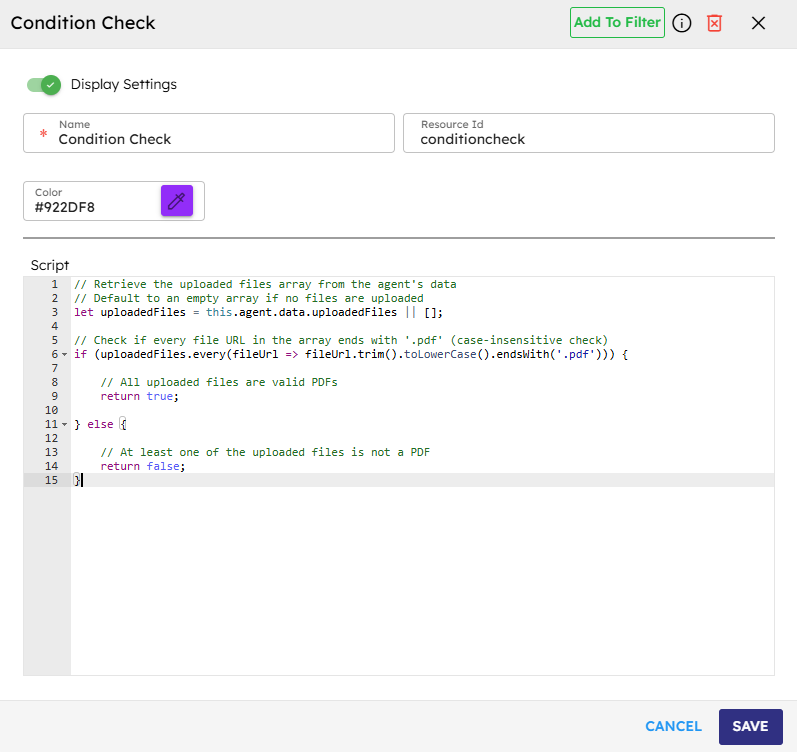
The Condition Check component runs a conditional script and starts different events based on its outcome. It checks the script and sends an onTrue event if the result is true, an onFalse event if the result is false, and an onError event if an error occurs. The execute method compiles and runs the script. It determines the correct event to start based on the script's result.
Skill Level
You need intermediate JavaScript knowledge.
How to use:

Overview
The Condition Check component runs JavaScript code and starts different event paths based on the result. This component allows branching logic in agent workflows, enabling you to create decision points based on any condition you need to check. The component checks JavaScript expressions and directs the workflow based on whether the result is true or false, making it an important building block for creating agent behaviors. You write a simple or intermediate JavaScript condition script that returns true or false to control the workflow path.
Input
Name |
Code |
Type |
Description |
Data Type |
|---|---|---|---|---|
Name |
|
text |
Name of the component. |
string |
Resource ID |
|
text |
The unique ID of the component is generated automatically if not provided. |
string |
Script |
|
JavaScript |
JavaScript code that evaluates to a boolean value (true/false) or any value that can be interpreted as true or false in JavaScript |
string |
Methods
ID |
Name |
Description |
Input |
Output |
|---|---|---|---|---|
|
Execute |
Compiles and executes the script, emitting either 'onTrue' or 'onFalse' based on the result. Emits 'onError' if an error occurs. |
Script to evaluate |
Boolean result (true/false) |
Events
ID |
Name |
Description |
Event Data |
Arguments |
|---|---|---|---|---|
onTrue |
On True |
Triggered when the script returns a truth value. |
Execute |
name, result, source |
onFalse |
On False |
Triggered when the script returns a false value. |
Execute |
name, result, source |
onError |
On Error |
Triggered if an error occurs during script execution. Possible Errors: Syntax Errors/Type Errors; Reference Errors; Infinite Loops or Recursion; Invalid Comparisons etc. |
Execute |
name, source, error |
Typical Chaining of Components
Source Components
Source Component |
Purpose |
Description |
|---|---|---|
Call API |
Response Validation |
Check API response status and route accordingly. |
Custom Script |
Complex Calculation Evaluation |
Evaluate results of complex calculations. |
Target Components
Target Component |
Purpose |
Description |
|---|---|---|
Display Message |
Conditional Messaging |
Show different messages based on condition results. |
Call GenAI Pipeline |
Conditional AI Processing |
Execute AI workflow only if the condition is met. |
Custom Script |
Error Handling |
Execute error handling logic. |
Implementation Example
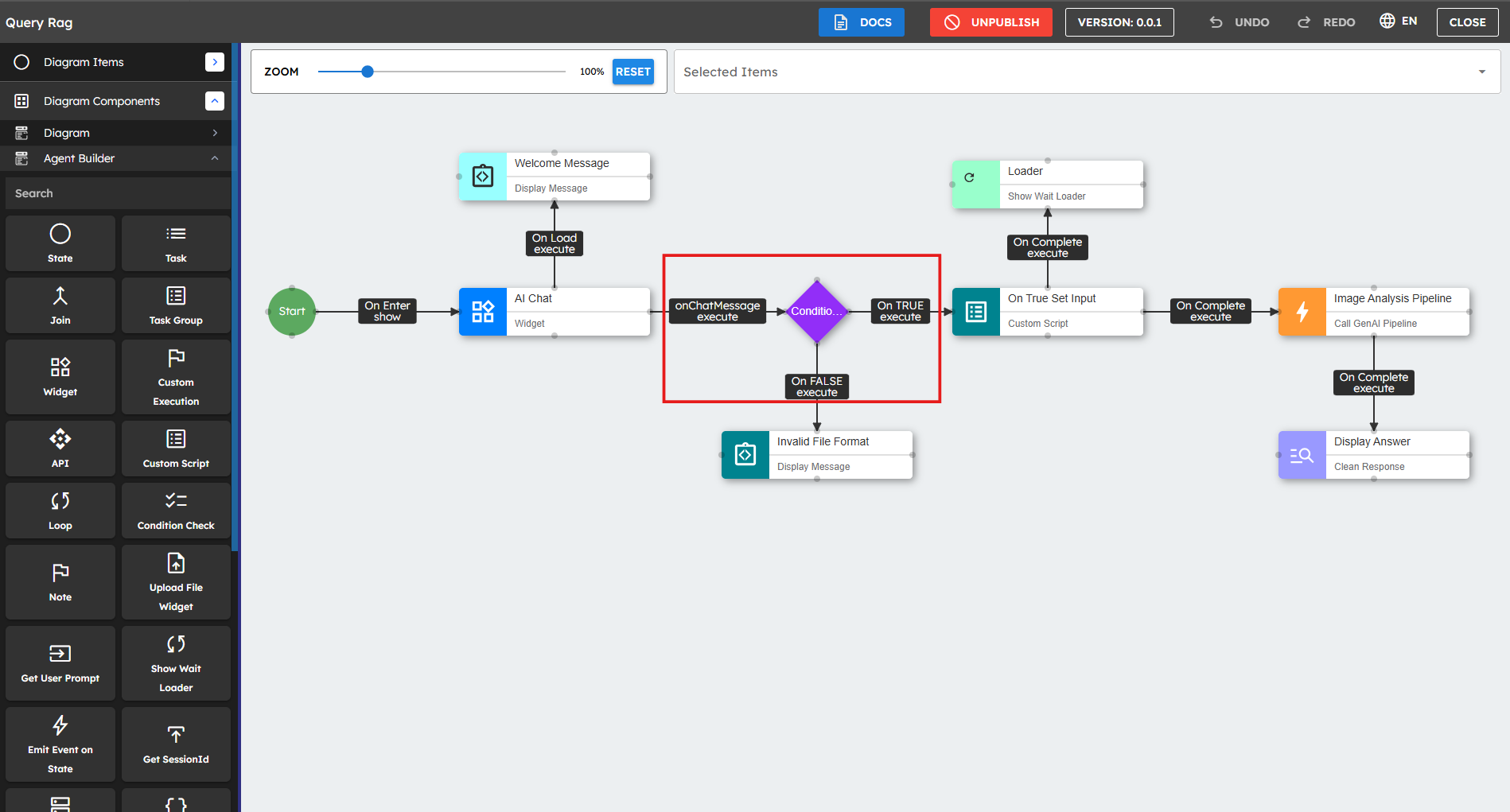
Drag the Condition Check component:
Place the Condition Check component next to the component where you want to perform the validation[1].Write the script:
Add the following script to check that all uploaded files end with.pdf(case-insensitive):// Retrieve the uploaded files array from the agent's data// Default to an empty array if no files are uploadedlet uploadedFiles = this.agent.data.uploadedFiles || [];// Check if every file URL ends with '.pdf' (case-insensitive)if (uploadedFiles.every(fileUrl => fileUrl.trim().toLowerCase().endsWith('.pdf'))) {returntrue;}else{returnfalse;}Connect Event Handlers:
Connect the Condition Check component to the rest of the flow with these events:On True: Runs when all uploaded files are PDFs.
On False: Runs when at least one file is not a PDF.
On Error: Runs if there is an error during validation.
Best Practices
Keep conditions focused and simple: Write short conditions that check one logical concept. Complex conditions should be broken down into multiple Check Condition components when possible.
Always handle errors: Connect the onError event to correct components to ensure errors are handled well.
Use multiple condition components: For complex decision trees, break logic into multiple Check Condition components for easier maintenance.
Validate input data: Always check for null or undefined values before you use variables to avoid runtime errors.
Avoid side effects: Condition checks should check the state but not change it. Keep the script focused on determining the condition outcome.
Test edge cases: Check both true and false paths work as expected, including boundary conditions and unexpected inputs.
Use consistent formatting: Use the same coding style for better readability and easier maintenance.
Common Use Cases
Use Case |
Description |
|---|---|
User Authorization |
Route workflows based on user permissions or login status. |
Form Validation |
Check input data meets the requirements before you continue. |
Content Personalization |
Show different content based on user preferences or history. |
Business Logic |
Use complex decision trees for business processes. |
Error Handling |
Create fallback paths when operations are not completed successfully. |
Time-based Routing |
Start different actions based on the time of day or day of the week. |
Feature Toggles |
Turn on or turn off features based on configuration settings. |