Entity Field Validations
Add validations to Entity Fields. Multiple validation rules may be specified for an Entity Field. To add validations to an Entity Field:
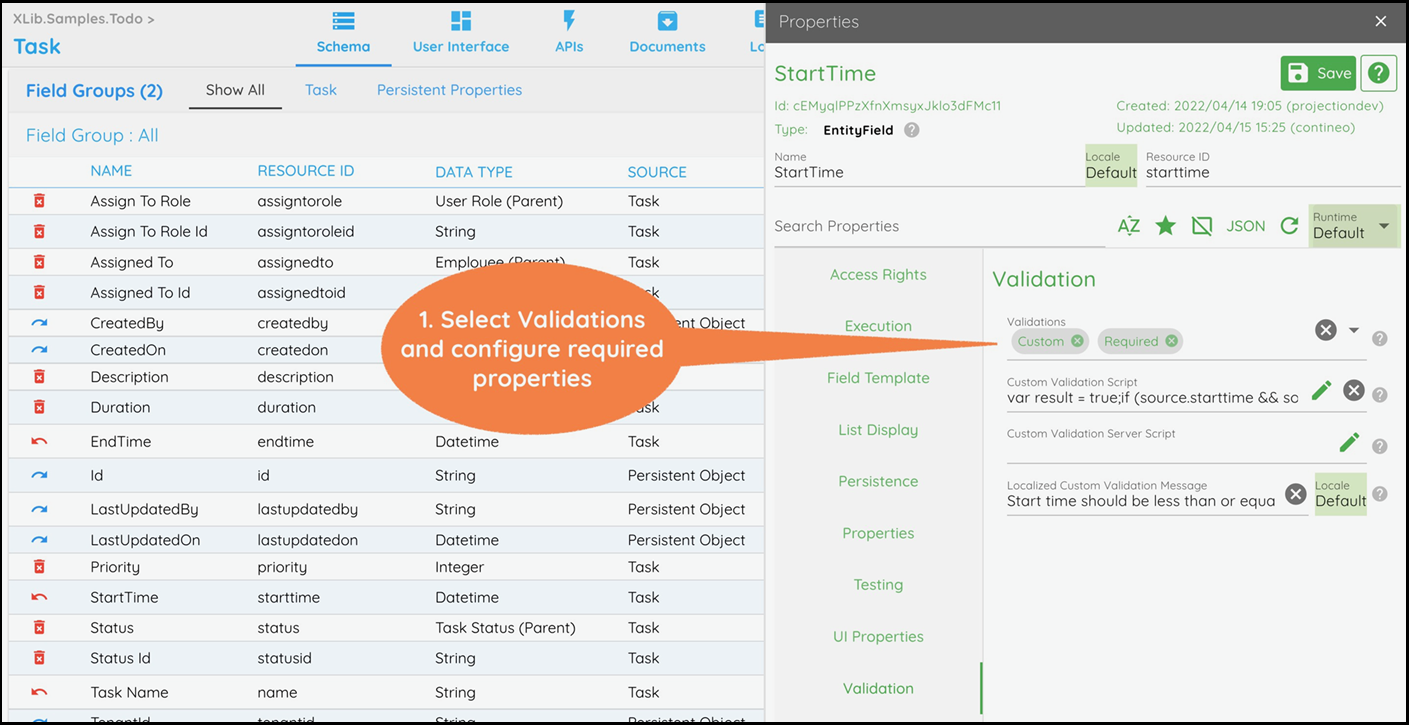
Click the Field Name in the Field list and select the required validations from the Validation > Validations property.
Configure the validation properties as per the validation types given below in the List of Validations.
Click Save to save the changes and generate the UI.
List of Validations
Validation Type | Description |
|---|---|
Required | Enforces a Required or Not-Null constraint on the property. See the Email field in |
Unique | Used to apply unique validation. Composite keys for the unique constraint may be selected in the Composite Keys property. See the Email field in |
Range | Available for numeric properties only. Requires a Start Value and End Value to be provided for the Property. See the Completion % field in |
Pattern | Requires a regex pattern to be provided for validation in the Pattern property. Also, set the pattern validation error message in the Localized Pattern Message property. |
Length | Available for text properties only. Requires a Minimum length and Maximum length to be provided for the Property. See the Task Name field in |
Custom | JavaScript for validation is to be provided in the Custom Validation Script. Custom validation error message to be provided in the Localized Custom Validation Message property. |
From List | This validation creates a dropdown on the UI for the field. This validation provides the option of 3 types of option loaders:
|