Sub-Agent Handling
Sub-agents are specialized agents designed to handle specific subtasks within a larger workflow. They operate as independent processing units that can be invoked by a parent agent, perform their specialized function, and return results back to the caller.
Overview
The Sub-Agent System lets you create hierarchical structures of agents, where one agent can start and manage other agents. This modular approach breaks complex functionality into manageable, reusable components.
Key Concepts
Agent Hierarchy
Parent Agent: The agent that starts a sub-agent.
Sub-Agent: A specialized agent that a parent agent starts.
Agent Stack: The hierarchy of currently active agents.
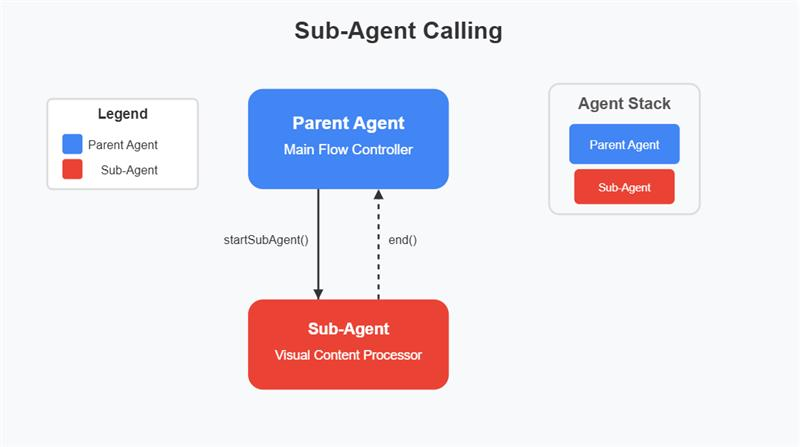
Starting Sub-Agents
You can start a sub-agent from any agent using the startSubAgent method:
// Basic usage - start a sub-agent by IDthis.agent.startSubAgent(this.agent.data.id);
Parameters:
agentId (String): ID of the agent to load
Example:
// From a Custom Script componentlet subAgentId = "LPSxMcs";  // ID of the target agent// Start the sub-agentthis.agent.startSubAgent(subAgentId);
console.log("Sub-agent started");
Agent Stack Management
When you start a sub-agent, the system adds it to the agent stack: The system always uses the agent at the top of the stack as the active agent:
// Get the currently active agentlet activeAgent = this.agent.getActiveAgent();
Ending Sub-Agents
When a sub-agent completes its work, it can end itself:
// End current agent and return to parentthis.agent.end();
When end() is called:
The agent is removed from the stack.
If the agent has a parent, the parent becomes active again.
Control flow returns to the parent agent.
Data Sharing Between Agents
Accessing Parent Data from Sub-Agent
Sub-agents can access and modify their parent's data:
// Reading parent datalet parentValue = this.agent.parent.data.someValue;

// Writing to parent datathis.agent.parent.data.someResult = processedValue;
Accessing Ancestor Data from Deep Sub-Agents
When you have multiple levels of sub-agents (such as Parent → Sub-Agent → Sub-Sub-Agent), deeper agents can access data from any ancestor in the chain:
// Access immediate parent data (one level up)let parentValue = this.agent.parent.data.someValue;

// Access grandparent data (two levels up)let grandparentValue = this.agent.parent.parent.data.someValue;

// Access great-grandparent data (three levels up)let greatGrandparentValue = this.agent.parent.parent.parent.data.someValue;
You can traverse the parent chain as deeply as you need using multiple .parent references.
Best Practices
Set Clear Data Boundaries: Be explicit about what data you share between agents.
Proper Cleanup: Always call
end()when a sub-agent completes.Set Context: Set all needed context before you start a sub-agent.
Error Handling: Implement proper error handling in sub-agent.
Naming Conventions: Use consistent naming for agent tasks and flows
Troubleshooting
Sub-Agent Not Starting
Verify the agent ID is correct.
Check for console errors when you call
startSubAgent()Ensure the agent exists in the system.
Data Not Available in Sub-Agent
Check that the parent reference is properly set.
Verify the data path is correct:
this.agent.parent.data.propertyName.Confirm that you set the data before you started the sub-agent.
Parent Not Regaining Control
Ensure your call
end()when the sub-agent completes.Check for any errors that might prevent proper cleanup.
Verify that the parent reference is correctly maintained.
The Sub-Agent System provides a powerful way to create modular, reusable components in your agent flows. It enables complex functionality while maintaining a clean separation of concerns.