Call Custom Function
The Call Custom Function component allows users to execute a custom Python function by providing the required code. This tool is useful for integrating custom logic and extending functionality within a system by running user-defined scripts dynamically.
To use this component, users must input the Python code they wish to execute. The component then processes the provided function and return the results accordingly. As part of the Custom Logic category, this tool offers flexibility for executing tailored computations, making it a valuable asset for advanced automation and scripting needs.
Provides a flexible programming interface for implementing any custom business logic, data processing, or specialized operations within the pipeline through Python code execution. This component serves as the universal solution for requirements that standard components cannot fulfill, allowing users to write custom functions that can access file paths, session data, request parameters, and pipeline context to perform any desired operations.
Users can implement custom file analysis (reading Excel metadata, processing specific data formats), complex data transformations (merging outputs from multiple steps, converting between formats), conditional logic based on dynamic criteria, external API integrations, mathematical computations, or any domain-specific algorithms. The component accepts a Python class definition and executes it with full access to the pipeline's data ecosystem, making it the most powerful and versatile tool for extending pipeline capabilities.
Use this component when standard components cannot achieve the desired functionality or when specialized business logic must be implemented.
Skill Level
You may need an intermediate understanding of Python language to use this component effectively.
Overview
The Call Custom Function component allows you to implement and execute custom Python code directly within your Pipeline Builder. This component provides flexibility to create specialized logic that is not covered by standard components, enabling you to extend the capabilities of your pipeline with custom processing, data manipulation, or business logic.
Key Terms
Term | Definition |
|---|---|
Custom Function | A Python class with an execute method that allows you to implement custom logic within the pipeline. |
Message Object | The primary data object is passed to the custom function, containing all request data and session information. |
Session Data | Persistent data that can be shared between different steps of the pipeline. |
Pipeline ID | Unique identifier for the current pipeline being executed. |
When to Use
Use the Call Custom Function component when you need to:
Implement specialized business logic not available in standard components.
Create custom data transformations or calculations.
Add conditional logic based on complex criteria.
Integrate with external systems via custom API calls.
Manipulate data in ways not supported by built-in components.
Implement domain-specific algorithms or processing.
Component Configuration
Required Inputs
Input | Description | Data Type | Example |
|---|---|---|---|
Function Code | The Python code that defines your custom function class. Must include an | Text |
|
How It Works
You define a Python class with an
executemethod in the Function Code field.When the pipeline runs, the component saves your code as a Python file in the appropriate directory structure.
The component dynamically imports your custom function class.
It instantiates your class and calls the
executemethod, passing the current Message object.Your code processes the data and returns a result.
The component maps this result to the specified output variable for use in subsequent pipeline steps.
Function Structure
Your custom function must follow this structure:
from Core.Message import Message

class {className}:
    defexecute(self, message: Message):
        # Your custom logic herereturn result
Important:
Do not replace
{className}in your code. This is a placeholder that is automatically replaced with the actual class name during execution.
Accessing Data in Custom Functions
1. From Message Arguments
defexecute(self, message: Message):
    # Get a value with a default fallback
    value = message.get_arg('parameter_name', 'default_value')

    # Process and returnreturn processed_result
2. From Session Data
defexecute(self, message: Message):
    # Access session data
    session = message.request.session
    pipeline_id = message.get_arg('pipeline_id')

    # Get session variable
    stored_value = session.get_session_data(pipeline_id, 'session_var_name')

    # Process and returnreturn processed_result
3. From HTTP Request
defexecute(self, message: Message):
    # Access direct HTTP request inputs
    request_inputs = message.request.httpRequest.get("inputs", {})
    input_value = request_inputs.get("input_name", "default")

    # Process and returnreturn processed_result
4. From Loop Context
defexecute(self, message: Message):
    # Access current loop item
    session = message.request.session
    pipeline_id = message.get_arg('pipeline_id')
    current_item = session.get_session_data(pipeline_id, 'loop_item')

    # Process and returnreturn processed_result
Note:
This method should be used when your Call Custom Function component is placed as a step within a Loop component in the Pipeline Builder. When your pipeline executes a Loop, each iteration processes one item from your list. By placing a Call Custom Function inside that Loop, you can access the current item being processed
loop_itemand perform custom operations on it. This is especially useful when you need to transform or enrich each item individually as it moves through the Loop.
Example Use Case: Information Aggregator
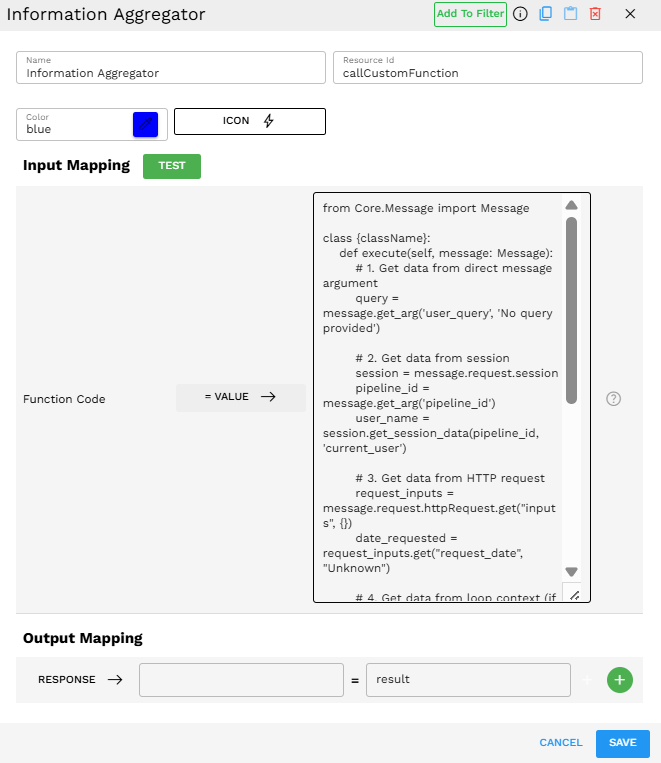
This example demonstrates a custom function that collects and combines data from multiple sources available in a pipeline:
from Core.Message import Messageclass {className}: defexecute(self, message: Message): # 1. Get data from direct message argument query = message.get_arg('user_query', 'No query provided') # 2. Get data from session session = message.request.session pipeline_id = message.get_arg('pipeline_id') user_name = session.get_session_data(pipeline_id, 'current_user') # 3. Get data from HTTP request request_inputs = message.request.httpRequest.get("inputs", {}) date_requested = request_inputs.get("request_date", "Unknown") # 4. Get data from loop context (if within a Loop) product = session.get_session_data(pipeline_id, 'loop_item') product_name = product.get('name', 'Unknown product') if product else'Not in loop'# Combine all data into a single response response = { "user": user_name, "query": query, "date": date_requested, "product": product_name, "summary": f"User {user_name} requested information about {product_name} on {date_requested}. Query: {query}" } return responseNote:
This example demonstrates how to access all possible data sources in one function. In a real pipeline, this function would be placed inside a Loop that processes product data. It accesses the user's query passed directly to the function, the user's name stored in the session, the request date from the HTTP request, and the current product from the loop item. It then combines all this information into a single structured response.
Output Format
Your custom function can return data in various formats:
Simple Value: A string, number, or boolean.
Dictionary: A key-value structure for multiple return values.
List: An array of values or objects.
Whatever is returned from the execute method must be mapped to the output variable defined in your Output Mapping.
Best Practices
Include error handling: Use try/except blocks to handle potential errors gracefully.
Validate inputs: Check that required inputs exist and are in the expected format.
Keep functions focused: Each custom function should have a single responsibility.
Add comments: Document your code clearly, especially for complex logic.
Use meaningful variable names: Make your code more readable with a descriptive name.
Troubleshooting
Issue | Possible Cause | Solution |
|---|---|---|
Syntax Error | Invalid Python syntax in your function code | Check for proper indentation, missing colons, brackets, or quotes. Use the Test feature to identify the specific syntax error. |
Function not returning the expected value | Logic error or incorrect input mapping | Add debug print statements in your code to log intermediate values. Verify input mappings are correctly defined. |
Import Error | Attempting to import a module that is not available | Ensure you are only importing modules that are installed in the environment. Check the spelling of import statements. |
Key Error | Accessing a non-existent key in a dictionary | Use the |
Limitations and Consideration
Execution Environment: Your code runs in a specific Python environment. Not all external packages may be available.
Security: Avoid including sensitive information directly in your function code.
Performance: Complex operations in custom functions may impact pipeline execution time.
Debugging: Error messages from custom functions may be limited. Consider adding explicit error handling and logging.
Versioning: Changes to your custom function are applied when the pipeline is saved and re-run.
Context: The function does not persist state between executions; use session data for sharing information across pipeline steps.