Call HTTP Get
The Call HTTP Get component allows users to make a REST API GET request to a specified URL. This tool is useful for retrieving data from external services, fetching resources, or integrating with APIs that require query parameters and custom headers.
To use this component, users need to provide the target URL, along with optional request headers and parameters. The response format can be specified as JSON, raw, or plain text, depending on the expected output. As part of the Custom Logic category, this tool helps automate API interactions efficiently.
Overview
The Call HTTP Get component allows you to make REST API GET requests from your Pipeline Builder workflows. This component simplifies the process of retrieving data from external APIs and integrating it into your pipeline, with support for custom headers, parameters, and different response formats.
How to use

Key Terms
Term |
Definition |
|---|---|
REST API |
Representational State Transfer Application Programming Interface - a set of rules for building and interacting with web services. |
GET Request |
An HTTP method is used to retrieve data from a specified resource. |
Headers |
Additional information is sent with an HTTP request or response, such as authentication tokens or content type. |
Parameters |
Key-value pairs are sent as part of a URL query string to filter or specify requested resources. |
When to Use
When you need to retrieve data from external REST APIs or web services.
When you want to fetch real-time information to incorporate into your pipeline.
When you need to integrate with third-party systems that expose GET endpoints.
When you want to validate the availability or status of an external service.
Component Configuration
Required Inputs
Input |
Description |
Data Type |
Example |
|---|---|---|---|
URL |
The endpoint URL to which the GET request is sent. |
URL |
|
Response Format |
Specifies the expected format of the response (JSON, raw, or text) |
String (Enum) |
|
Optional Input
Input |
Description |
Data Type |
Example |
|---|---|---|---|
Request Headers |
Custom HTTP headers to include with the request (authentication tokens, accept types, etc.) |
JSON |
|
Request Params |
URL query parameters to include with the request. |
JSON |
|
How It Works
The component constructs an HTTP GET request using the provided URL.
Default headers are applied (content-type: application/JSON, Accept: /, Connection: keep-alive)
If custom headers are provided, they are merged with the default headers.
Request parameters are added to the URL as query parameters.
The HTTP request is sent to the specified endpoint.
The response is processed according to the specified response format.
Additional response metadata (status code, headers, etc.) is collected.
All response data is returned as component output for use in subsequent pipeline steps.
Example Use Case
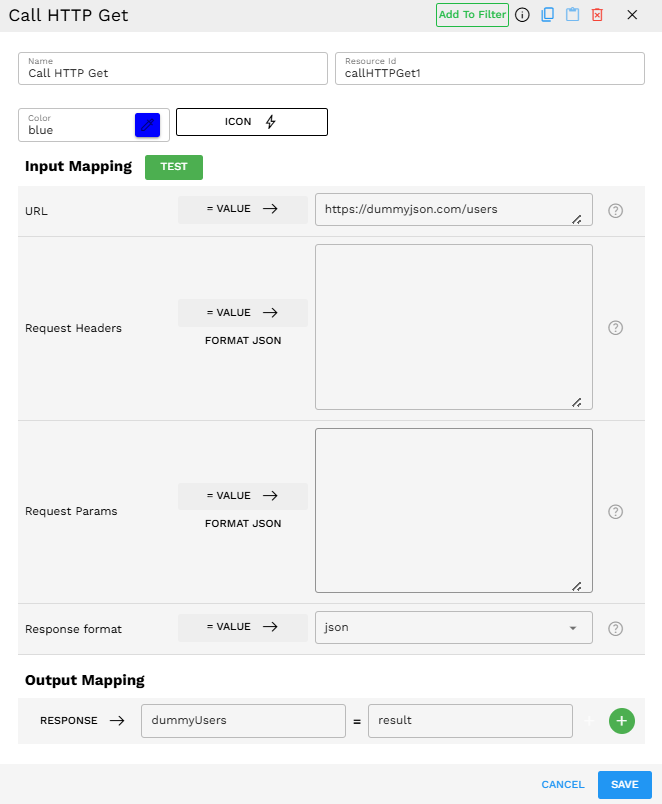
Scenario: Retrieving user data from an external API to populate a dashboard.
Configuration:
URL:
<https://dummyjson.com/users>Request Headers: Default headers (no custom headers needed)
Request Params: No custom parameters
Response Format: JSON
Process:
The component sends a GET request to
<https://dummyjson.com/users>.The API returns a JSON response containing user data.
The component processes the response as JSON.
The response data is mapped to the output variable "dummyUsers".
Subsequent pipeline components can use this data for display or further processing.
Component Configuration Example:
Output Format
The component returns a comprehensive result object containing both the API response and metadata about the request. The "response" field content varies based on your selected Response Format:
Response Format |
Description |
When to Use |
|---|---|---|
JSON |
Parses the response as JSON and returns a structured object |
Use when working with modern APIs that return well-structured JSON data. This makes it easier to access specific fields in subsequent components. |
text |
Returns the raw response as a text string |
Use when the API returns plain text, HTML, XML, or any non-JSON format that you need as a string. Also useful for debugging when you're unsure of the response structure. |
raw |
Returns the raw response object |
Use when you need access to the lowest level response data, such as when dealing with binary data or when advanced processing is needed. |
Regardless of the Response Format, the result object contains:
response: The actual data returned by the API (format depends on the Response Format setting).
status_code: The HTTP status code returned.
cookies: Any cookies set by the server.
elapsed: How long the request took to complete.
encoding: The character encoding of the response.
headers: Headers returned by the server.
ok: Boolean indicating if the request was successful (status code 200-299).
reason: The HTTP reason phrase corresponds to the status code.
Example output for a successful request:
{"response":{"users":[{"id":1,"firstName":"John","lastName":"Doe","email":"john.doe@example.com"},{"id":2,"firstName":"Jane","lastName":"Smith","email":"jane.smith@example.com"}],"total":2},"status_code":200,"cookies":{},"elapsed":"0:00:00.125678","encoding":"utf-8","headers":{"Content-Type":"application/json","Date":"Sat, 05 Apr 2025 12:00:00 GMT"},"ok":true,"reason":"OK"}
Best Practices
Use appropriate response format - Choose 'JSON' for structured data, 'text' for plain text responses, and 'raw' only when you need the raw binary response
Troubleshooting
Issue |
Possible Cause |
Solution |
|---|---|---|
Status code 401/403 |
Authentication or authorization issue |
Verify your authentication credentials in the Request Headers. Ensure you have permission to access the resource. |
Status code 404 |
Resource not found |
Double-check the URL and any path parameters. Ensure the resource exists at the specified location. |
JSON parsing error |
The response is not valid JSON, but the format is set to 'JSON' |
Change the Response Format to text and inspect the raw response. Check if the API is returning JSON or another format. |
Empty response |
API returned no data, or the component failed to process the response |
Verify the API endpoint manually using a tool like Postman. Check that your parameters are correct. |
Timeout error |
API took too long to respond |
Check if the API server is experiencing issues. Consider implementing retry logic for intermittent failures. |