Call HTTP Post
The Call HTTP Post component allows you to send REST API POST requests to a specified URL. This tool is useful for integrating with external APIs, automating workflows, and exchanging data between systems. You can provide the target URL, request data in JSON format, and specify custom headers. Additionally, you can define the expected response format, choosing from JSON, raw, or text. Once the request is sent, the system processes the response based on the provided parameters.
How to use:

Overview
The Call HTTP Post component allows you to send data to third-party services, trigger external processes, and integrate with web services that support HTTP POST operations. It enables REST API POST requests to external services, third-party APIs, and internal systems for comprehensive data exchange, workflow automation, and system integration within pipelines.
This component serves as the universal gateway for HTTP-based integrations, supporting authentication, custom headers, flexible data payloads, and multiple response formats. It handles both known public APIs (OpenAI, Stripe, Slack) with predictable structures and unknown private APIs with dynamic response analysis. The component returns comprehensive response metadata including status codes, headers, timing information, and formatted response data, enabling sophisticated error handling and conditional flow control.
Critical Response Structure
The Call HTTP Post component returns complex object {response: api_data, status_code: integer, headers: object, ok: boolean, reason: string, cookies: object, elapsed: time_object, encoding: string} where response contains actual API data and other fields provide request metadata for error handling and flow control. URL INPUT accepts endpoint URLs from input sources (user-provided), session variables (dynamically constructed), or hardcoded values for known APIs. For dynamic URL construction, use Call Custom Function before this component to build endpoints with path parameters, query strings, or variable components, then store in session for URL input. DATA INPUT accepts JSON request payloads from session variables (processed data from previous components), input sources (user-provided request bodies), or hardcoded values (templates for known APIs). For known APIs such as OpenAI, provide complete request structure examples with model parameters, prompts, and configuration. For unknown APIs, use placeholder structures or extract from user requirements. HEADERS INPUT manages authentication and custom metadata, accepting JSON objects from session (for dynamic token handling), input sources, or hardcoded templates. For known APIs, include authentication patterns: Bearer tokens for OpenAI or Claude ({'Authorization': 'Bearer YOUR_API_KEY'}), API key headers for various services ({'X-API-Key': 'YOUR_KEY'}), or custom authentication schemes. For unknown private APIs, use generic headers or keep empty with placeholder messages. RESPONSE_FORMAT INPUT determines parsing strategy: 'json' for structured API responses requiring field extraction, 'text' for plain text APIs or debugging unknown responses, 'raw' for binary data or advanced processing needs.
Known API Handling Scenarios
For OpenAI, Claude, Stripe, Slack, or other recognizable services, provide accurate endpoint URLs, complete request body structures with realistic parameters, proper authentication header formats with placeholder keys, and expected response format selection. Include common API patterns such as chat completions, file uploads, webhook notifications, or data retrieval operations.
Unknown API Handling Scenarios
When users mention private endpoints, internal systems, or unrecognized services, avoid hallucination by using placeholder messages such as 'Configure your endpoint here', generic request body templates, empty or minimal headers, and conservative response format selection. Never assume API structure or invent endpoints for unknown services.
Error Handling and Flow Control
The component's status_code output enables precise error handling through Check Condition components. Success flows check result.status_code for 200-299 range, error flows handle 400-500+ codes with specific error processing. The ok boolean provides quick success/failure determination, while reason field contains HTTP status descriptions for user feedback.
Response Data Processing Strategies
For known APIs, design specific data extraction using result.response.field_name patterns to access expected response fields.
For unknown APIs, implement response analysis using Generate Text components to examine result.response structure and extract meaningful data automatically.
The flexible response processing enables both precise field extraction and intelligent content analysis.
Mluti API Integration Patterns
The component supports sequential API calls using session variables to pass data between HTTP Post components, conditional API branching based on response content or status codes, authentication workflows where first API call retrieves tokens for subsequent calls, and complex integration scenarios requiring multiple external service interactions.
Authentication and Security
The component supports various authentication methods including Bearer tokens in Authorization headers, API keys in custom headers or query parameters, Basic authentication with encoded credentials, and OAuth token handling through dynamic header construction. Always use placeholder values for sensitive credentials, allowing users to replace with actual keys during deployment.
Key Terms
Term |
Definition |
|---|---|
HTTP POST |
A request method that sends data to a server to create or update a resource. |
REST API |
An architectural style for designing networked applications that use standard HTTP methods. |
Headers |
Metadata sent with HTTP requests that provide information about the request or the client. |
Response Format |
The structure in which data is returned from the API (JSON, raw, or text). |
When to Use
Use when you need to send data to an external service or API.
Ideal for situations where you need to create or update resources on external systems.
Helpful when integrating your Pipeline Builder workflow with third-party web services.
Use when you need to trigger external processes or workflows.
Component Configuration
Input Mapping
Input |
Description |
Data Type |
Example |
|---|---|---|---|
URL |
The endpoint URL to which the POST request should be sent. This is where your data is posted. |
URL |
|
Request Data |
The payload is to be sent in the POST request body. It must be in JSON format. |
JSON |
|
Request Headers |
Custom HTTP headers are to be included with the request. These override the default headers when provided. Useful for authentication tokens, API keys, or custom metadata. |
JSON |
|
Response Format |
Specifies the expected format of the API response. Choose from "JSON", "raw", or "text" options. This affects how the response data is processed and returned. |
String |
|
Output Mapping
The output mapping allows you to specify how the response from the HTTP Post call should be made available to other components in your Pipeline Builder workflow. Typically, you would map the "response" from the component to a variable name of your choice.
Component Output |
Description |
Mapping Example |
|---|---|---|
response |
The full response object contains all API response data and metadata. |
|
After mapping, other components in your workflow can access the API response data through the variable name you specified (such as result)
How It Works
The component takes your URL and prepares to send a POST request to that endpoint.
It formats your Request Data as JSON to be sent in the request body.
The component applies default headers (content-type: application/JSON, Accept: /, Connection: keep-alive).
If custom Request Headers are provided, they are merged with (and can override) the default headers.
The POST request is executed with the configured URL, data, and headers.
The response from the server is processed according to the specified Response Format.
The component returns a comprehensive result object containing the response data and metadata.
Example Use Case
Scenario: Authenticating a user with a login API
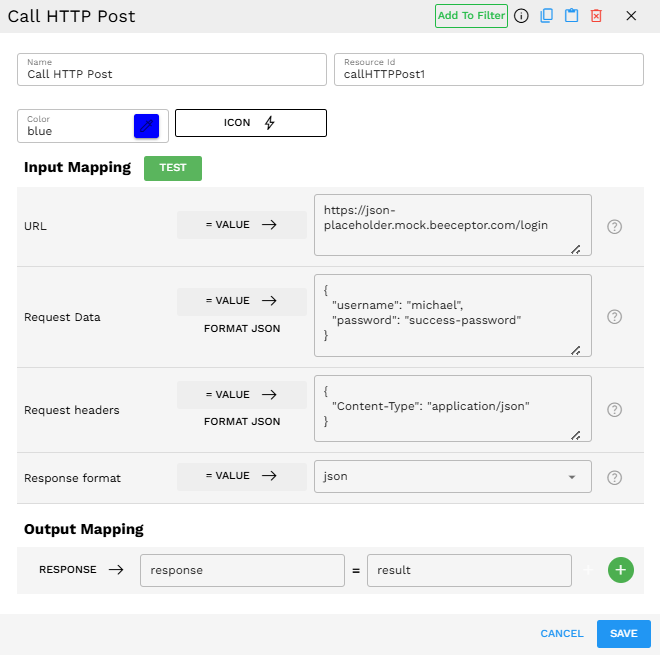
Configuration:
URL:
https://json-placeholder.mock.beeceptor.com/loginRequest Data:
{"username":"michael","password":"success-password"}Request Headers:
{"Content-Type":"application/json"}Response Format:
json
Process:
The Call HTTP Post component sends the login credentials to the API endpoint.
The API validates the credentials and generates an access token.
The API returns a JSON response with login status and token.
The component processes this response and returns it in the result object.
The Output Mapping connects the response from the component to a result variable that subsequent components can use.
Example Response:
{
'response':{
'success': True,
'message': 'Login successful',
'token': 'eyJhbGciOiJIUzI1NiIsInR5cCI6IkpXVCJ9.eyJzdWIiOiIxMjM0NTY3ODkwIiwibmFtZSI6IkpvaG4gRG9lIiwiaWF0IjoxNjgwMjM5MDIyLCJleHAiOjI2MTkzMDAwMDAsImlzcyI6ImJlZWNlcHRvci5jb20iLCJhdWQiOiJCZWVjZXB0b3IgdXNlcnMifQ.D-wEdKyDTOk3GlHs8d2yjfYGZ9gYqWfx2wDPY7mTf-w'
},
'status_code':200,
'cookies':,
'elapsed': datetime.timedelta(microseconds=786251),
'encoding': 'utf-8',
'headers':{
'Access-Control-Allow-Origin': '*',
'Alt-Svc': 'h3=":443"; ma=2592000',
'Content-Length': '308',
'Content-Type': 'application/json',
'Date': 'Sat,05 Apr 202511:26:53 GMT',
'Vary': 'Accept-Encoding',
'X-Beeceptor-Rule-Id': '9u11ccf2ij5'
},
'ok': True,
'reason': 'OK'
}
Output Format
The component returns a comprehensive result object containing both the API response and metadata about the request. The response field content varies based on your selected Response Format:
Response Format |
Description |
When to Use |
|---|---|---|
JSON |
Parses the response as JSON and returns a structured object |
Use when working with modern APIs that return well-structured JSON data. This makes it easier to access specific fields in subsequent components. |
text |
Returns the raw response as a text string |
Use when the API returns plain text, HTML, XML, or any non-JSON format that you need as a string. Also useful for debugging when you are unsure of the response structure. |
raw |
Returns the raw response object |
Use when you need access to the lowest level response data, such as when dealing with binary data or when advanced processing is needed. |
Regardless of the Response Format, the result object contains:
response: The actual data returned by the API (format depends on the Response Format setting).
status_code: The HTTP status code returned.
cookies: Any cookies set by the server.
elapsed: How long the request took to complete.
encoding: The character encoding of the response.
headers: Headers returned by the server.
ok: Boolean indicating if the request was successful (status code 200-299).
reason: The HTTP reason phrase corresponds to the status code.
Best Practices
Include appropriate authentication in your headers when calling secured APIs.
Use Custom Functions for complex request preparation, dynamic endpoint construction, or response data transformation.
Implement Check Condition components for robust error handling based on status codes and response validation.
Use Generate Text for intelligent response analysis when API structure is unknown or dynamic.
Chain multiple Call HTTP Post components for complex multi-step API workflows with proper session variable management.
Troubleshooting
Issue |
Possible Cause |
Solution |
|---|---|---|
401 Unauthorized error |
Missing or invalid authentication credentials |
Check that your authorization header contains the correct API key or token and that it is formatted properly. |
400 Bad Request error |
Malformed JSON data or missing required fields |
Validate your JSON structure and ensure all required fields expected by the API are included. |
Empty or unexpected response |
Incorrect Response Format setting |
Adjust the Response Format to match what the API returns (JSON, raw, or text). |
Connection timeout |
API endpoint is unreachable or responding slowly |
Verify the URL is correct and that the external service is operational. |