Chat With Context
The Chat With Context component provides an enhanced conversational interface that leverages external knowledge bases in addition to the capabilities of a Large Language Model (LLM).
This component enables you to build interactive, context-aware conversations in your Pipeline Builder applications while maintaining conversation history between interactions.
The key difference from the Chat Response Without Context component is the ability to integrate relevant external information, making responses more accurate and informative for domain-specific applications.
Skill Level
Understanding basic Prompt Engineering concepts is helpful.
No Python or JavaScript knowledge is required.
Here’s the full Markdown conversion of your provided HTML content:
Overview
Chat With Context
A chat feature that uses AI plus your data to give better answers.
Looks up helpful information from your documents.
Remembers past messages with a session ID.
Follows your setup instructions (system prompts).
Keeps answers accurate by using the right context.
Key Terms
Term | Definition |
|---|---|
LLM Provider | The service provides the Large Language Model capabilities (such as OpenAI GPT, Anthropic Claude, Google Gemini, Llama). |
System Prompt | Instructions that set the behavior, constraints, and personality of the AI assistant. It can include variables from previous pipeline data. |
Chat History | The record of previous exchanges between the user and the AI assistant is maintained across multiple iterations. |
sessionId | A unique identifier generated after the first interaction. Must be passed as an input parameter in subsequent component calls to maintain conversation continuity. |
Chat Summary | A condensed version of the chat history that helps maintain context while managing token usage. |
Context Embeddings | Vector representations of external knowledge that can be searched to find relevant information for the user's query. |
RAG | Retrieval Augmented Generation - a technique that enhances LLM responses by retrieving relevant information from external sources. |
When to Use
Use Case | Description |
|---|---|
Knowledge-intensive conversations | When you need to implement multi-turn conversations that reference specific knowledge bases. |
Customer support | Ideal for customer support applications that require responses to include product documentation. |
Specialized domains | Perfect for knowledge-intensive domains like legal, medical, or technical support. |
Proprietary information | When you need to generate responses based on proprietary or domain-specific information. |
Factual accuracy | For applications where accuracy and factual grounding are critical. |
Component Configuration
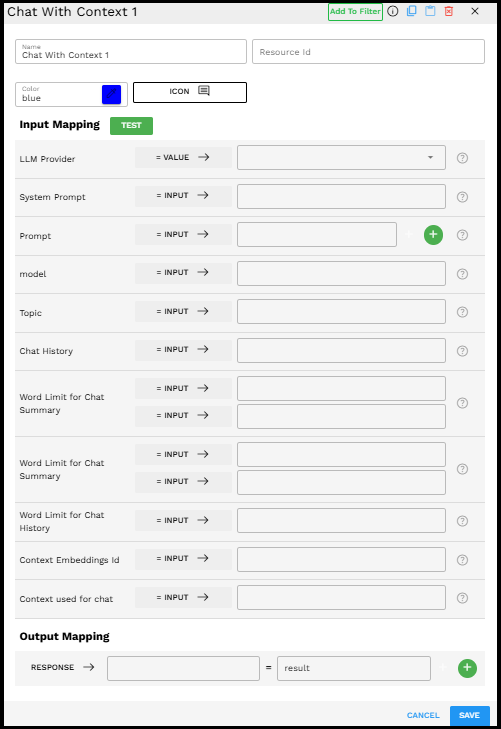
Chat With Context component in the Pipeline Builder interface
Required Inputs
Input | Description | Data Type | Example |
|---|---|---|---|
LLM Provider | Select the Large Language Model provider (GPT, Claude, Gemini, Llama) you want to use for generating responses. |
|
|
System Prompt | Instructions that define how the AI assistant should behave. You can reference variables from previous pipelines by clicking the + icon. |
|
|
Prompt | The user's message to be sent to the LLM. |
|
|
model | The specific model to use from the selected LLM provider. |
|
|
Topic | A meaningful description of the conversation's intent or subject. Helps maintain conversation focus. |
|
|
Chat History | The record of previous exchanges between the user and the AI assistant. |
|
|
Word Limit for Chat Summary | Maximum word count for the condensed summary of the chat history. |
|
|
Word Limit for Chat History | Maximum word count for the complete chat history. Helps manage token usage while retaining context. |
|
|
Context Embeddings Id | The unique identifier for the vector embedding collection that contains your external knowledge base. |
|
|
Context used for chat | The contextual information retrieved from your knowledge base. |
|
|
Possible Chaining
The Chat With Context component can be chained with other components in the Pipeline Builder to create powerful GenAI applications.
Common component connections include:
Create VectorDB Context → Chat With Context: Retrieves relevant documents from your vector database and feeds them as context.
Check Condition → Chat With Context: Routes conversations based on conditions or topic detection.
Extract Text → Create VectorDB Context → Chat With Context: Processes documents on the fly to create conversational context.
Chat With Context → Generate Text: Uses conversation output to generate derivative content.
Chat With Context → Call HTTP Post: Takes actions based on conversation outcomes.
Example Use Case: HR Policy Assistant
Scenario: Creating an HR assistant that can answer employee questions about company policies and procedures using the employee handbook.
Configuration:
LLM Provider: Anthropic Claude
System Prompt:
"You are an HR assistant for our company. Answer employee questions based on the provided company handbook information. If the answer is not in the provided context, explain that you do not have that specific information and offer to connect them with an HR representative. Always be professional and maintain confidentiality."Topic: HR Policies
Context Embeddings Id:
company_handbookWord Limit for Chat Summary:
300Word Limit for Chat History:
800
Conversation Flow
First Iteration:
User input: "What's our company policy on remote work?"
Context retrieved: \[Company handbook sections about remote work policies]
AI response:
"According to our company handbook, our remote work policy includes:

1. Employees may work remotely up to 3 days per week with manager approval
2. Core hours of 10am-3pm must be maintained regardless of location
3. Employees must have reliable internet and a secure workspace
4. Equipment can be requested through the IT portal
5. Performance expectations remain the same as in-office work

Would you like more specific details about any aspect of the remote work policy?"

\[SessionId generated: session\_abc123]

---

Second Iteration:
User input: "Yes, what's the policy on working remotely from another country?"
sessionId: session\_abc123
Context retrieved: \[Company handbook sections about international remote work]
AI response:
"According to our handbook, working remotely from another country requires:

1. Advance approval at least 30 days before travel
2. Maximum duration of 4 weeks per calendar year
3. The country must be on the company's approved list (available on the HR portal)
4. You must complete the International Work Request Form
5. You're responsible for ensuring proper internet connectivity and security
6. The company cannot guarantee compliance with all local employment laws

For stays longer than 4 weeks or countries not on the approved list, you'll need special approval from both your department VP and the HR Director. Would you like me to explain the application process in more detail?"
Best Practices
Prepare quality context data – The better your knowledge base, the more accurate the responses.
Balance context amount – Include enough context for accurate answers but avoid exceeding token limits.
Design your System Prompt carefully – Clearly instruct the LLM on how to use the context.
Implement proper error handling – Handle cases where relevant context might not be available.
Configure appropriate word limits – Balance context retention with efficiency.
Always pass the SessionID – Maintain conversation continuity across interactions.
Test thoroughly – Use varied queries to ensure effective context retrieval.
Troubleshooting
Issue | Possible Cause | Solution |
|---|---|---|
LLM does not use the provided context | System Prompt does not clearly instruct LLM to use context. | Modify System Prompt to explicitly require using context. |
The context retrieved is not relevant | Issues with vector embeddings or search configuration. | Check embeddings and adjust the number of context records retrieved. |
LLM does not remember previous exchanges |
| Capture and pass the |
Responses are too general | Context may be too broad or insufficient. | Improve quality and specificity of knowledge base. |
Error retrieving context | Invalid Context Embeddings ID or connectivity issues. | Verify the ID and database connectivity. |
Limitations and Considerations
Limitation/Consideration | Description |
|---|---|
Context Quality Dependence | Response quality depends on your knowledge base quality. |
Token Consumption | External context increases token usage and cost. |
Response Time | Vector search adds some latency compared to context-free queries. |
Context Limitations | Limited by LLM token constraints. |
Maintenance Requirements | Knowledge base must be updated regularly. |
Hallucination Potential | Context reduces but doesn’t fully eliminate hallucinations. |