Custom Script
The Custom Script component runs a user-defined script and returns the result. The execute method compiles and runs the script. It sends an onComplete event if successful or an onError event if an error occurs. This component allows flexible script execution in workflows.
How to use

Overview
The Custom Script component lets you run JavaScript code in your agent workflow. It provides flexibility for data manipulation, complex logic implementation, and behavior control. Common use cases include formatting API inputs, transforming responses, accessing agent data, and implementing custom business logic.
Example
Input
Name |
Code |
Type |
Description |
Data Type |
|---|---|---|---|---|
Script |
|
JavaScript |
JavaScript code executed when the component runs. The script can access the agent context and should return a value available to subsequent components. |
string |
Methods
ID |
Name |
Description |
Input |
Output |
|---|---|---|---|---|
|
Execute |
Compiles and executes the script, emitting an event on completion or error |
JavaScript code to execute |
Result of the script execution (any JS value: primitive, object, array, etc.) |
Events
ID |
Name |
Description |
Source Methods |
Argument |
|---|---|---|---|---|
onComplete |
On Complete |
Starts when the script runs successfully |
Execute |
name, result, source |
onError |
On Error |
Starts if an error occurs when the script runsError Code : |
Execute |
name, error, source |
Typical Chaining of Components
Source Components
Source Component |
Purpose |
Description |
|---|---|---|
AI Chat |
Process User Input |
Process chat messages or extract key information from user interactions |
Call API |
Response Transformation |
Transform API responses into application-friendly formats |
Check Condition |
Conditional Logic |
Execute specific logic based on condition results |
Target Components
Target Component |
Purpose |
Description |
|---|---|---|
Call GenAI Pipeline |
Input Preparation |
Prepare data for AI processing |
Call API |
API Request Preparation |
Format data for API requests |
Check Condition |
Data Evaluation |
Perform calculations needed for condition evaluation |
Custom Script |
Sequential Processing |
Chain multiple processing steps for complex transformations |
Implementation Example
Example: Setting Inputs for API Call
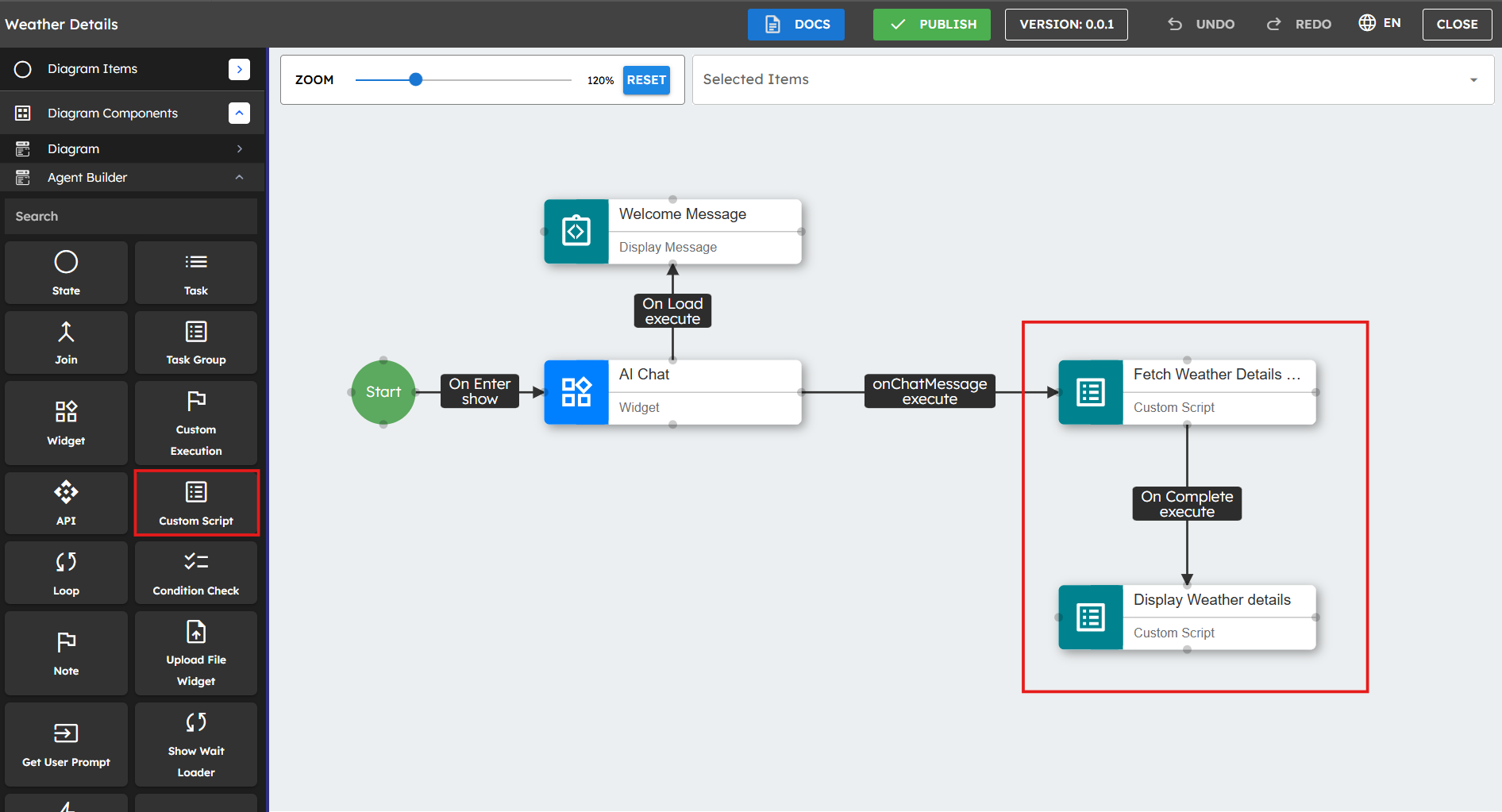
This example shows how to create a weather agent that takes a user's location input, gets current weather data from the Open-Meteo API, processes the response, and stores weather information in the agent's data store for easy access[1].
Add Custom Script component to the canvas.
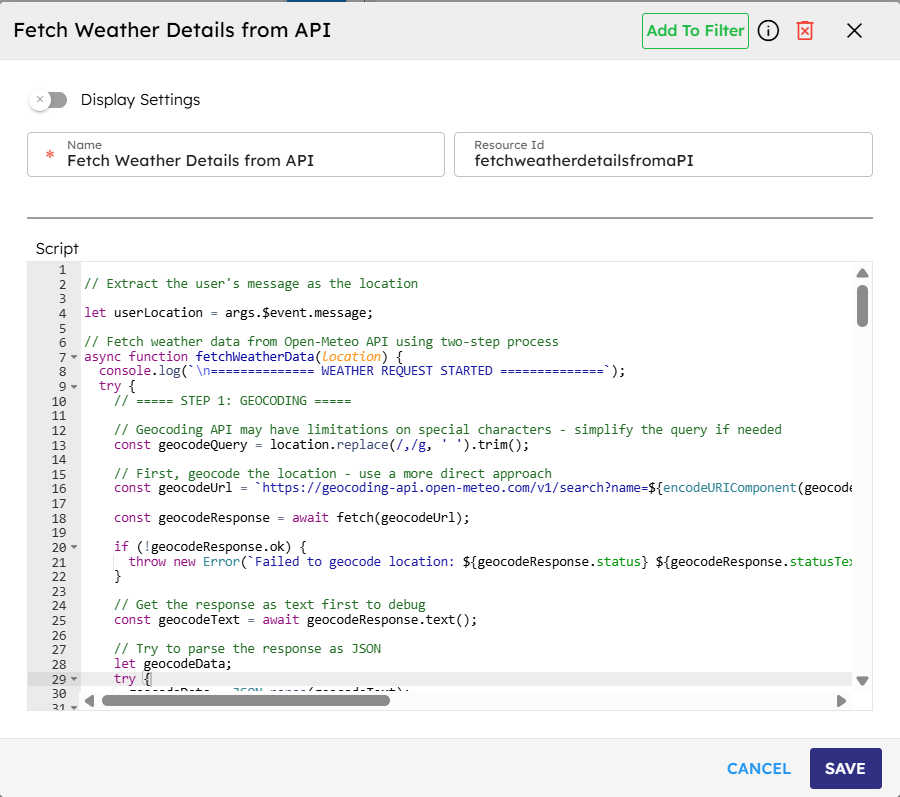
Add a Custom Script component to your agent canvas. This component processes the user's location input and makes API calls to get weather data.Write a script to get the weather data from Open Meteo API.
// Custom Script One : Fetch the data from Open Meteo API // Extract the user's message as the locationlet userLocation = args.$event.message;// Fetch weather data from Open-Meteo API using two-step processasyncfunctionfetchWeatherData(location) {try{// ===== STEP 1: GEOCODING =====// Simplify the query if neededconst geocodeQuery = location.replace(/,/g, ' ').trim();// First, geocode the locationconst geocodeUrl = `https://geocoding-api.open-meteo.com/v1/search?name=${encodeURIComponent(geocodeQuery)}&count=1&language=en&format=json`;const geocodeResponse = awaitfetch(geocodeUrl);if(!geocodeResponse.ok) {thrownewError(`Failed to geocode location: ${geocodeResponse.status}`);}const geocodeText = await geocodeResponse.text();let geocodeData;try{geocodeData = JSON.parse(geocodeText);}catch(e) {thrownewError(`Failed to parse geocoding response as JSON: ${e.message}`);}// Check if we have resultsif (!geocodeData.results || geocodeData.results.length === 0) {returnawaitfetchWeatherDirect(location);}// Get the first resultconst locationData = geocodeData.results[0];const { latitude, longitude, name, country, timezone } = locationData;// ===== STEP 2: WEATHER DATA =====// Now use the coordinates to get weather dataconst weatherUrl = `https://api.open-meteo.com/v1/forecast?latitude=${latitude}&longitude=${longitude}¤t=temperature_2m,relative_humidity_2m,apparent_temperature,precipitation,weather_code,wind_speed_10m&timezone=${timezone || 'auto'}&forecast_days=1`;const weatherResponse = awaitfetch(weatherUrl);if(!weatherResponse.ok) {thrownewError(`Failed to fetch weather data: ${weatherResponse.status}`);}const weatherData = await weatherResponse.json();// Add location info to the weather dataweatherData.locationName = name;weatherData.country = country;returnweatherData;}catch(error) {return{ error:true, message: error.message };}}// Fallback function: try fetching weather directly with location parameterasyncfunctionfetchWeatherDirect(location) {try{const directUrl = `https://api.open-meteo.com/v1/forecast?current=temperature_2m,relative_humidity_2m,apparent_temperature,precipitation,weather_code,wind_speed_10m&timezone=auto&forecast_days=1&location=${encodeURIComponent(location)}`;const directResponse = awaitfetch(directUrl);if(!directResponse.ok) {thrownewError(`Failed to fetch weather data directly: ${directResponse.status}`);}const weatherText = await directResponse.text();let weatherData;try{weatherData = JSON.parse(weatherText);}catch(e) {thrownewError(`Failed to parse weather response as JSON: ${e.message}`);}weatherData.locationName = location;returnweatherData;}catch(error) {return{ error:true, message: error.message };}}// (WMO Weather interpretation codes mapping omitted for brevity)// Main execution flow(async () => {try{if(!userLocation || userLocation.trim() ==='') {thrownewError('Empty location provided');}const weatherData = awaitfetchWeatherData(userLocation);// Store the data in agent datathis.agent.data.weatherData = weatherData;this.agent.data.lastLocation = userLocation;this.agent.data.lastFetchTime = newDate().toISOString();returnweatherData;}catch(error) {return{ error:true, message: error.message };}})();Write a Custom Script to display weather details.
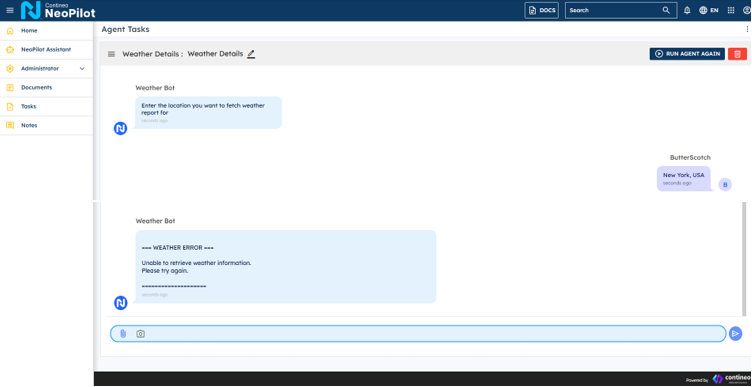
// Custom Script Two : Display the Weather Detailslet widget = this.agent.getWidgets()['BVyR4LptEXAXJ'];let chatComponent = widget.getElements({ resourceId:'chat1'});if(!widget.getData('chatMessages')) {widget.setData('chatMessages', []);}let weatherSummary =this.agent.data.weatherSummary;let messageText ="";if(weatherSummary && !weatherSummary.error) {messageText = `=== WEATHER REPORT ===Location: ${weatherSummary.location}${weatherSummary.country ?', '+ weatherSummary.country :''}Temperature: ${weatherSummary.temperature}Condition: ${weatherSummary.condition}Updated: ${weatherSummary.updated}====================`;}else{messageText = `=== WEATHER ERROR ===Unable to retrieve weather information.${weatherSummary?.message ||'Please try again.'}====================`;}chatComponent[0].addMessage({text: messageText,sender:"Weather Bot",size: 6,avatar:"https://contineo.world/imgs/genaipro.svg"});
Agentic Workflow Representation
Agent Execution
Best Practices
Keep scripts focused and simple: Each script should perform a specific, clear task. Start with basic scripts and add complexity only when needed.
Use error handling: Add try/catch blocks to handle possible errors well and prevent workflow problems. For debugging, use
console.log()statements to understand how the script runs.Structure and document your code: Use clear variable names, descriptive comments, and consistent formatting. Add comments that explain complex logic, especially for scripts that other team members might maintain.
Validate inputs: Always check that expected input values exist and have the correct type before you use them. Consider unusual edge cases and make your script handle them correctly.
Avoid side effects: When possible, make scripts that change input to output without changing the external state. For computationally intensive tasks, optimize your code to minimize execution time.
Create reusable components: Keep a collection of tested, reusable scripts for common operations in your agents. Use consistent patterns and methods for similar tasks to make your agent's code work together better.
Common Use Cases
Use Case |
Description |
|---|---|
Data Transformation |
Convert data between different formats or structures. |
API Input Preparation |
Format data to match required API payloads. |
Response Processing |
Parse and extract relevant information from API responses. |
Conditional Logic |
Implement complex decision-making that goes beyond the Check Condition component. |
Dynamic Configuration |
Adjust agent settings or parameters based on runtime conditions. |
Data Aggregation |
Combine information from multiple sources into a unified structure. |
Variable Management |
Set, update, or calculate values for use elsewhere in the workflow. |