Create Or Update Graph Node
The Create or Update Graph Nodes component enables dynamic management of nodes in a Neo4j graph database within your Pipeline Builder. It provides the functionality to either create new nodes or update existing ones based on matching criteria. The component searches for nodes with a specific label and unique property value, updating them if found or creating them if not found. This makes it a powerful tool for maintaining knowledge graphs, entity records, and relationship data that can be dynamically updated based on new information. Ideal for RAG (Retrieval Augmented Generation) pipelines and applications that require structured graph data management.
Overview
The Create or Update Graph Nodes component allows you to dynamically manage nodes in a graph database within your Pipeline Builder. It provides functionality to either create new nodes or update existing ones based on matching criteria, making it a powerful tool for graph-based data management and Retrieval Augmented Generation (RAG) systems.
How to use:

When to Use This Component
When you need to create or modify nodes in a graph database as part of your pipeline.
When implementing RAG pipelines that require dynamic graph database updates.
When integrating with Neo4j database instances for graph operations.
Graph RAG (Retrieval Augmented Generation) is a method that combines graph databases with AI language models. It stores information in a graph structure (showing how different pieces of information are connected) and then retrieves the most relevant data to help AI models generate better answers. Think of it as giving an AI a map of connected information so it can find exactly what it needs to answer questions accurately.
Component Configuration
Required Inputs
Input |
Description |
Data Type |
Example |
|---|---|---|---|
Graph DB Config |
Configuration in JSON format for connecting to your Neo4j database instance. You must use the exact key names shown in the example: NEO4J_URI, NEO4J_USER, NEO4J_PASSWORD, and NEO4J_DATABASE. These specific keys are required for the connection to work correctly. |
JSON |
|
Node Label |
The label that categorizes the node in your graph database. This defines the type of entity the node represents. |
String |
|
Match Key |
The property name that is used to uniquely identify nodes. The component uses this property to determine whether to create a new node or update an existing one. |
String |
|
Match Value |
The specific value of the match key property. If a node with this value for the specified match key exists, it is updated; otherwise, a new node is be created. |
String |
|
Node Properties |
A dictionary of properties to set or update on the node. These define the attributes and data associated with the node. |
JSON |
|
How It Works
The component connects to the specified Neo4j database using the provided Graph DataBase Config.
It searches for an existing node with the specified node label that has a property matching the Match Key and Match Value.
If a matching node is found, the component updates that node with the properties provided in Node Properties.
If no matching node is found, a new node is created with the specified node label and all the properties provided in Node Properties, including the Match Key and Match Value.
The operation result is returned, including information about whether a node was created or updated.
Example Use Case: Person Node Creation
Let's say you are building a pipeline that needs to create a person node in a graph database:
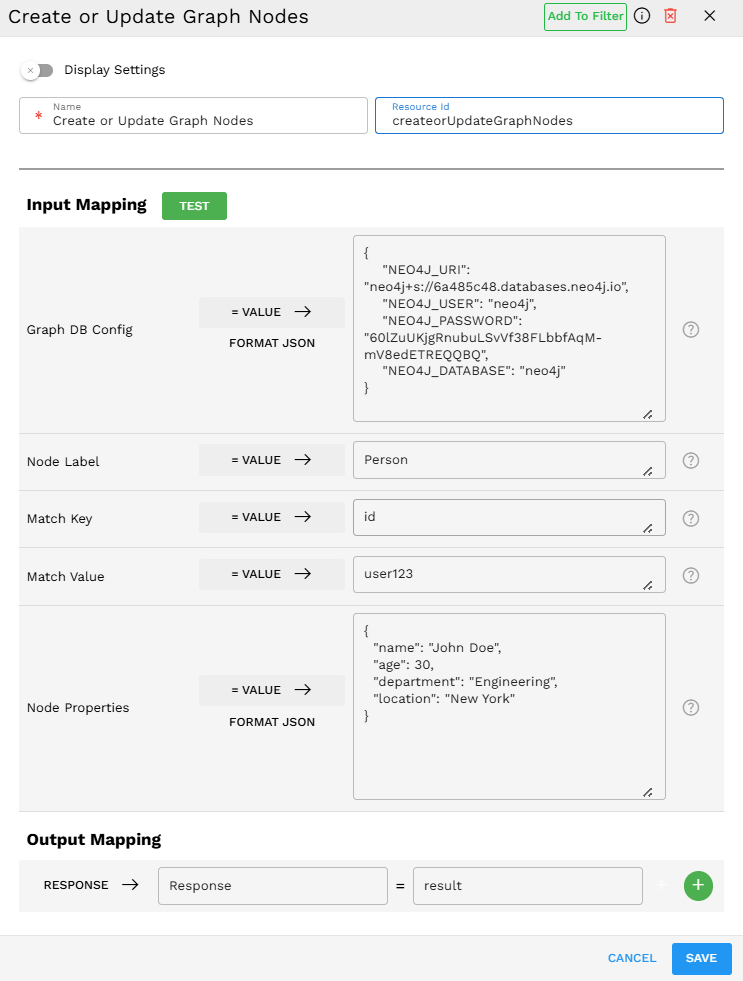
Configuration Example
As shown in the configuration:
Set Graph DataBase Config to your Neo4j connection details.
Set Node Label to
Person.Set the Match Key to
ID.Set Match Value to
user123.Set Node Properties to include name, age, department, and location.
What Happens
The component checks if a Person node with ID "user123" exists.
If it exists, the node's properties are updated with the new information.
If it does not exist, a new Person node is created with all the specified properties.
Output Format
The component returns a response in the following format (showing as plain text):
Response = <Node element_id='4:39ab8ec5-f22c-4f61-bbc2-135deb02b59e:0' labels=frozenset({'Person'}) properties={'name': 'John Doe', 'location': 'New York', 'id': 'user123', 'department': 'Engineering', 'age': 30}>
This output shows:
The node's unique element ID in the Neo4j database.
The node's label (Person).
All properties that were set on the node.
Tips for Best Results
Use proper configuration key names - Ensure you use the exact key names in Graph DB Config: NEO4J_URI, NEO4J_USER, NEO4J_PASSWORD, and NEO4J_DATABASE
Choose unique match keys - Select properties that reliably identify your entities.
Properly structure your node properties - Ensure your JSON is valid and properties are appropriately typed.
Be consistent with node labels - Use a consistent naming convention for node labels across your application.
Include the match key in node properties - Always include the match key/value in your node properties JSON to ensure consistency.
Limitations and Considerations
Currently supports Neo4j - This component is specifically designed for Neo4j graph databases.