Delete Collection
The Delete Collection component removes a VectorDB collection based on a specified collection ID. Users need to provide the collection name to execute the deletion. This ensures efficient management of stored data by allowing the removal of obsolete or unnecessary collections.
Overview
The Delete Collection component allows you to permanently remove a vector database collection by its collection ID. This component is part of the RAG (Retrieval Augmented Generation) group and helps you manage your vector database resources.
Key Terms
Term | Definition |
|---|---|
Collection | A group of related vectors in a vector database that typically represents embedded data for a specific use case. |
Collection ID | The unique identifier for a vector database collection. |
VectorDB | A database optimized for storing and querying vector embeddings, used in semantic search and RAG applications. |
When to Use
Use when you need to remove outdated or unnecessary vector collections to free up resources.
Ideal for cleaning up test collections that are no longer needed.
Helpful when you want to rebuild a collection from scratch with new embeddings.
Use as part of database maintenance procedures to manage storage and performance.
Component Configuration
Required Inputs
Input | Description | Data Type | Example |
|---|---|---|---|
Collection ID | The unique identifier of the vector database collection you want to delete. This should match exactly with an existing collection name in your vector database. | Text |
|
How It Works
The component takes the Collection ID you specify as input.
It connects to the vector database.
It checks if the collection exists.
If the collection exists, it permanently deletes it from the vector database.
The component returns the result of the operation.
Example Use Case
Scenario: Deleting collection with collection ID customer_support_docs_v1
Configuration: Collection ID: customer_support_docs_v1
Process:
When executed, the component connects to your vector database.
It locates the collection with ID "customer_support_docs_v1"
The collection and all its embedded vectors are permanently deleted.
You can then create a new collection with the same or different ID and populate it with fresh, updated content.
Output Format
The component returns a result indicating the success or failure of the deletion operation:
"Collection customer_support_docs_v1 deleted."
If the collection does not exist, the component does not return an error message:
Collection config not found: customer_support_docs_v1
Best Practices
Backup important data - Consider backing up important collections before deletion, as this operation cannot be undone.
Verify collection ID - Double-check the collection ID before execution to avoid accidentally deleting the wrong collection.
Troubleshooting
Issue | Possible Cause | Solution |
|---|---|---|
"Collection config not found" error | The specified collection ID does not exist in the database. | Verify the collection ID and check if it exists using a List Collections component. |
Limitations and Considerations
Irreversible operation - Deletion is permanent and cannot be undone; ensure you want to delete the collection.
Example Implementation
Below is an example of how the Delete Collection component appears in the pipeline builder:
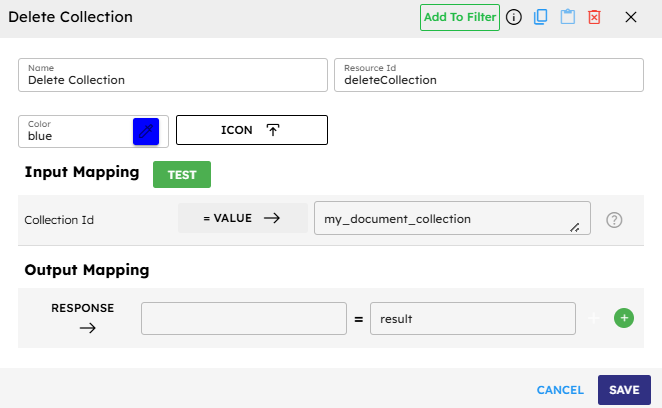
The component has been configured with a Collection ID and is ready to execute when the pipeline runs.