Delete Graph Nodes
The Delete Graph Nodes component is a powerful tool in the Pipeline Builder that enables the precise removal of nodes from Neo4j graph databases. It allows users to target specific nodes by their label and unique property values, with options to detach relationships during deletion. This component is essential for data maintenance workflows, enabling users to remove outdated information, implement data retention policies, or restructure graph relationships. With configurable detach mode settings, it provides flexibility between safely preserving connected data and completely removing node structures. The Delete Graph Nodes component integrates seamlessly with other Pipeline Builder components to create comprehensive data management workflows.
Overview
The Delete Graph Nodes component allows you to remove specific nodes from your Neo4j graph database. This component is essential for maintaining and updating your graph data structure by enabling the deletion of nodes that are no longer needed or contain outdated information.
Key Terms
Term | Definition |
|---|---|
Node | An entity in a graph database that represents a person, place, thing, or concept (such as a User, Product,or Document) |
Node Label | A categorization or type assigned to nodes in a graph database (such as 'User',or 'Product') |
Detach Mode | An operation mode that determines whether to delete a node along with all its relationships (True) or only if it has no relationships (False). |
Neo4j | A graph database management system that stores data in nodes connected by relationships, both of which can have properties |
When to Use
Use the Delete Graph Nodes component when you need to:
Remove outdated or incorrect data from your graph database.
Clean up test or temporary nodes.
Implement data governance policies that require data deletion.
Update your graph structure by removing nodes before recreating them with new information.
Delete specific entities based on unique identifiers.
Component Configuration
Required Inputs
Input | Description | Data Type | Example |
|---|---|---|---|
Graph DB Config | Configuration in JSON format for connecting to your Neo4j database instance. Must include specific keys: NEO4J_URI, NEO4J_USER, NEO4J_PASSWORD, and NEO4J_DATABASE. | JSON |
|
Node Label | The label or type of the node you want to delete. This identifies the category of nodes to target. | String |
|
Match Key | The property key is used to uniquely identify the node you want to delete. This is typically a unique identifier like an ID, email, or name. | String |
|
Match Value | The value of the match key property. This specifies which particular node(s) to delete. | String |
|
Optional Inputs
Input | Description | Data Type | Example |
|---|---|---|---|
Detach Mode | Controls how node deletion handles relationships. When set to "True" (default), the component deletes the node AND all its relationships (DETACH DELETE). When set to "False", the component only deletes the node if it has no relationships, otherwise it fails with an error. Accepts string values "True" or "False" (case-insensitive). | String |
|
How It Works
The component establishes a connection to your Neo4j database using the provided Graph DB Config with the exact required keys (NEO4J_URI, NEO4J_USER, NEO4J_PASSWORD, NEO4J_DATABASE).
It constructs a Cypher query to match nodes with the specified Label and property (Match Key = Match Value).
Based on the Detach Mode setting:
If Detach Mode is "True" (default): It executes a DETACH DELETE operation, which removes the node and all its relationships regardless of how many relationships exist.
If Detach Mode is "False": It executes a standard DELETE operation, which only succeeds if the node has no relationships. If the node has any relationships, the operation fails with an error message.
The component processes empty strings or invalid values for Detach Mode as "False".
The component returns the count of deleted nodes or an error message if the operation fails.
Example Use Case
Scenario: Removing a user from a customer database after they've requested account deletion.
Configuration:
Graph DB Config: Your Neo4j connection details
{"NEO4J_URI":"neo4j+s://64485c48.databases.neo4j.io","NEO4J_USER":"neo4j","NEO4J_PASSWORD":"your-secure-password","NEO4J_DATABASE":"customer_data"}Node Label:
CustomerMatch Key:
customerIdMatch Value:
CUST-12345Detach Mode:
True
Process:
The component connects to your customer_data database.
It locates the Customer node where customerId = 'CUST-12345'.
With Detach Mode set to True, it removes the Customer node along with all associated relationships (such as connections to Orders, Support Tickets, etc.).
The component returns a successful response indicating the node was deleted.
Component Configuration:
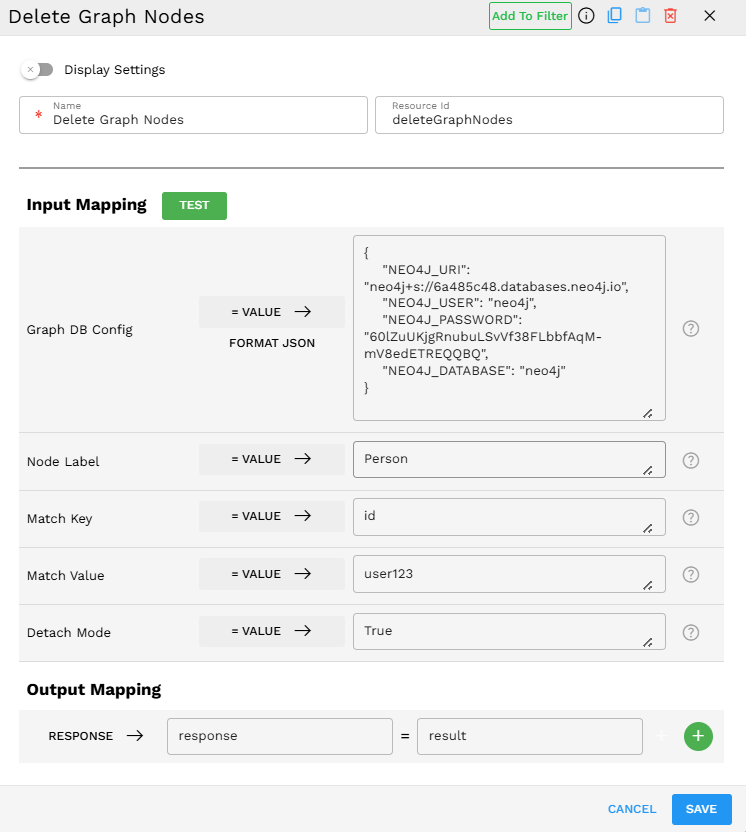
Output Format
The component returns the count of deleted nodes as a number:
1
This indicates that one node matching the criteria was successfully deleted.
If no matching nodes are found, the output is:
0
If the operation fails due to an error (such as attempting to delete a node with relationships when Detach Mode is "False"), the component raises an exception with a descriptive error message that appears in the Pipeline Builder logs.
Best Practices
Be specific with match criteria - Use unique identifiers whenever possible to ensure you're deleting exactly the nodes you intend to delete.
Format Graph DB Config correctly - Always use the exact key names required: NEO4J_URI, NEO4J_USER, NEO4J_PASSWORD, and NEO4J_DATABASE. Missing any of these keys causes the component to fail.
Use Detach Mode appropriately - Set it to "True" when you want to remove a node and all its relationships. Set it to "False" as a safeguard when you only want to delete isolated nodes without relationships.