Join Flows
The Join Flows component synchronizes multiple flows within a pipeline by waiting for them to complete before proceeding. Users specify the step IDs to be joined and set a timeout duration to control the waiting period. This ensures coordinated execution in workflow automation.
Overview
The Join Flows component waits for two or more specified flows to complete before allowing the pipeline execution to continue, enabling coordinated processing of data from multiple sources or operations.
This component is essential for coordinating parallel workflows, implementing fan-out/fan-in patterns, and ensuring data availability from multiple sources before continuation. Use this component when you need to process data through multiple parallel paths, for example, separate loops handling different datasets and then combine or analyze the results together. It monitors the execution status of specified step IDs and waits until all designated flows reach completion or until a configurable timeout expires.
The component is crucial for scenarios involving parallel data processing where subsequent steps require results from all parallel branches, multi-source data aggregation where different APIs or data sources are processed simultaneously, complex workflow coordination where multiple conditional branches need to merge, and batch processing scenarios where multiple loops handle different data segments.
Input configuration requires a timeout value in seconds to prevent indefinite waiting and an array of step IDs identifying the components whose completion must be awaited. The step IDs are unique identifiers visible in component properties panels and must exactly match the components you want to synchronize. The component throws timeout exceptions if flows don't complete within the specified duration and provides error handling for failed or stuck flows. After successful synchronization, subsequent components can access session data from all joined flows, enabling comprehensive result processing and analysis.
How to use:

Key Terms
Term |
Definition |
|---|---|
Flow |
A sequence of connected components in a pipeline that processes data in a specific way. |
Step ID |
A unique identifier is assigned to each component in your pipeline. |
Timeout |
The maximum duration is to wait for all flows to complete before continuing execution. |
When to Use
When you need to process data through multiple parallel paths and then combine the results
When different operations need to be completed before proceeding to the next step.
When coordinating multiple loops that process different sets of data.
When implementing fan-out/fan-in patterns in your workflow.
Component Configuration
Required Inputs
Input |
Description |
Data Type |
Example |
|---|---|---|---|
Timeout (Seconds) |
The maximum time (in seconds) the component waits for all flows to complete before proceeding. |
Integer |
|
Array of Step IDs to be Joined |
List of unique identifiers of the components whose completion you want to wait for. |
Array |
|
How It Works
The Join Flows component identifies the steps to be joined using their unique Step IDs.
It monitors the execution status of each specified flow.
The component waits until all specified flows have completed their execution.
If all flows are complete within the specified timeout period, the component allows the pipeline to continue to the next step.
If any flow is not completed within the timeout period, the component stops waiting and allows the pipeline to continue, potentially with incomplete data.
Example Use Case: Data Aggregation from Multiple Sources
Scenario: You need to process customer data and product inventory data separately and then combine the results for a comprehensive analysis.
Step 1: Create Parallel Processing Loops
First, set up two separate loops to process different data sets:
Loop 1: "Customer Data Processing" - processes customer information
Loop 2: "Inventory Processing" - processes product inventory data
Step 2: Obtain Loop IDs
Each component in your pipeline has a unique identifier. To join flows, you need the IDs of the loops:
Find the ID for the Customer Data Processing loop (for example,
customerLoop_gL8xMkHe28o2)Find the ID for the Inventory Processing loop (for example,
inventoryLoop_gL7xMkHe29o3)
You can find these IDs in the properties panel when selecting each loop component.
Step 3: Configure the Join Flows Component
Set Timeout (Seconds) to an appropriate value (for example,
300for 5 minutes)For Array of Step IDs to be Joined, enter:
["customerLoop_gL8xMkHe28o2","inventoryLoop_gL7xMkHe29o3"]
Step 4: Add Post-Join Processing
After the Join Flows component, add additional components to process the combined data, such as a data analysis component or report generation.
Output Format
The Join Flows component does not transform data directly. Instead, it controls the flow of execution in your pipeline. The output depends on whatever data was passed from the joined flows, accessible through the standard output mapping in subsequent components.
Best Practices
Set realistic timeouts based on the expected execution time of your flows.
Use descriptive names for your components to make it easier to identify which Step IDs to join.
Verify Step IDs carefully - incorrect IDs causes the component to wait for flows that may not exist.
Consider error handling for cases where flows might not complete within the timeout period.
Document the purpose of each joined flow to maintain clarity in complex pipelines.
Troubleshooting
Issue |
Possible Cause |
Solution |
|---|---|---|
Pipeline is non responsive at Join Flows |
One or more flows are not completed. |
Check the execution of each flow, ensure they're properly configured, and consider increasing the timeout value. |
Join Flows completed immediately |
Incorrect Step IDs or flows already completed. |
Verify the Step IDs match the components you want to join and ensure the timing of your pipeline is as expected. |
Timeout errors |
Flows take longer than the specified timeout. |
Increase the timeout value or optimize the flows to complete more quickly. |
Missing data after Join Flows |
One flow completes but with errors or incomplete data. |
Add error handling in each flow and validate data completeness before the Join Flows component. |
Limitations and Considerations
Timeout constraints - The component proceeds after the timeout even if some flows have not been completed.
No partial completion option - The component waits for all specified flows or until timeout, with no option to proceed after a subset of flows completes.
Component dependency - Step IDs may change if pipeline components are renamed or recreated, requiring updates to the Join Flows configuration.
No built-in error aggregation - Errors from individual flows should be handled before the Join Flows component.
Example Implementation
Pipeline Overview
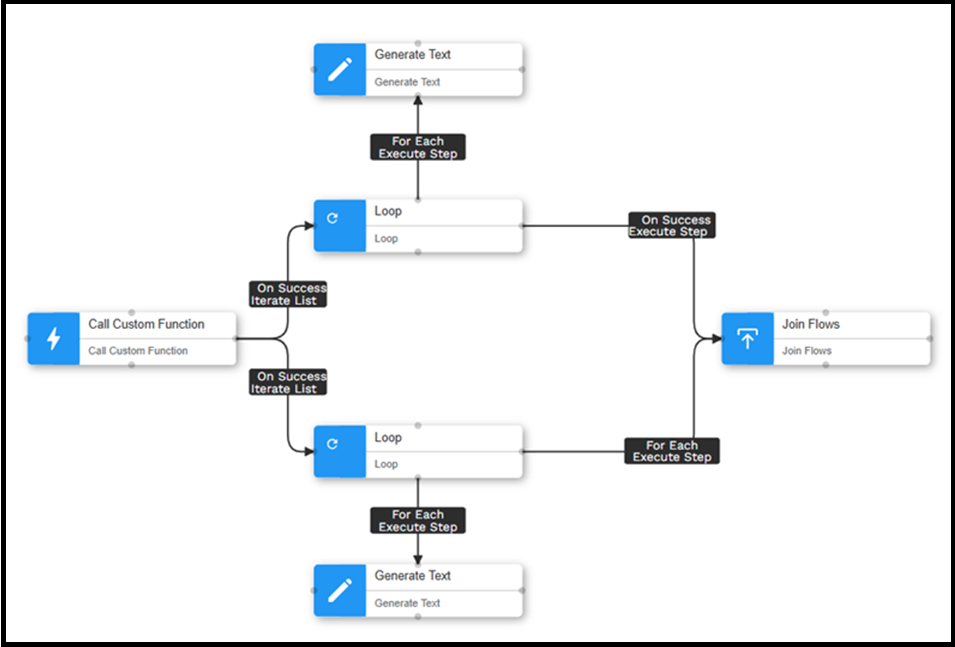
In this example, you can see a pipeline that processes data through separate flows. Each flow processes different aspects of the data independently, and we need to join these flows before continuing with the rest of the pipeline.
Step 1: Finding Loop IDs
To join flows, you need to find the unique identifiers of each loop component:
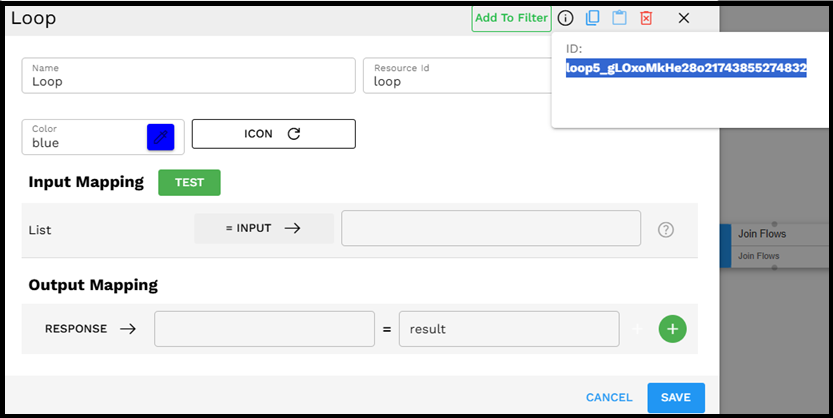
Click on the first loop component (in this case, "New Entity Loop") to view its properties. Look for the ID field in the properties panel, which contains the unique identifier (for example, "newentityloop_gLOxoMkHe28o2").
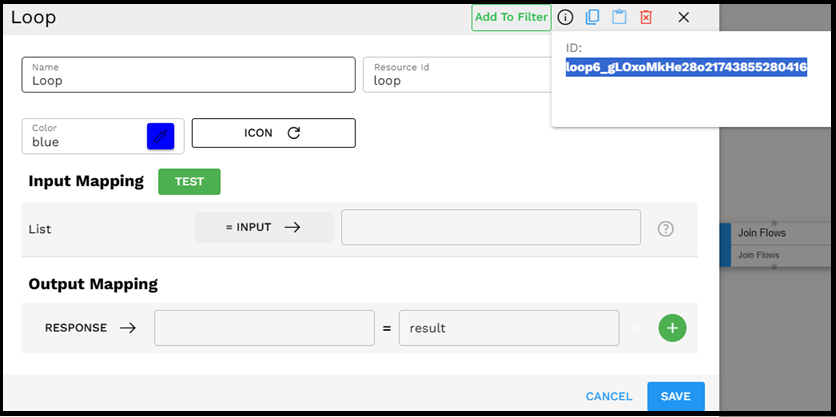
Similarly, click on the second loop component (in this case, "Enum Entities Loop") to find its ID (for example, "loop4_gLOxoMkHe28o2").
Step 2: Configuring the Join Flows Component
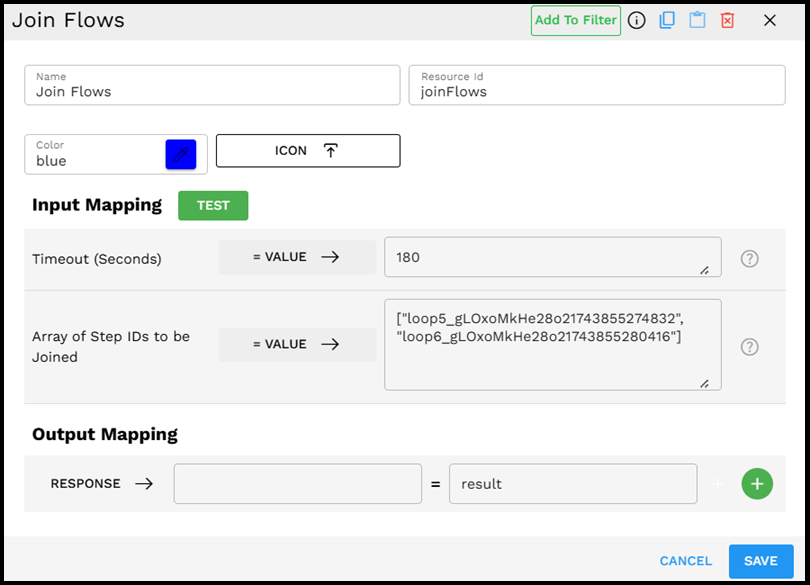
Now, configure the Join Flows component:
Set the timeout value (such as 180 seconds) to specify how long the component should wait for all flows to complete
In the "Array of Step IDs to be Joined" field, enter the IDs of both loops as an array:
["newentityloop_gLOxoMkHe28o2","loop4_gLOxoMkHe28o2"]Configure any output mappings as needed for your pipeline.
Save the configuration.
Once configured, the Join Flows component waits for both loops to complete their processing before allowing the pipeline execution to continue to the next step. This ensures that data from both processes is available for subsequent components in your pipeline.