Drop Down Component
Using Drop Down component.
Here is the content converted to Markdown:
acData in the Drop Down component can be loaded with the help of Static Values or a Data Loader.
Static Values may be used when the data to be displayed in the Drop Down is fixed. For instance, Gender (M/F) or a list of months (January - December).
Data Loader should be used when the data to be displayed in the Drop Down is dynamic and is likely to change. For instance, a list of Customers, or names of the Head of the Department, and so on. Such dynamic data typically resides in the Entities (Database table) in the form of Master Data; or it can originate from an external application such as ERP.
Configuration Properties of the Drop Down
The configuration properties of the Drop Down are displayed in the following image:
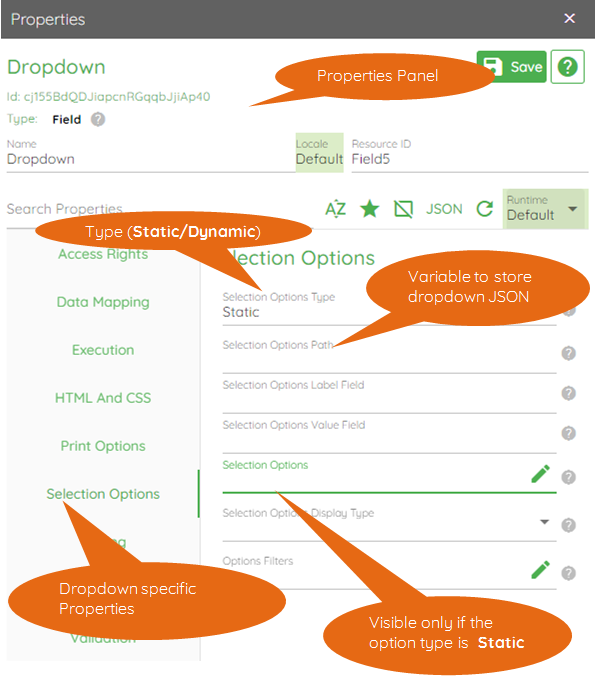
The Properties Panel of the Drop Down control has a Selection Options group. Drop Down options can be configured by clicking the Selection Options group.
Select Static or Dynamic from the Selection Options Type. Other options are deprecated and should not be used.
Selection Options Path represents the variable containing the data (JSON) to be displayed in the Drop Down.
Selection Options is visible only if the Selection Options Type is Static. The user can configure a static JSON here. If the Selection Options Type is Dynamic, then instead of Selection Options, Selection Options Loader is displayed (this is not shown in the image above).
Whether the Selection Options Type is Static or Dynamic, the data should be a JSON array of objects, having the following format:
[{"<displaykey>": <displayvalue>,"<identifierkey>": <identifiervalue>
  },{
    ...
  }]
The Drop Down component is typically comprised of two elements:
Display Element
Value Element
A user may view the name of a customer in the Drop Down, but the actual value used may be the customer ID.
The <display key> element in the JSON object should be assigned to the Selection Options Label Field, and the <identifier key> should be assigned to the Selection Options Value Field.
Example:
Consider the JSON:
[{"K":"Acme International","V":"C001"},{"K":"Acme Inc","V":"C002"}]
Assigning "K" (without quotes) to the Selection Options Label Field, and "V" (without quotes) to Selection Options Value Field, displays:
"Acme International"
"Acme Inc"
in the Drop Down, and use the respective Company IDs (C001, C002) when the form is submitted.
It is critical to set the value of:
<Drop Down Property Panel> -> Data Mapping -> Field Name
This variable is used to hold the value selected by the user from the Drop Down component. If this value is not set, the user cannot select a value from the Drop Down.