Execute Graph Search
The Execute Graph Search component enables you to query and retrieve information from Neo4j graph databases within your Pipeline Builder. This Retrieval Augmented Generation(RAG) component executes cypher queries against your graph database to extract relationship-rich data, which can enhance your generative AI responses with structured knowledge.
By connecting to your Neo4j instance and running customized queries, you can leverage complex relationships between entities to provide context-aware, data-driven results in your GenAI pipelines. This component is ideal for knowledge graph integration, recommendation systems, and other applications where interconnected data structures add significant value to your AI outputs.
Overview
The Execute Graph Search component allows you to query and retrieve information from a graph database within your Pipeline Builder. This component is part of the Retrieval Augmented Generation(RAG) group and enables you to execute search queries against Neo4j graph databases to retrieve relationship-based data for your GenAI pipelines.
Key Terms
Term | Definition |
|---|---|
Graph Database | A database that uses graph structures with nodes, edges, and properties to represent and store data. Relationships between data entities are first-class citizens in graph databases. |
Neo4j | A popular graph database management system that stores data in nodes and relationships, both of which can have properties. Neo4j uses Cypher as its query language. |
Cypher Query | A declarative graph query language for Neo4j that allows for expressive and efficient querying of graph data. |
RAG | Retrieval Augmented Generation - a technique to enhance generative AI outputs by retrieving and incorporating relevant information from external knowledge sources. |
When to Use
Use when you need to retrieve relationship-rich information from a graph database to enhance your generative AI responses.
Ideal for situations where data is highly interconnected and querying those relationships is important.
Helpful when you want to supplement your LLM knowledge with specific domain information stored in a graph structure.
Use when implementing knowledge graph-based RAG systems in your Pipeline Builder.
When you need to analyze connections between entities in complex datasets.
Component Configuration
Required Inputs
Input | Description | Data Type | Example |
|---|---|---|---|
Graph DB Config | Configuration in JSON format for connecting to your Neo4j database instance. This must include the specific parameters: NEO4J_URI, NEO4J_USER, NEO4J_PASSWORD, and NEO4J_DATABASE to establish a secure connection. | JSON |
|
Query | The Cypher query string is to be executed on the graph database. This determines what data is retrieved from the graph. | String |
|
How It Works
The component first establishes a connection to the Neo4j database using the provided Graph DB Config parameters.
It validates the connection and ensures that the database is accessible.
The component then executes the provided Cypher query against the graph database.
Query results are processed and formatted as a structured output.
The formatted results are returned through the component's output port, which can be mapped to subsequent components in your Pipeline Builder.
Any errors encountered during execution (connection failures, query syntax errors, etc.) are captured and reported.
Example Use Case
Scenario: Retrieving a person's profile from a user management system.
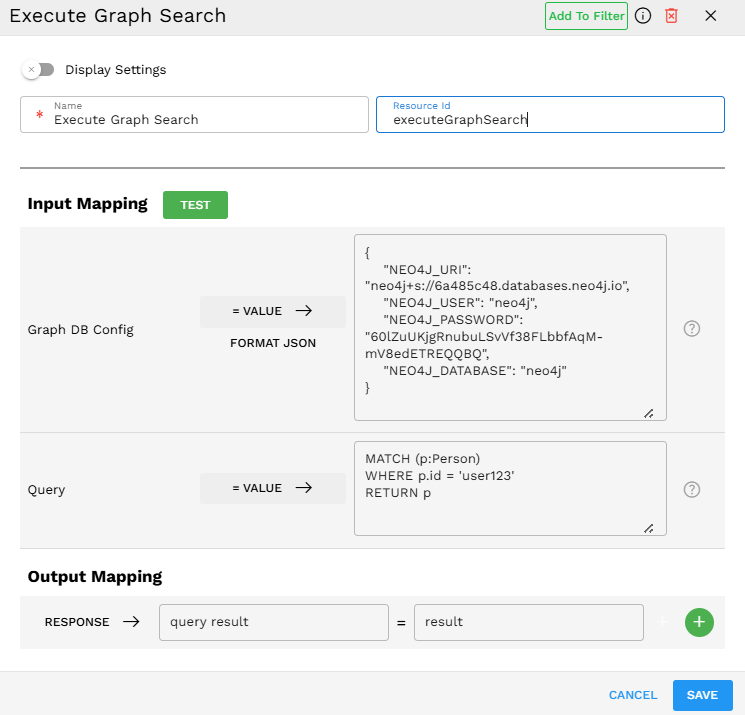
Configuration:
Process:
The component connects to the Neo4j database hosted at 6a485c48.databases.neo4j.io using the provided credentials.
It executes the Cypher query to find a person node where the ID property equals 'user123'.
The query returns the entire Person node with all its properties.
The output is mapped to the 'result' variable in the Output Mapping section.
This result can then be used by subsequent components in your Pipeline Builder, such as passing user information to a GenAI component to generate personalized content.
Output Format
The output is returned as a JSON object containing the query results. For example:
{"result":{"query result":[{"p":{"age":30,"department":"Engineering","id":"user123","location":"New York","name":"John Doe"}}]}}
The component maps the response from the Neo4j query to the "result" variable as shown in the Output Mapping section of the configuration. Note that the actual Neo4j query results are contained within the "query result" array, which preserves the structure of nodes and relationships returned by your Cypher query.
Best Practices
Optimize your Cypher queries for performance, especially when working with large graphs. Use appropriate indexes and limit result sets when possible.
Use parameterized queries rather than string concatenation to avoid injection vulnerabilities and improve query caching.
Limitations and Considerations
Database Compatibility - The component is currently compatible only with Neo4j graph databases.