Scalar Search Collection
The Scalar Search Collection component performs exact field-based searches on vector database collections using SQL-like query criteria for precise data retrieval without semantic similarity matching. This component enables traditional database-style querying within vector collections, allowing users to search for specific field values, apply conditional filters, and retrieve exact matches based on metadata attributes rather than content similarity.
This component is part of the Retrieval Augmented Generation (RAG) group. It performs a scalar search on a specified VectorDB collection based on user-defined criteria. Users provide a collection ID and search parameters to retrieve relevant records. The component allows customization of the number of results and selection of specific fields in the query response, enabling efficient and precise data retrieval.
The scalar search targets precise field conditions using familiar SQL operators and syntax. The component is essential for scenarios requiring exact metadata filtering, specific record retrieval by ID or attribute values, structured conditional queries, and precise data extraction from vector collections.
How to use:

Critical Requirements
Search criteria must reference actual field names that exist in the target collection schema. Incorrect field names causes query failures.
Collection structure knowledge is essential, requiring understanding of available fields, data types, and valid values for effective querying.
INTEGRATION PATTERNS: Standalone precise filtering for exact record retrieval, combined workflows where scalar search filters collections before vector search for hybrid approaches, metadata extraction workflows for getting specific attributes, conditional data processing where different paths are taken based on scalar search results, and multi-step pipelines using scalar search for initial filtering followed by further processing.
OUTPUT STRUCTURE: Returns search_result array containing objects with requested fields like {"search_result": [{"component_id": "accordian_0.0.1", "component_name": "cnx-accordian", "component_type": "List"}]} enabling direct field access and iteration. The component integrates seamlessly with other vector database operations, custom functions for result processing, conditional logic based on search results, and loop operations for batch processing of retrieved records. Advanced scenarios include building dynamic filters based on user input, implementing access control through metadata filtering, creating data validation pipelines, and developing complex query logic for specialized use cases.
Notes:
If a user has given only collection id and has requested sql like search over collection then you can first use get_collection_config, understand it, and use this. If a user has mentioned fields, but the requested output cannot be obtained with the specified fields, then first use get_collection_config and after understanding the configuration, you can use this also there can be many scniarios based on the requrement so flow can change according to that.
WHEN TO USE: Use scalar search when you need exact matches on specific fields (), metadata filtering with precise conditions (date > '2023-01-01', category in ['tech', 'docs']), retrieving records by known identifiers, applying complex conditional logic with AND/OR operators, or filtering collections by structured attributes before further processing. DO NOT USE for semantic similarity searches, natural language queries, or content-based relevance matching - use Vector Search Collection or Create VectorDB Context for those scenarios. Input configuration requires collection_id identifying the target vector collection (must exist and be accessible), search_criteria containing SQL-like conditional expressions using supported operators, num_records specifying result limit (default 1, adjust based on use case), and fields_in_query_response array specifying which columns to return (all fields returned if not specified).
DYNAMIC FIELD DISCOVERY: When users provide only collection_id without field specifications, use Get Collection Config component first to discover available fields, then configure fields_in_query_response accordingly. SUPPORTED SEARCH OPERATORS: Basic operators include and (&&) for combining conditions, or (||) for alternative conditions, comparison operators (<, >, <=, >=, ==, !=) for numeric and date comparisons, arithmetic operators (+, -, *, /, %, **) for calculations, like operator for pattern matching with wildcards (prefix%, %suffix%, %contains%), in operator for list membership (field in ['value1', 'value2']), and not operator for negation. Advanced usage supports complex expressions like 'component_type == "Button" and (category in ["UI", "Form"] or priority > 5)', date filtering with 'created_date >= "2023-01-01" and status != "archived"', pattern matching with 'component_name like "cnx-%" and version like "%.1"', and numeric conditions with 'rating >= 4.0 and downloads > 1000'.
Scalar Search vs. Vector Search
Use Scalar Search when |
Use Vector Search when |
|---|---|
You need exact matches on specific fields. |
You need semantic similarity matches based on meaning. |
You know the exact attribute values you're looking for. |
You have a natural language query and want relevant results. |
You want to filter by metadata fields such as dates, IDs, and categories. |
You want to find contextually similar content regardless of the exact wording. |
Key Terms
Term |
Definition |
|---|---|
RAG |
Retrieval Augmented Generation - a technique that enhances LLM responses by retrieving relevant context from external knowledge sources. |
Vector Database |
A database optimized for storing and querying vector embeddings (numerical representations of data). |
Scalar Search |
A method of searching that uses standard criteria rather than vector similarity. |
Collection |
A named group of related records in a vector database. |
When to Use
Use the Scalar Search Collection component when you need to:
Retrieve specific records from a vector database collection.
Implement RAG pipelines that require targeted information retrieval.
Search for information using exact criteria rather than semantic similarity. For example, component_name = 'xyz'
Find UI components or widgets based on specific attributes.
Filter database records using precise conditions.
Component Configuration
Required Inputs
Input |
Description |
Data Type |
Example |
|---|---|---|---|
Collection ID |
Unique identifier of the saved collection in your vector database. Supports multiple values. |
String |
|
Search Criteria |
The search criteria are to be passed to the vector database. Defines what you're looking for in the collection. Supports multiple values and conditional expressions like equality, LIKE, IN, and comparison operators. |
Text |
|
Optional Input
Input |
Description |
Data Type |
Example |
|---|---|---|---|
Number of Records |
Maximum number of records to return from the search. The default is 1 if not specified. |
Integer |
|
Fields to be returned in query response |
An array containing column names that should be included in the query response. If not specified, all fields are returned. |
Array |
|
How It Works
The component connects to the specified vector database collection using the provided Collection ID.
It formulates a query based on the Search Criteria you provide.
The query is executed against the collection to find matching records.
The search results are limited to the specified Number of Records.
If specific fields are requested, only those fields are included in the response.
The results are returned in a structured format that subsequent components can use in your workflow.
Original Example Use Case: Component Search
Scenario: You want to search for UI components in a widget collection to find accordion components.
Configuration:
Collection ID:
contineo_widget_collectionSearch Criteria:
component_name in ["cnx-accordian"]Number of Records:
10Fields to be returned:
["component_id","component_name","component_type"]
Component Configuration (as shown in the UI):
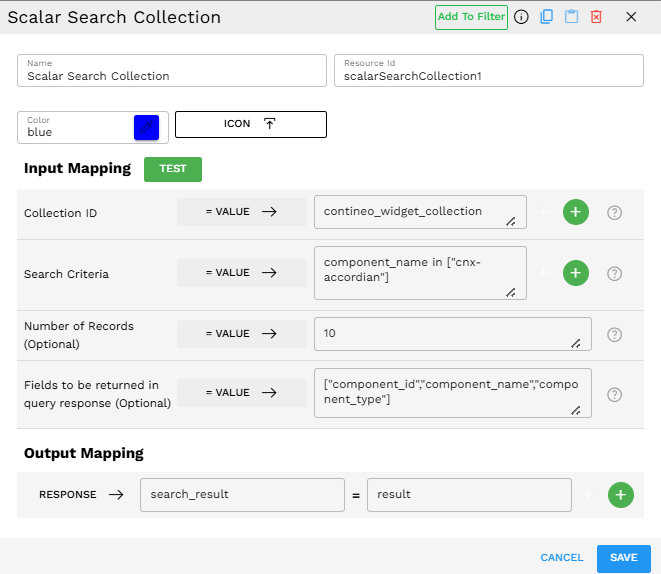
Process:
The component connects to the "contineo_widget_collection" collection.
It searches for records where the component_name matches "cnx-accordian"
It limits the results to a maximum of 10 records.
It returns only the specified fields: component_id, component_name, and component_type.
Output Format
The output is returned in a structured JSON format under the "search_result" key. Here's an example of the actual output:
{"search_result":[{"component_id":"accordian_0.0.1","component_name":"cnx-accordian","component_type":"List"}]}
This output can then be mapped to other components in your Pipeline Builder pipeline.
Reference on Scalar Filters
The Scalar Search Collection component supports a wide range of operators for constructing search criteria. A boolean expression is always a string comprising field names joined by operators.
Basic Operators
Operator |
Description |
|---|---|
and (&&) |
True if both operands are true. |
or (||) |
True if either operand is true. |
+, -, *, /, ** |
Addition, subtraction, multiplication, division, and exponent. |
% |
Modulus. |
<, > |
Less than, greater than. |
==, != |
Equal to, not equal to. |
<=, >= |
Less than or equal to, greater than or equal to. |
not |
Reverses the result of a given condition. |
like |
Compares a value to similar values using wildcard operators. For example, "prefix%" matches strings that begin with "prefix". |
in |
Tests if an expression matches any value in a list of values. |
Advanced Operators
Operator |
Description |
|---|---|
count(*) |
Counts the exact number of entities in the collection. Use this as an output field to get the exact number of entities in a collection or partition. This applies to loaded collections. You should use it as the only output field. |
Comparison Example: Scalar vs Vector Search
Scenario: You have a knowledge base containing technical documentation.
Using Scalar Search:
Collection ID:
technical_docsSearch Criteria:
document_type = "api" AND published_date > "2023-01-01"Number of Records:
5Fields to be returned:
["title", "summary", "last_updated"]
This scalar search returns exactly the 5 most recent API documents published after January 2023.
Equivalent in Vector Search:
Collection ID:
technical_docsQuery Text:
API documentationNumber of Records:
5Filter by Column Values:
{"document_type": ["api"], "published_date": {"$gt": "2023-01-01"}}Fields to be returned:
["title", "summary", "last_updated"]
The Vector Search would use semantic similarity to find the most relevant API documentation based on the query "API documentation", while also applying filters for document type and publication date.
Key differences:
Scalar Search uses
Search Criteriafor direct database queries.Vector Search uses
Query Textfor semantic searching plus optional filtering.Vector Search is better for finding relevant content when you do not know the exact field values.
Scalar Search is better for precise filtering when you know exactly what you are looking for.
Best Practices
Be specific with your search criteria to ensure you get the most relevant results.
Limit the fields returned to only what you need to improve performance.
Set an appropriate Number of Records - too many may slow down your workflow.
Test your searches using the TEST button to verify results before deploying.
Consider indexing frequently searched fields in your vector database for better performance.