Extract Text
The Extract Text component takes a file path typically provided by the Download From S3 component and extracts plain text content from various document formats such as CSV, PDF, Microsoft Word, Microsoft Excel, and text. It automatically detects the file type based on the extension and uses the appropriate method to extract readable text, which is then returned as a string for further processing in your pipeline builder workflow. This component serves as a simple but essential bridge between document storage and text-based processing components.
Overview
The Extracts Text serves as a critical bridge between document storage and text-based processing, converting structured documents into readable text strings. The component handles multiple encoding types for text files and includes fallback mechanisms for PDF extraction to ensure reliable text retrieval. This component can also be used with any locally stored files that need text extraction for analysis, summarization, or AI processing workflows.
How to use:

When to Use
After downloading files from Amazon S3 when you need to work with their text content.
When you need to feed document content into text-processing components.
When preparing document content for analysis or AI processing.
Component Configuration
Required Inputs
Input |
Description |
Data Type |
Example |
|---|---|---|---|
File Path |
The local path to the file (typically from the Download From S3 component) |
String |
|
How It Works
Takes the file path (usually from Download From S3 component).
Detects the file type by its extension.
Extracts text using the appropriate method for that file type.
Returns the extracted text as a string.
Supported File Types
PDF Documents (.pdf)
Word Documents (.docx, .doc)
Excel Spreadsheets (.xlsx, .xls, .xlsb)
CSV Files (.csv)
Text Files (.txt)
JSON Files (.json)
PowerPoint Presentations (.ppt, .pptx)
Example Use Case
Common workflow:
Download From S3 component retrieves a file and saves it locally.
Extract Text component takes that local file path and extracts the text.
The extracted text is then available for further processing (such as summarization, analysis, and so on).
Example configuration:
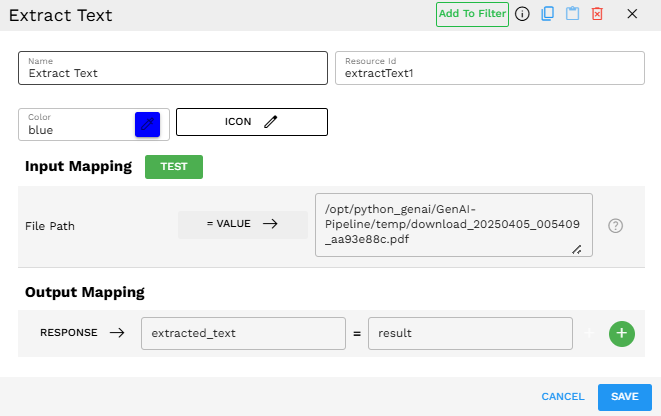
In this example, the File Path input is connected to the output of the Download From S3 component, and the extracted text output can be used by subsequent components.
Output
The component outputs the extracted text content as a string, available in the response variable.
Common Issues
Issue |
Solution |
|---|---|
File not found error |
Check that the Download From S3 component is completed successfully. |
Unsupported file type |
Verify your file has one of the supported extensions. |
Empty text extraction |
For PDFs, ensure they have text content (not just scanned images). |