Get Collection Config
The Get Collection Config component retrieves the configuration file for a specified collection ID used with LLM embeddings. Users provide the collection ID to access its configuration details, enabling effective management and retrieval of stored embeddings data. This component is essential for understanding the structure, schema, and configuration of collections used in Retrieval Augmented Generation (RAG) systems within the Pipeline Builder.
Overview
The Get Collection Config component retrieves comprehensive configuration metadata for vector database collections, providing essential schema information, field definitions, and structural details required for dynamic pipeline configuration and collection management.
This component serves as a discovery mechanism when users provide only collection IDs without specifying schema details, enabling intelligent pipeline construction based on actual collection structure. It connects to the vector database and extracts complete configuration data including document column names, filterable fields, embedding specifications, and schema definitions that are crucial for subsequent vector operations. The component is particularly valuable when building dynamic RAG pipelines where collection structure needs to be determined at runtime, troubleshooting collection-related issues, or preparing for vector search operations without prior knowledge of available fields.
Key Terms
Term | Definition |
|---|---|
Collection | A group of related vectors and their associated metadata are stored in a vector database. |
Vector Database | A specialized database optimized for storing and querying vector embeddings. |
Embedding | A numerical representation of text or other data in vector space that captures semantic meaning. |
Schema | The structure defines how data is organized within a collection. |
When to Use
Use when you need to understand the structure of a vector database collection before querying it.
Ideal for situations where you need to identify available fields for filtering in RAG components.
Helpful when you want to verify collection configurations or troubleshoot collection-related issues.
Use as a preparatory step before configuring other VectorDB components in your Pipeline Builder.
Component Configuration
Required Inputs
Input | Description | Data Type | Example |
|---|---|---|---|
Collection ID | The unique identifier of the vector database collection for which you want to retrieve configuration details | Text |
|
Input accepts collection_id as text identifier for the target collection (typically user-provided or from previous pipeline steps), and the component automatically connects to the configured vector database (default Milvus) to retrieve metadata.
Output Configuration
Returns comprehensive JSON configuration containing:
collection_id (unique identifier)
document_column_names (array of all available columns like ["component_name", "component_id", "component_type", "description"])
document_schema (detailed field definitions with datatypes, max_length, primary key specifications)
embed_column_name (field used for vector embeddings like "description" or "text")
filter_by_column_names (array of fields available for metadata filtering)
id_column_name (primary identifier field)
vector_db (database provider like "Milvus")
This standardized output structure enables dynamic configuration of downstream components including Vector Search Collection, Create VectorDB Context, and other RAG components by providing field names for filtering, column specifications for result formatting, and schema validation for data integrity.
Common integration patterns
User-initiated search without field specification. When a user provides collection ID → Get Collection Config → extract available fields → configure Vector Search with discovered schema
Dynamic RAG pipeline construction (Get Collection Config → analyze available fields → configure appropriate filters and field selections)
Schema validation workflows (Get Collection Config → verify expected fields exist → proceed with collection operations)
Troubleshooting collection issues (Get Collection Config → inspect schema and field definitions → identify configuration problems).
How It Works
The component takes the Collection ID as input.
It connects to the vector database (the default is Milvus).
It retrieves the configuration metadata for the specified collection.
The component returns detailed information about the collection's structure, including schema, field definitions, and vector configuration.
The component handles collection discovery, schema introspection, and metadata extraction while providing error handling for non-existent collections and connection issues. Advanced usage includes multi-collection analysis, schema comparison between collections, and automated pipeline configuration based on discovered metadata structures.
Example Use Case
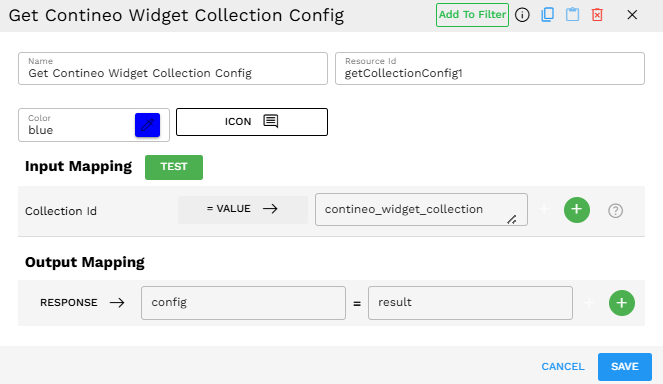
Scenario: Before setting up a RAG pipeline, you need to understand what fields are available in your widget collection for filtering and retrieval.
Configuration:
Collection ID:
contineo_widget_collection
Process:
When executed, the component connects to the vector database.
It then retrieves the configuration for the "contineo_widget_collection".
The output contains complete metadata about the collection's schema, fields, and configuration.
Output Format
The component returns a JSON object containing comprehensive configuration details about the specified collection:
{"collection_id":"contineo_widget_collection","document_column_names":["component_name","component_id","component_type","component_definition","description","created_on","last_updated_on","properties","version","version_of_id","category"],"document_schema":{"auto_id":false,"enable_dynamic_field":true,"fields":[{"auto_id":false,"datatype":"DataType.VARCHAR","field_name":"component_id","is_primary":true,"max_length":100}// Additional field definitions...]},"embed_column_name":"description","filter_by_column_names":["component_id","component_name","component_type","properties","category"],"id_column_name":"component_name","vector_db":"Milvus"}Best Practices
Review the configuration output to understand which fields are available for filtering in subsequent RAG components.
Pay special attention to the
filter_by_column_namesproperty, which shows which fields can be used for filtering in the Create VectorDB Context component.Note the
embed_column_nameto understand which field contains the text used for vector embeddings.Use this component early in your Pipeline Builder workflow development process to better understand your data structure.
Troubleshooting
Issue | Possible Cause | Solution |
|---|---|---|
Collection config not found | The specified Collection ID does not exist in the vector database. | Verify the Collection ID is correct and that the collection has been created. |
Limitations and Considerations
Vector Database Support - Currently, this component primarily supports Milvus as the vector database provider.
Schema Modifications - This component only retrieves configuration information and cannot modify the collection schema.