Get JSON from string
The Get JSON from String component processes a given string by removing unnecessary decorations and converting it into either a JSON format or an array. Users specify the input string and desired output format to ensure structured and machine-readable data transformation.
Overview
The Get JSON from String component transforms string representations of JSON into actual JSON objects or arrays. It addresses a common challenge in GenAI pipelines: when an LLM generates JSON output, it is returned as a text string (often with code markers such as ``` JSON) rather than an actual JSON object. This component bridges this gap by cleaning and parsing the string, allowing you to directly access JSON properties in subsequent pipeline steps. It handles various input formats, and code block markers, and can extract nested JSON structures for seamless integration in your Pipeline Builder workflows.
Converts LLM-generated JSON strings into properly formatted JSON objects or arrays by cleaning up formatting artifacts, code block markers, and syntax inconsistencies that commonly occur in Large Language Model responses. This component addresses the critical challenge in AI pipelines where LLMs generate JSON content as text strings wrapped in markdown code blocks (json,, json) rather than actual JSON objects, making them unusable for downstream processing. The component intelligently removes decorative formatting, converts Python-style boolean values (True/False) to JSON standard (true/false), and handles nested JSON structures while preserving data integrity.
CRITICAL USAGE RULE: Use this component exclusively after the Generate Text components when requesting structured JSON or array outputs from LLMs - it is NOT needed for plain text responses and should only be used when structured data manipulation is required. The component processes input strings by first removing common code block markers (json,, json) that LLMs frequently add to JSON responses, then standardizing boolean representations to ensure JSON compliance, followed by recursive parsing of nested JSON strings within the structure. The output_format parameter determines result structure: 'json' returns the parsed data as-is (preserving original structure), while 'array' specifically extracts array values - if input is already an array it returns directly, if it's an object containing arrays it extracts the first array value found, and raises an error if no array structure exists. Input configuration includes string_to_be_converted accepting LLM response strings from session variables (typically output from Generate Text components that requested structured data), and output_format as hardcoded value choosing between 'json' for object preservation or 'array' for array extraction. The component handles complex scenarios including deeply nested JSON structures, mixed data types within arrays, escaped characters, and malformed JSON recovery through intelligent parsing algorithms. Integration patterns include post-LLM structured output processing (Generate Text with JSON prompt → Get JSON from String → Use structured data), array extraction for iteration workflows (Generate Text with array request → Get JSON from String with array format → Loop processing), and data validation pipelines where JSON structure needs verification before downstream consumption.
Advanced error handling provides detailed diagnostics for malformed JSON, unsupported format conversions, and parsing failures while maintaining system stability. The component is essential for reliable structured data workflows, reducing parsing errors, and ensuring consistent JSON format compliance in AI-driven automation pipelines.
How to use:

Key Terms
Term |
Definition |
|---|---|
JSON |
JavaScript Object Notation is a lightweight data-interchange format that is easy for humans to read and write and easy for machines to parse and generate. |
Code Block Markers |
Delimiters like |
Nested JSON |
JSON objects or arrays that contain other JSON objects or arrays as values. |
When to Use
Use when you need to process string outputs from LLMs that contain JSON data.
Ideal for cleaning up JSON strings that have code block markers or formatting characters.
Helpful when you need to extract JSON from text content for further processing.
Use when converting between different JSON representations (object or array).
Component Configuration
Required Input
Input |
Description |
Data Type |
Example |
|---|---|---|---|
String to convert into JSON |
The string representation of JSON that needs to be converted into a valid JSON object or array. The component automatically handle strings with code block markers ( |
String |
|
Output Format |
Specifies the desired format of the output. Choose between "json" or "array". |
Json, Array |
|
How It Works
The component takes the input string and removes any code block markers (
json,, json) if present.It processes boolean values by replacing string representations like "True"/"False" with proper JSON boolean values (true/false).
The component then parses the cleaned string into a JSON object.
For nested JSON strings within the structure, it recursively parses them as well.
Based on the specified output format:
If "json" is selected, it returns the parsed JSON object as is.
If "array" is selected, it returns the parsed data as an array. If the input is already an array, it returns it directly; if it's an object with an array value, it extracts and returns that array.
Example Use Case
Scenario: Processing LLM-generated component metadata
Configuration:
String to convert into JSON:
"```json\n{\n \"collection_id\": \"contineo_widget_collection\",\n \"document_column_names\": [\n \"component_name\", \"component_id\", \n \"component_type\", \"component_definition\", \n \"description\", \"created_on\", \n \"last_updated_on\", \"properties\", \n \"version\", \"version_of_id\", \n \"category\"\n ]\n}\n```"Output Format:
json
Process:
The component removes the code block markers
```jsonand```It processes the string and converts it into a proper JSON object.
Since the output format is set to "JSON", it returns the complete object.
Output:
{"collection_id":"contineo_widget_collection","document_column_names":["component_name","component_id","component_type","component_definition","description","created_on","last_updated_on","properties","version","version_of_id","category"]}
Example in Pipeline Builder:
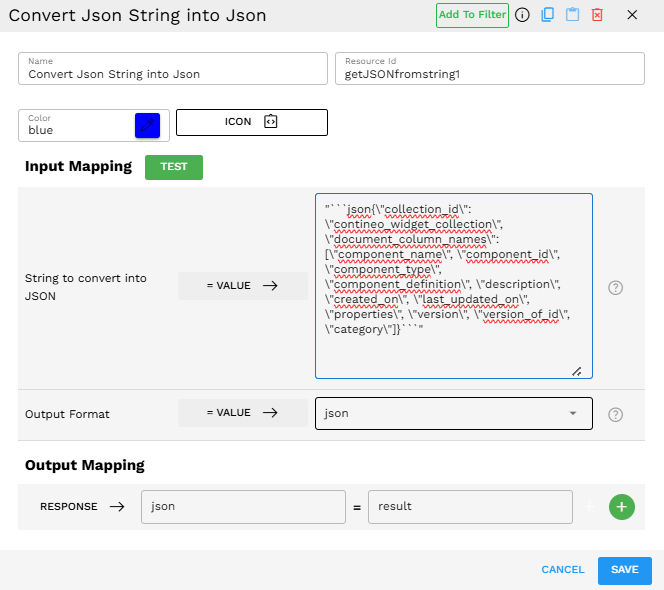
Output Format
The output is a properly formatted JSON object or array, depending on the selected output format and the structure of the input data.
For "JSON" output format:
Input (with json markers): `"json\n{\n "name": "Dashboard Widget",\n "id": 123,\n "settings": {\n "width": 300,\n "height": 200,\n "visible": true\n }\n}\n```"`
Output:
{"name":"Dashboard Widget","id":123,"settings":{"width":300,"height":200,"visible":true}}
For "array" output format:
Input (plain string with newlines): "{\n \"components\": [\n {\n \"type\": \"button\",\n \"label\": \"Submit\"\n },\n {\n \"type\": \"input\",\n \"label\": \"Email\"\n },\n {\n \"type\": \"checkbox\",\n \"label\": \"Remember me\"\n }\n ]\n}"
Output:
[{"type":"button","label":"Submit"},{"type":"input","label":"Email"},{"type":"checkbox","label":"Remember me"}]
Best Practices
If you are extracting JSON from LLM outputs, consider using this component immediately after your LLM component to ensure clean JSON for downstream processing.
When in doubt about the structure of your data, use the "JSON" output format first to inspect the complete object before deciding to extract arrays.
Remember that this component handles nested JSON automatically, so there is no need to perform multiple passes for complex structures.
Troubleshooting
Issue |
Possible Cause |
Solution |
|---|---|---|
"Error converting string to json/array" |
Malformed JSON in the input string |
|
"Cannot convert to array: Input is not an array or does not contain an 'array' key" |
Trying to convert a non-array JSON object to an array format |
|
"Error occurred while loading the JSON from input string" |
The input might contain special characters or invalid syntax. |
|
Limitations and Considerations
Format restrictions - The component only supports "JSON" and "array" as output formats.
Automatic conversion - The component automatically converts Python-style boolean values (True/False) to JSON format (true/false), but other Python-specific syntax might cause errors.
Error handling - The component returns detailed error messages, but it cannot repair severely malformed JSON.