Invoke Pipeline
The Invoke Pipeline component allows you to call and execute another pipeline within your current pipeline. This component enables modular pipeline design, facilitating code reuse and helping to organize complex processes into manageable, reusable units.You can reuse the data in the current pipeline from the other pipeline. Provide the pipeline ID and any necessary custom inputs to pass data into the invoked pipeline. It enables seamless workflow automation by integrating multiple pipeline executions.
How to use:

Key Terms
Term |
Definition |
|---|---|
Pipeline |
A workflow process that consists of a sequence of connected components designed to perform specific tasks. |
Pipeline ID |
The unique identifier for a pipeline is used to reference it from other pipelines or components. |
Parent Pipeline |
The pipeline that contains the Invoke Pipeline component and calls another pipeline. |
Child Pipeline |
The pipeline is called from the Invoke Pipeline component. |
When to Use
To reuse an existing pipeline within another pipeline.
To modularize your processes for better organization and maintenance.
To split complex processes into smaller, manageable units.
To create hierarchical workflows with parent-child relationships.
Component Configuration
Required Inputs
Input |
Description |
Data Type |
Example |
|---|---|---|---|
Invoke Pipeline ID |
Select the pipeline you want to invoke from the dropdown list. |
String |
Compare Resumes with JD - v.0.0.1 |
Optional Inputs
Input |
Description |
Data Type |
Example |
|---|---|---|---|
Custom Inputs |
JSON object containing custom parameters to pass to the invoked pipeline. These values can be accessed within the child pipeline. |
JSON |
|
How It Works
The Invoke Pipeline component in the current pipeline identifies checks for the invoked pipeline whether the pipeline is accessible.
Any custom inputs specified are passed to the invoked pipeline.
The invoked pipeline is executed with the provided inputs.
After the invoked pipeline completes its execution, control returns to the current pipeline.
The output from the invoked pipeline is available in the current pipeline through the Response.
In the Invoke Pipeline component, in the Output Mapping, if you specify RESPONSE, all the output mappings, that is RESPONSE from the called pipeline can be seen after the called pipeline’s execution in the Inspect window of the browser in the current pipeline.
Example Use Case
Scenario: You have created a reusable pipeline (Pipeline A) that processes data in a specific way, and you want to use this pipeline within another workflow (Pipeline B).
Step 1: First, locate the ID of the pipeline you want to invoke (Pipeline A)
In Pipeline A, click the More option in the upper tab.
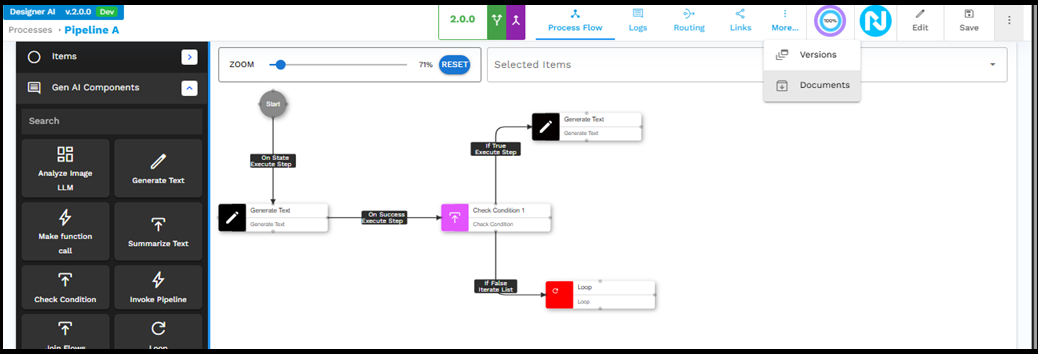
Select Documents from the dropdown menu.
In the Files screen, click the template containing the pipeline configuration.
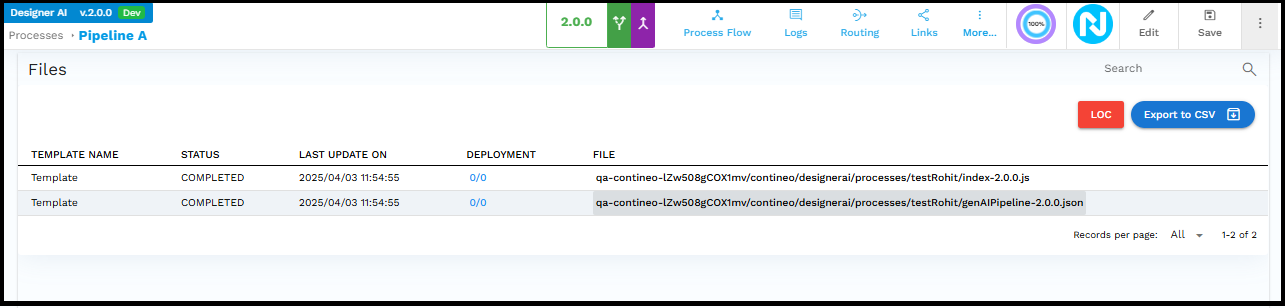
The JSON file opens, showing the pipeline configuration with the ID at the top.
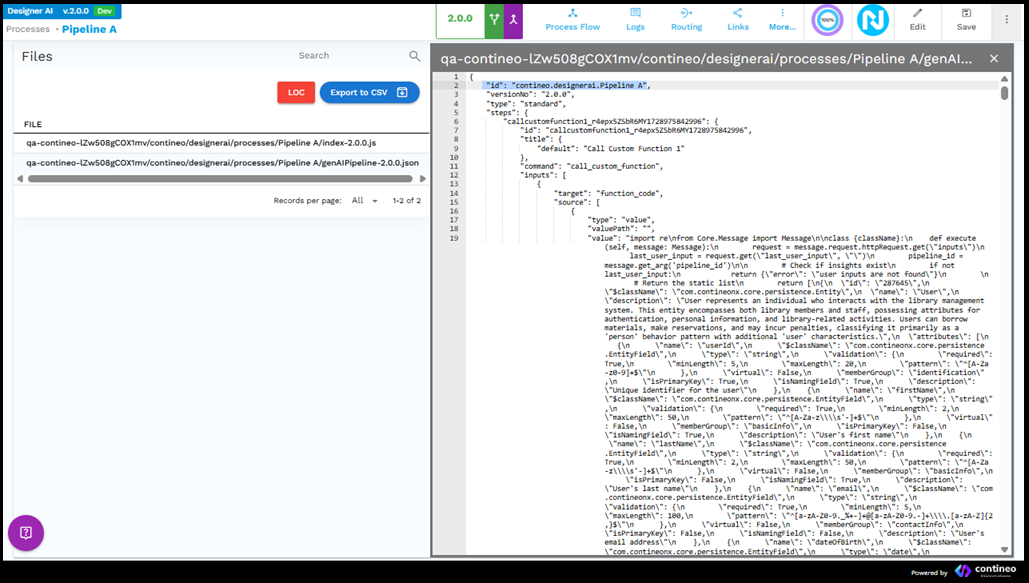
Copy the pipeline ID (for example, "contineo.designerai.Pipeline A")
Step 2: Configure the Invoke Pipeline component in Pipeline B.
Add the Invoke Pipeline component to your Pipeline B.
Copy the Pipeline ID into the Invoke Pipeline ID field.
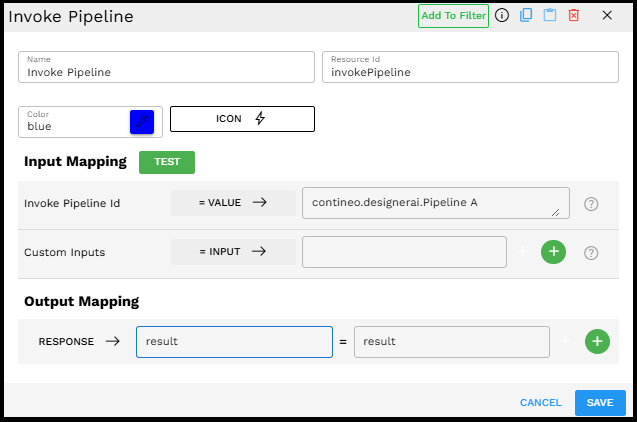
If needed, configure any custom inputs as a JSON object.
Set up the output mapping to capture the result from the invoked pipeline.
Step 3: Execute Pipeline B, which now invokes Pipeline A as part of its workflow.
Output Format
The output from the Invoke Pipeline component is the result returned by the invoked pipeline. This can be mapped to a variable in your parent pipeline using the Output Mapping section:
RESPONSE → result = result
Where "result" is the output from the invoked pipeline that becomes available in the parent pipeline.
Best Practices
Use meaningful names for your pipelines to make them easier to identify and manage.
Document the inputs and outputs of reusable pipelines to make them easier to use.
Avoid deep nesting of pipeline invocations to prevent complex dependencies and potential performance issues.
Test invoked pipelines independently before using them in parent pipelines.
Consider versioning your reusable pipelines to maintain stability in parent pipelines.
Troubleshooting
Issue |
Possible Cause |
Solution |
|---|---|---|
Pipeline not found |
Incorrect Pipeline ID |
Double-check the Pipeline ID by viewing the pipeline's JSON configuration. |
Invalid inputs error |
The custom inputs format is incorrect |
Ensure that the custom inputs are provided in valid JSON format. |
Output not available in the parent pipeline |
Incorrect output mapping |
Verify that the output mapping is correctly configured to capture the result from the invoked pipeline. |
Circular reference |
Pipelines invoking each other in a loop |
Redesign your pipeline structure to avoid circular references. |
Limitations and Considerations
Pipeline Availability - The invoked pipeline must exist and be accessible to the current user.
Performance Impact - Complex nested invocations may impact performance and should be optimized.
Debugging Complexity - Nested pipelines can make debugging more challenging; consider using logging in both parent and child pipelines.
State Management - Be aware of how the state is passed between parent and child pipelines to avoid unexpected behavior.