Make Function Call
The Make Function Call component generates a JSON-formatted response based on a provided JSON schema using an LLM. Users specify an LLM provider, function name, and function definition to structure the output. This enables automated function execution with AI-driven responses.
Overview
The Make Function Call component enables your Pipeline Builder to interact with Large Language Models (LLMs) in a structured way. It allows you to define functions with specific parameters that the LLM can execute, providing responses in a consistent JSON format that adheres to your defined schema.
Key Terms
Term | Definition |
|---|---|
Function Calling | A capability that allows LLMs to interact with predefined functions, enabling structured data extraction and action-taking based on user input. |
JSON Schema | A vocabulary that allows you to annotate and validate JSON documents, defining the structure, types, and validation rules for your function parameters. |
LLM Provider | A service that offers access to Large Language Models, such as OpenAI, which hosts models like GPT-4. |
When to Use
When you need to extract structured data from unstructured text or user queries.
When building conversational agents that need to take specific actions based on user intents.
When you want consistent, validated JSON responses from an LLM.
When interfacing with backend systems that require structured input data.
When implementing workflows that combine natural language understanding with specific business logic.
Component Interface
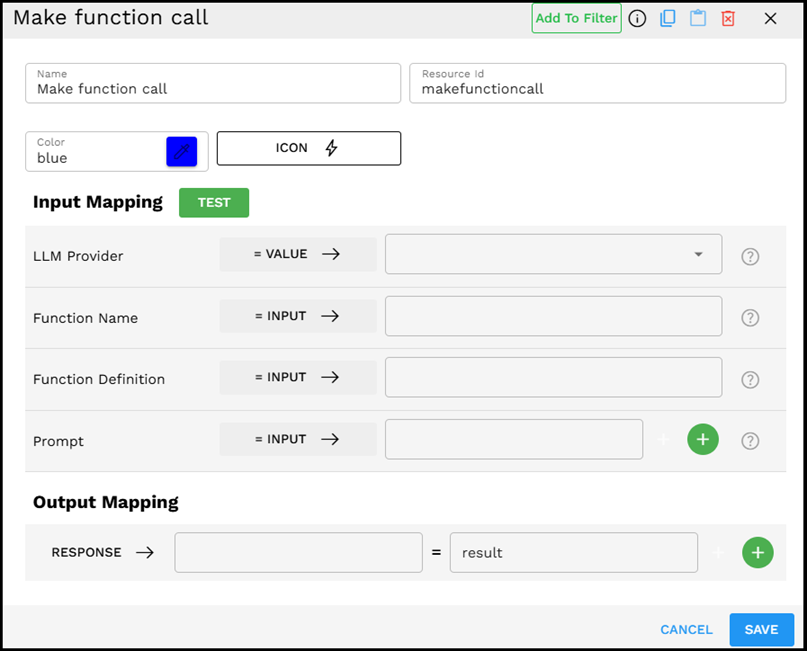
The Make Function Call component provides an intuitive interface for configuring function definitions and prompts.
Required Input
Input | Description | Data Type | Example |
|---|---|---|---|
LLM Provider | Select the large language model service you want to use for the function call. | LLMProvider |
|
Function Name | Enter a descriptive name for the function you want the LLM to execute. This should reflect the action or data extraction being performed. | Text |
|
Function Definition | A JSON schema that defines the structure, parameters, and validation rules for your function. This tells the LLM what data format to return. | JSON |
|
Prompt | Additional context or instructions for the LLM to better understand the function call requirements. You can provide multiple prompt elements that can be joined together. | String |
|
How It Works
The component takes your function definition and formats it according to the LLM provider's function-calling API requirements.
It combines your prompts with the function definition to create a complete request to the LLM.
The LLM processes the request and generates a response that adheres to your function's JSON schema.
The component validates the response against your schema to ensure it meets all requirements.
The structured JSON data is returned, and ready to be used in subsequent pipeline components.
Example Use Case: Extracting Contact Information
Let's say you need to extract contact information from customer support messages:
Set LLM Provider to "OpenAI GPT - GPT-4o-mini"
Set Function Name to "extract_contact_info"
Define the Function Definition with a simple schema for contact information:
{"name":"extract_contact_info","description":"Extract contact information from text","parameters":{"type":"object","properties":{"name":{"type":"string","description":"Full name of the person"},"email":{"type":"string","description":"Email address"},"phone":{"type":"string","description":"Phone number"}},"required":["name"]}}Set multiple Prompt values:
Session value:
user_messageDirect value:
Extract the contact details from the text above
The component combines these prompts using the delimiter (newline character), send the request to the LLM, and return structured contact information in the specified JSON format.
Output Format
The output is a JSON object that conforms to your function definition schema. For our example, it might look like:
{"name":"John Smith","email":"john.smith@example.com","phone":"+1 (555) 123-4567"}
Best Practices
Be specific in your function definition - Provide clear descriptions for each parameter to guide the LLM.
Use appropriate validation - Leverage JSON schema features like "required" fields, "enum" for fixed options, and "pattern" for regex validation.
Keep function definitions focused - Create functions that do one thing well, rather than trying to handle multiple unrelated tasks.
Provide context in your prompt - Give the LLM sufficient information about what you're trying to achieve.
Use session variables - Store and reuse context from earlier in your pipeline to inform the function call.
Troubleshooting
Issue | Possible Cause | Solution |
|---|---|---|
Invalid JSON response | The LLM may struggle with complex schema requirements. | Simplify your schema, provide clearer descriptions, or use a more capable LLM model. |
Missing required fields | The function definition may not be clear enough about what is required. | Use the "required" property in your JSON schema and add clearer descriptions for each field. |
LLM ignoring function definition | The prompt may contradict or override the function's purpose. | Ensure your prompt aligns with the function's purpose and does not suggest alternative formats. |
Response timeout | Function definition may be too complex for the model to process quickly. | Simplify the schema, break it into smaller functions, or increase timeout settings. |
Limitations and Considerations
Model capabilities vary - More advanced models like GPT-4 typically handle complex function definitions better than smaller models.
Complex schemas increase error probability - The more complex your schema, the more likely the LLM might make mistakes in formatting.
Token limits apply - Very complex function definitions count toward the model's token limits.
Cost considerations - Function calling typically uses more tokens than simple prompts, which may affect usage costs.
Schema validation is necessary - Always implement validation on the outputs, as LLMs may occasionally produce non-conforming responses.