Scrape Webpage
The Scrape Webpage component is a powerful tool in the Pipeline Builder that allows you to extract content from any website by simply providing its URL. This component acts as a gateway to web data, retrieving both the full content and text-only versions of webpages for further processing in your workflows.
With the Scrape Webpage component, you can easily incorporate external web content into your pipelines without complex coding. Whether you need to analyze news articles, gather information from public websites, or feed web content into large language models, this component simplifies the process of web data extraction. The component returns structured responses containing both the operation status and the scraped content, giving you flexibility in how you utilize the extracted information in subsequent pipeline steps.
Skill Level
No Python or JavaScript knowledge is required.
Overview
The Scrape Webpage component extracts and cleans text content from publicly accessible websites using advanced web scraping techniques with BeautifulSoup parsing and intelligent content filtering. This component retrieves webpage content by making HTTP requests with browser-like headers to avoid blocking, then processes the HTML to extract meaningful text while removing non-content elements like navigation, scripts, styles, and advertisements. It automatically handles encoding issues, applies content cleaning algorithms, and returns structured results with success/failure status.
Use this component when you need to extract article content from news websites, gather information from Wikipedia or documentation sites, collect research data from public web sources, or integrate website content into your data processing workflows.
The component works best with static content websites and provides basic JavaScript content loading through built-in delays. It returns a structured response containing the cleaned text content and operation status, enabling error handling through status checking and content validation. Common integration patterns include scraping multiple URLs using loops, combining scraped content with AI analysis through Generate Text components, and building content aggregation workflows for research or monitoring purposes. The component includes robust error handling for network timeouts, inaccessible websites, empty content, and various HTTP errors, making it reliable for automated content extraction workflows.
When to Use This Component
Use Case |
Description |
|---|---|
Information Extraction |
Extract information from public websites. |
Content Analysis |
Gather content for analysis or processing by other components. |
LLM Context |
Feed web content into Large Language Models as context. |
Automated Workflows |
Create automated workflows that depend on web data. |
Component Configuration
Required Inputs
Input |
Description |
Data Type |
Example |
|---|---|---|---|
URL |
The web address of the site you want to scrape. You can hardcode this as a VALUE, receive it as an INPUT from an agent, or as a SESSION variable from a previous component. |
String |
|
Output Mapping
Output Field |
Description |
Example |
|---|---|---|
result |
The complete response from the scraping operation contains both the status and the scraped content. |
|
result.text |
Only the extracted text content from the website is useful when you only need the textual information without status details. |
|
Possible Chaining
The Scrape Webpage component works effectively when chained with other components in the Pipeline Builder:
Scrape Webpage → Create VectorDB Context: Store scraped web content in a vector database for semantic search.
Scrape Webpage → Extract Text: Process and clean the extracted web content.
Scrape Webpage → Generate Text: Use web content as input for text generation.
Scrape Webpage → Chat Response Without Context: Create chatbot responses based on web content.
Scrape Webpage → Summarize Text: Create concise summaries of web content.
Get JSON from string → Scrape Webpage: Use dynamically generated URLs from JSON data.
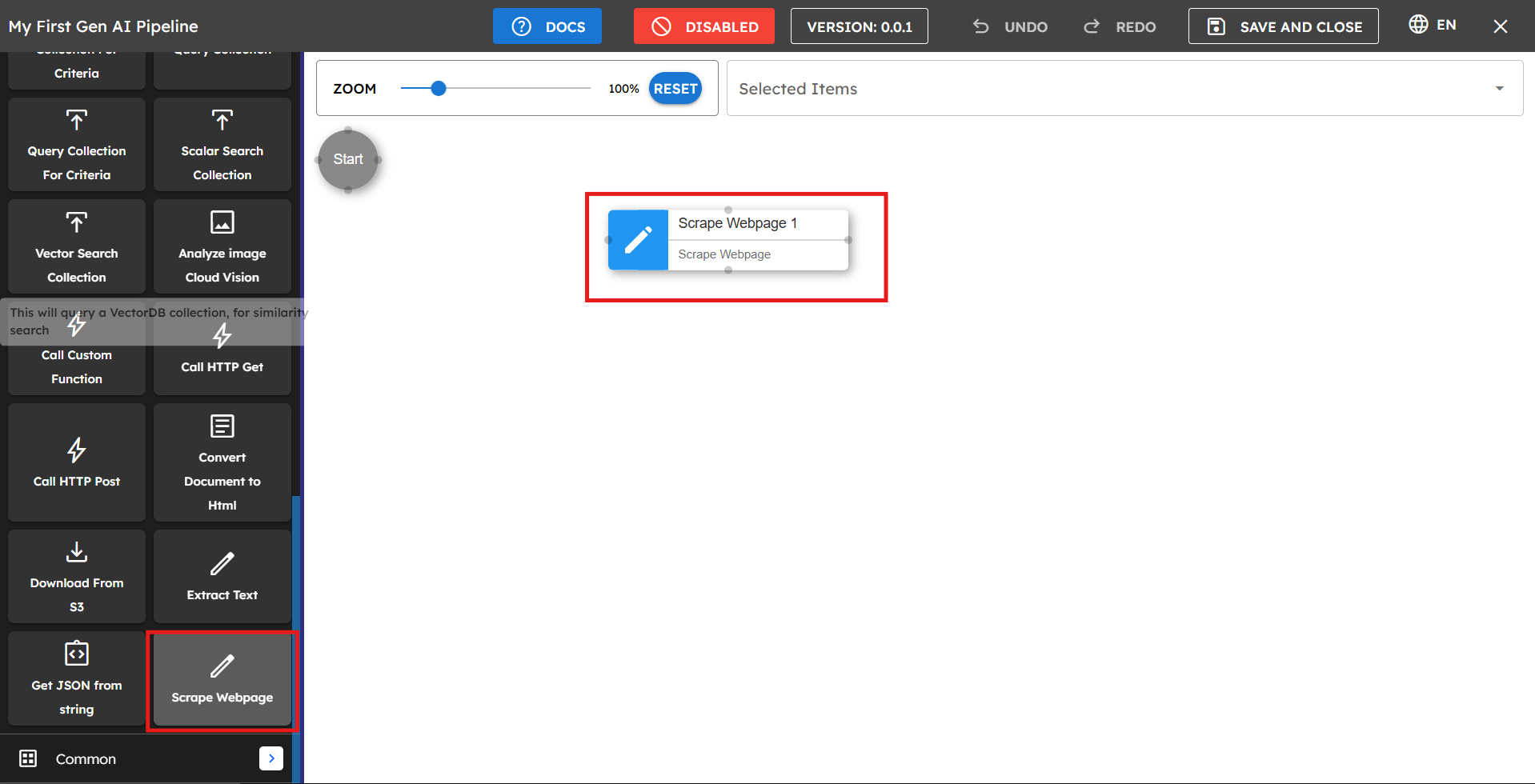
Example Use Case: NASA Website Content Analysis
Let's say you want to extract content from NASA's website to analyze the latest space news:
Drag the Scrape Webpage component from the component list to the main pipeline area.
Rename the component to "Scrape NASA Website" for clarity.
In the URL field, select "VALUE" and enter
https://www.nasa.gov/Set up the output mapping:
Map
extracted_contenttoresultto capture the full response.Map
extracted_content_texttoresult.textto extract only the text content.
Connect this component to subsequent components that process the NASA website content.

Sample Response Output
The component returns a JSON response structured as follows:
{"result":{"content":{"status":"success","text":"NASA\nSearch\nSuggested Searches\nFeatured\nBack\nFeatured\nHighlights\nHighlights\nHighlights\nFeatured\nHighlights\nHighlights\nHighlights\nFeatured\nFeatured\nHighlights\nArtemis II Patch Honors All\nThe four astronauts who might be the first to fly to the Moon under NASA's Artemis campaign have chosen an emblem to represent their mission that references both their distant destination and the home they return to.\nTHE CREW\nMISSION UPDATES\nDESIGN CHALLENGE\nFeatured News\nCommercial Lunar Spacesuits\nNASA and Axiom Space experts discuss the lunar spacesuit Axiom is developing that astronauts wear when they step foot on the Moon again during the Artemis III mission.\nExplore\nEarth Information Center\n..."}}}
If you map to result.text, you'll receive only the extracted text content without the status information.
Tips for Best Results
Check website permissions: Ensure the website you're scraping allows web scraping (check their robots.txt file or terms of service).
Use specific URLs: Target specific pages rather than general domains for more focused results.
Process the output: Connect to text processing components to clean and structure the scraped content.
Rate limiting: Avoid making too many requests to the same website in a short period to prevent being blocked.
Troubleshooting
Issue |
Possible Cause |
Solution |
|---|---|---|
Empty or unexpected results |
The website uses JavaScript to load content. |
Some websites load content dynamically, which may not be captured by basic scraping. Consider using additional processing steps. |
Status shows failure |
Website blocking scraping requests. |
The website may have protection against scraping. Check if the site allows scraping in its terms of service. |
Incorrect URL format |
URL is missing protocol or contains errors. |
Ensure the URL includes the full protocol (for example, "https://") and is correctly formatted. |
Limitations and Considerations
Limitation |
Description |
|---|---|
Single URL Limitation |
The component can only scrape one website URL at a time. |
Authentication Restrictions |
Cannot access content behind logins or authentication. |
Legal Considerations |
Always ensure you have permission to scrape content from websites. |
Dynamic Content Limitations |
Some website content loaded via JavaScript might not be fully captured. |