State
The State component is fundamental for managing workflow states and controlling execution flow in the agent. It functions as a state node that can be entered and exited, allowing developers to orchestrate complex state-based workflows and implement sequential processing. When entered, it sets itself as the agent's current state and triggers the onEnter event.
Skill Level
Basic understanding of workflow design concepts.
Overview
The State component provides a fundamental mechanism for managing an agent's workflow state and controlling the execution flow. When you enter a State component, it sets itself as the agent's current state and triggers the onEnter event.
The State component is visually represented as a circular node with a distinctive color, which makes it easy to identify within the agent builder canvas. This visual distinction helps developers quickly recognize state transitions and overall flow control within complex agent workflows.
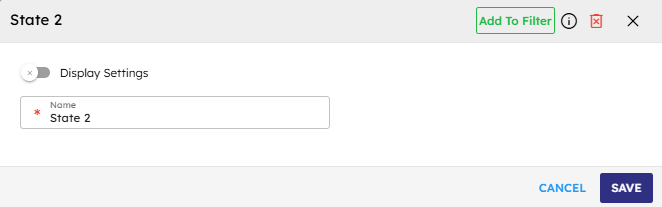
Input
Name | Code | Type | Description | Data Type |
|---|---|---|---|---|
Name |
| text | Identifier name for the state component. | string |
Methods
Id | Name | Description | Input | Output |
|---|---|---|---|---|
| Enter | Sets this state as the current state in the agent and triggers the onEnter event. | Event arguments (optional) | None |
| Leave | Clears this state as the current state in the agent and triggers the onLeave event. | Event arguments (optional) | None |
Events
Id | Name | Description | Source Methods |
|---|---|---|---|
onEnter | On Enter | The system triggers this event when the workflow enters the state and becomes the current state | Enter |
onLeave | On Leave | The system triggers this event when the workflow exist the state and is no longer the current state | Leave |
Typical Chaining of Components
Source Components
Source Component | Purpose | Description |
|---|---|---|
| Initial State | Set the initial state of the agent workflow. |
| Conditional State Transition | Execute logic to determine state transitions. |
| User-Driven State Change | Change state based on user interactions. |
| Sequential State Transition | Chain multiple states together for step-by-step workflows. |
Target Components
Target Component | Purpose | Description |
|---|---|---|
| State-Specific Output | Display messages specific to the current state. |
| State Processing | Execute state-specific logic or processing. |
| State Data Storage | Store state-specific data in the agent cache. |
| State-Based AI Execution | Execute AI tasks based on the current state. |
Implementation Example
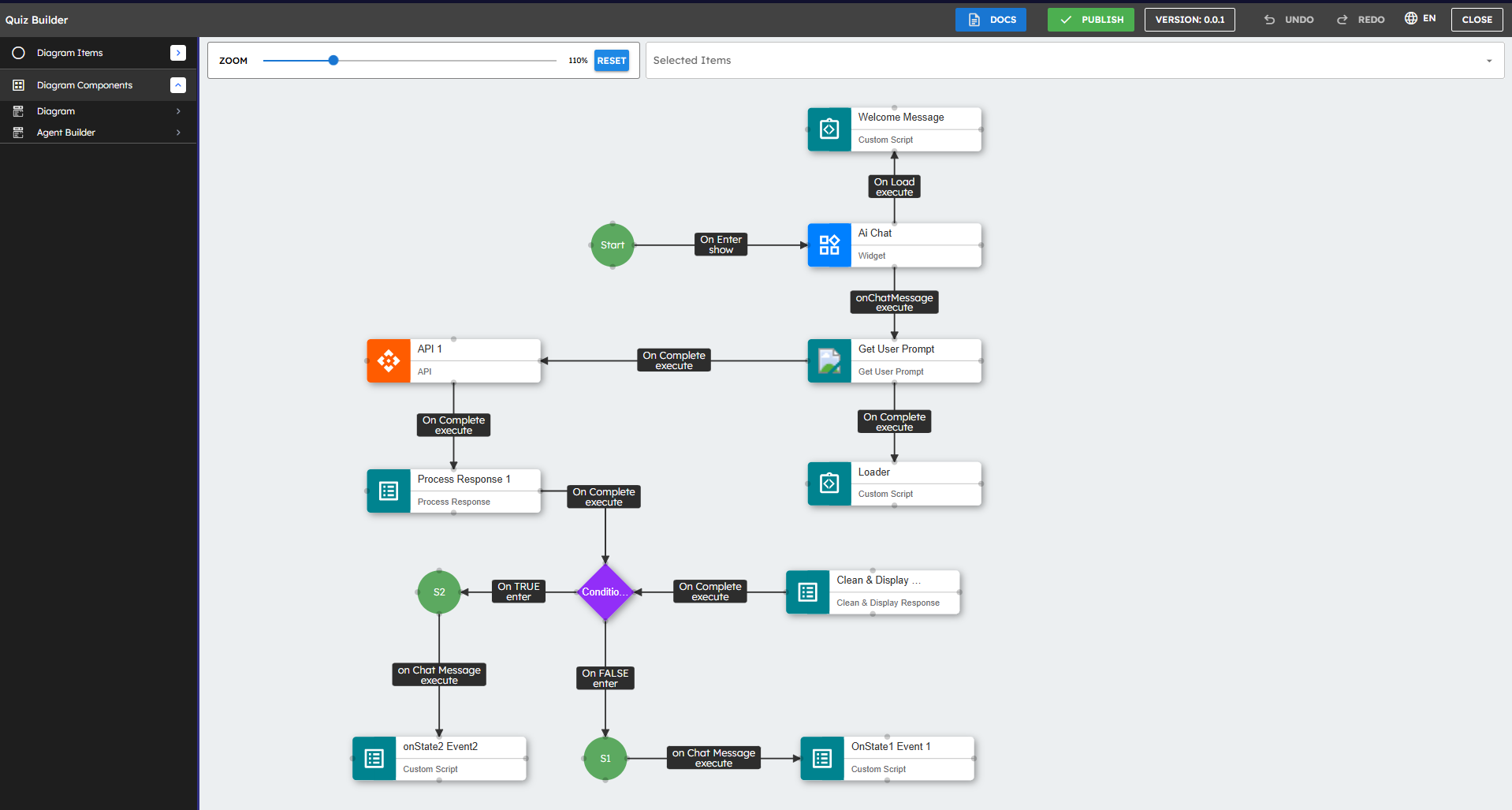
The above example shows a conditional workflow using State components:
The workflow includes two State components (S1 and S2) and a Condition component in the middle.
After processing a response, the workflow reaches the Condition component which evaluates certain criteria.
If the condition evaluates to TRUE, the flow enters State S2 through the "On TRUE enter" path.
If the condition evaluates to FALSE, the flow enters State S1 through the "On FALSE enter" path.
Each state then triggers its own associated "on Chat Message execute" event, leading to different Custom Script components.
You can also enter into a state using any other custom logic as well.
This simple example demonstrates how State components can be used together with conditional logic to create branching workflows based on specific criteria or user inputs.
Best Practices
Naming Convention: Use clear, descriptive names for state components that indicate their purpose in the workflow.
Color Coding: Use consistent color schemes for related states to visually group them.
State Management: Keep track of state transitions in agent data to maintain a history of the conversation flow.
Error Handling: Implement error handling mechanisms for cases where invalid state transitions might occur.
State Hierarchy: Organize states in a logical hierarchy to manage complex workflows.
Default States: Include default or fallback states to handle unexpected user inputs or edge cases.
State Persistence: Consider using Set Agent Data components to persist state-specific information across user sessions.
Documentation: Document the purpose and expected transitions for each state to improve maintainability.
Modular Workflow Design: Use State components to divide complex workflows into modular, manageable stages for better maintainability.
Visual Organization: Position State components in a logical flow from left to right or top to bottom to visually represent the progression of your workflow.
State Validation: Implement validation checks before transitioning between states to ensure all required conditions are met.
Default Paths: Always define default or fallback states to handle unexpected inputs or errors gracefully.
Contextual Feedback: Provide clear feedback to users about their current state in the workflow through appropriate messaging.
State Timeout Handling: Consider implementing timeout handling for states that require user input to prevent workflow stalling.
Testing All Paths: Test all possible state transition paths thoroughly to ensure robust workflow execution.
Common Use Cases
Use Case | Description |
|---|---|
Multi-step Form Processing | Guide users through a sequence of form inputs with specific validation at each step. |
Conversation Flow Management | Control the flow of conversation with users based on their inputs and context. |
Workflow Orchestration | Coordinate complex business processes with multiple conditional paths. |
Guided Tutorials | Create step-by-step tutorials or onboarding experiences. |
Decision Trees | Implement decision tree logic for complex decision-making processes. |
User Journey Mapping | Map and track user journeys through different stages of interaction. |
Process Monitoring | Monitor and log the progress of automated processes. |